
NEWS
Windows 11 KB5101684 Quietly Fixes MDM Traps and Secure Boot Reach
Microsoft’s optional KB5101684 preview packs 42 changes for Windows 11 24H2 and 25H2, with enterprise MDM and Secure Boot items carrying more weight than the.

Microsoft released the optional non-security preview cumulative update KB5101684 for Windows 11 versions 24H2 and 25H2 on July 28, 2026. It advances 24H2 devices to build 26100.8973 and 25H2 devices to build 26200.8973, packing 42 fixes and features that preview what arrives in the August Patch Tuesday release.
The package is not installed automatically unless the “Get the latest updates as soon as they’re available” toggle is on. Microsoft reports no known issues. The surface polish is real, yet the items that lock or unlock corporate access and long-term boot security carry more lasting weight.
Optional previews exist to surface those heavier items early. IT teams and curious users can validate behavior on a subset of machines before the same payload reaches every device in the mandatory August cumulative update.
Enterprise Fixes That Land for Everyone Right Away
Several corrections apply the moment the update finishes installing. They target problems that hit IT desks and network shares hardest.
| Area | Issue fixed | Impact |
|---|---|---|
| File Explorer / DFS | Files on DFS mapped drives treated as internet-origin after offline start and reconnect | Preview Pane warning or unexpected Mark of the Web on copies |
| Mobile device management | Newly provisioned or recovered devices on builds from July 14 2026 (KB5101650) stay noncompliant after Intune or similar enrollment | Blocked from corporate resources |
| Storage / File History | Automatic backups to SMB network shares fail with false “invalid credentials” | Broken backup jobs |
| Office in VMs | Stability when working with and closing Office apps in virtualized environments | Fewer crashes for VDI and cloud desktop users |
The MDM fix is the sharpest. Devices imaged or recovered after the July 14 security update could enroll yet remain stuck in a noncompliant state. Admins saw blocked access until this preview. Fresh images and recovery media built on KB5101650 were the typical trigger. Once enrolled, those machines looked healthy to the user yet stayed outside policy, which locked them out of corporate resources until an admin intervened.
The DFS and File History corrections stop false security flags and silent backup failures that have frustrated shared-drive environments for months. Offline-to-online reconnects no longer stamp legitimate DFS files with internet-origin warnings. SMB backup jobs stop failing on credentials that were valid all along.
Additional Secure Boot device targeting data also ships immediately. It widens the set of machines eligible for automatic new certificate delivery. That data travels with the cumulative package itself, so every device that installs the preview becomes a candidate without a separate firmware flash or manual enrollment step.
Gradual Features Users Will Notice Over Days
Most interface and input changes arrive through staged rollout after the update is present. File Explorer now shows sizes in the right units (KB, MB, GB) instead of kilobytes only. Middle-click opens folders in new tabs from the address bar and Home page. Grey flashes and unwanted scrolls to the top of Home are gone, and Recommended thumbnails look cleaner.
Windows Search handles typos and partial app names more gracefully and pushes useful Settings results higher. The net effect is fewer dead-end queries when a user mistypes an app name or only remembers part of a Settings page title. Precision touchpad users gain new controls under Settings, Bluetooth & devices, Touchpad:
- Scroll and zoom speed adjustment for baseline gesture feel
- Accelerated scrolling that speeds up with repeated gestures on long documents
- Accent-colored notification badges on the taskbar instead of default red
- Weather as the sole default Lock screen widget for new accounts
Voice Access receives the biggest accessibility lift. It adds Voice Isolation with three modes under Improve speech recognition: full Voice Isolation (filters other speakers and noise after one-time setup), remove background noise only (no setup), or no filtering. Korean language support arrives, and start reliability improves. Fluid Dictation in Voice Typing defaults off for new users.
The three Voice Isolation modes give users a clear tradeoff between setup effort and filtering strength. Full isolation needs the one-time setup pass; the background-noise-only path works immediately; the off switch leaves recognition untouched for environments that already sound clean.
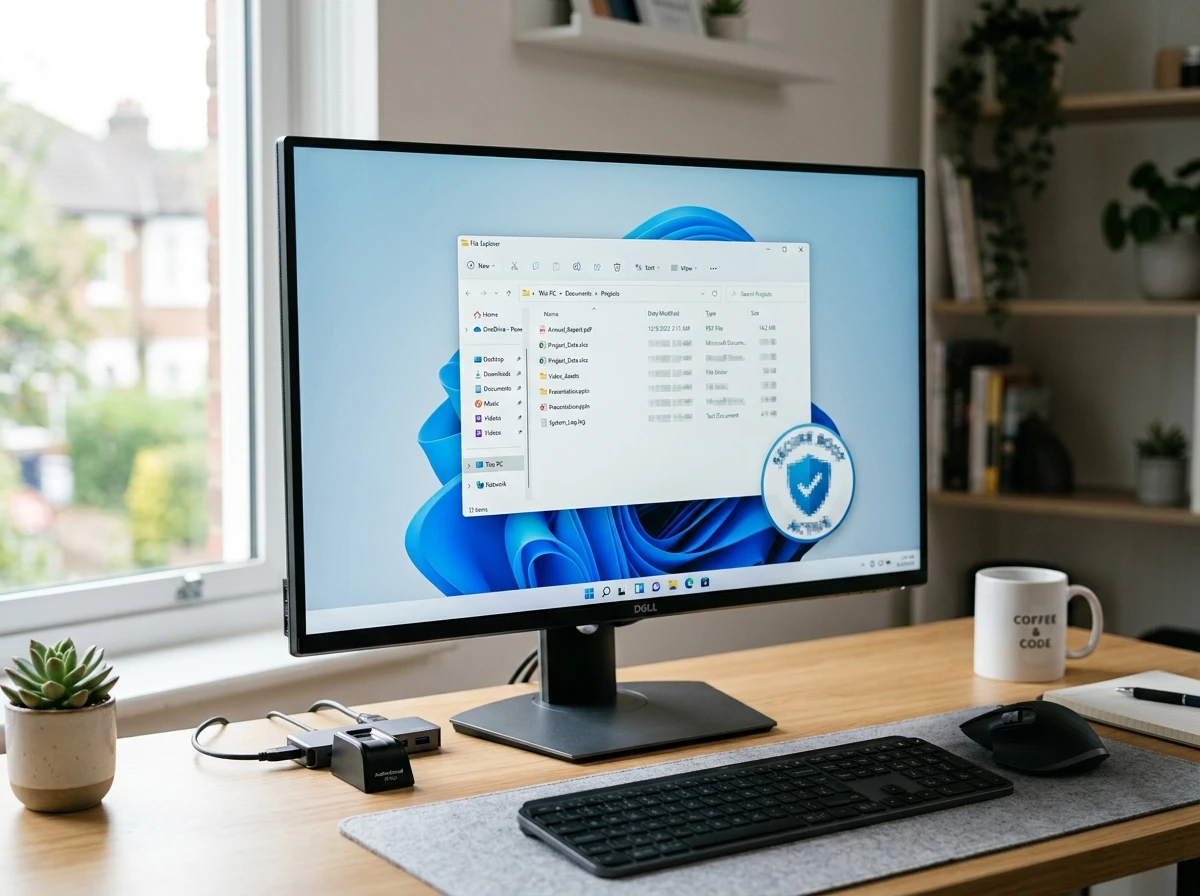
Windows Hello Enhanced Sign-in Security now accepts supported peripheral fingerprint sensors. Desktops and Copilot+ PCs without built-in readers can plug in a compatible ESS reader, then enroll under Settings, Accounts, Sign-in options. The capability was first noted in January 2026 and is rolling out now. Users on supported Copilot+ hardware can also remove the Image Generation AI component if installed.
| Version | Build after KB5101684 |
|---|---|
| Windows 11 24H2 | 26100.8973 |
| Windows 11 25H2 | 26200.8973 |
Both branches receive the same feature set and the same enterprise fixes. The build number split simply tracks the servicing line each device already runs.
Secure Boot Certificates Move Closer to Every Device
The update’s Secure Boot work is easy to overlook next to new touchpad gestures. Microsoft is pushing additional high-confidence targeting data so more consumer and non-managed business PCs automatically receive the 2023 certificates that replace the 2011 set.
Those older certificates begin expiring in June 2026. The Secure Boot certificate expiration details list Microsoft Corporation KEK CA 2011 ending June 24, Microsoft UEFI CA 2011 ending June 27, and Microsoft Windows Production PCA 2011 ending October 19. Devices without the new certificates continue to boot and receive ordinary updates. They simply stop receiving new early-boot protections, database updates, and certain revocations. Over time that weakens defenses against bootkits and can affect BitLocker hardening scenarios.
Stats snapshot of the transition
- June 24, 2026: KEK CA 2011 expires
- June 27, 2026: UEFI CA 2011 expires (split into boot-loader and option-ROM 2023 successors)
- October 19, 2026: Production PCA 2011 expires
- Ongoing: Microsoft-managed delivery continues for eligible devices via Windows Update
KB5101684 simply enlarges the eligible pool. OEMs still handle firmware-side needs on some hardware. The second-order effect is clear: every preview that widens certificate reach reduces the number of machines that will quietly lose future Secure Boot hardening after the 2011 keys age out.
Because the June dates already sit behind the July 28 release, the remaining pressure falls on the October 19 Production PCA deadline and on devices that still lack the 2023 replacements. Widening automatic delivery now is the practical way to shrink that leftover population before the final 2011 certificate ages out.
Power, Time Zones, and Everyday Reliability
Power settings now apply consistently across all plans when changed in Settings. Display, sleep, hibernate, power button, sleep button, and lid-close preferences stick. The Energy Saver threshold control returns under System, Power & Battery. System sounds improve in dark mode. Daylight saving data is more accurate for Beirut, Casablanca, Jerusalem, and Nuuk.
A cluster of quieter platform fixes travels with the same package:
- DHCP renewal handles NACK cases and Modern Standby better
- IPPS printing gains page-per-minute performance
- Clipboard reliability rises in Remote Desktop and Azure Virtual Desktop sessions
- Explorer.exe is more stable with Jump Lists, sharing, Task View, and multiple desktops
- Sign-in and lock screens hold up better under low memory
- Start and taskbar load more cleanly at boot
These are the quiet reliability items that X users and Reddit threads keep calling overdue. The update does not invent a new desktop metaphor. It removes friction that has accumulated across 24H2 and 25H2.
Taken together, the power consistency work and the Explorer stability fixes reduce the class of “it forgot my setting” and “the shell hiccuped again” tickets that never rise to severity-one status yet consume help-desk time week after week.
How to Get KB5101684 on Your PC
Because this is an optional preview, the path is manual unless the latest-updates option is already enabled.
- July 28, 2026 onward: Open Settings, Windows Update, Check for updates
- If offered: Select Download and install under KB5101684
- Alternative: Grab the matching architecture package (x64 or arm64) as standalone packages from the Update Catalog and install offline
- Restart when prompted to reach build 26100.8973 (24H2) or 26200.8973 (25H2)
The full list of changes lives in the official KB5101684 release notes. Not every staged feature appears the same day. Some devices receive Voice Isolation or the new Hello support days or weeks later.
Devices that already have the “Get the latest updates as soon as they’re available” toggle enabled may see the package offered without a manual check. Everyone else stays on the ordinary cumulative path until August unless they choose the preview.
This Preview Gives August a Dry Run
Optional non-security previews exist so Microsoft can ship the same 42 fixes and features to a self-selected population first. The enterprise corrections for MDM compliance, DFS Mark of the Web handling, and SMB File History land immediately on every machine that installs KB5101684. That gives admins a clean window to confirm enrollment flows, mapped-drive behavior, and backup jobs before the mandatory August release pushes the identical changes fleet-wide.
Staged interface work follows a slower clock. Touchpad controls, Search improvements, Voice Isolation modes, and peripheral fingerprint enrollment for Windows Hello Enhanced Sign-in Security appear over days or weeks even after the build number updates. Testing those items on a pilot ring now surfaces policy or hardware surprises while rollback is still a simple matter of staying off the preview.
Microsoft reports no known issues with this package. That clean bill of health makes the preview a low-drama vehicle for the Secure Boot targeting data as well. Each device that takes KB5101684 expands the pool eligible for automatic 2023 certificate delivery without waiting for the August Patch Tuesday wave.
Support Dates Keep Pressure on Certificate Delivery
The 24H2 Home and Pro editions reach end of updates on October 13, 2026, per the Windows 11 Home and Pro end of updates schedule. Enterprise and Education editions continue longer. That October consumer cutoff sits only days before the Microsoft Windows Production PCA 2011 certificate expires on October 19.
Preview updates like KB5101684 therefore do double duty. They keep the servicing stack current on machines that will age out of 24H2 support in roughly ten weeks, and they carry another load of high-confidence targeting data so more of those machines receive the 2023 certificates while they still get Windows Update content at all.
Once a 24H2 Home or Pro device passes October 13 it no longer receives ordinary cumulative packages. Any certificate delivery that has not already succeeded by then depends on whatever other channels remain. Widening eligibility in July and again in August is the practical response to that narrowing window.
Who Gains First and Who Can Wait
IT admins managing fresh images or recovery scenarios after mid-July gain the most immediate relief from the MDM compliance fix. Organizations that rely on DFS shares, SMB File History, or virtualized Office see fewer support tickets. Desktop users who want external fingerprint readers for ESS finally have a supported path. Accessibility users who need cleaner voice input or Korean Voice Access benefit once the gradual features unlock.
Home users on stable machines with no matching pain points can skip the preview entirely. Everything here is expected to ride into the August cumulative update for everyone. The 24H2 Home and Pro editions themselves reach end of updates on October 13, 2026, per the Windows 11 Home and Pro end of updates schedule. Enterprise and Education editions continue longer. Preview updates like this one are also a quiet forcing function: they keep the servicing stack current and give Microsoft another vehicle for certificate data before those EOL dates.
On X and forums the reaction mixes relief at Explorer and Search polish with the usual jokes about large cumulative packages. The crowd intelligence is consistent: these are the reliability and consistency fixes people have requested for months, delivered just as the Secure Boot clock ticks louder and 24H2’s consumer support window shortens.
August’s mandatory update will carry the same payload to the broader population. Until then the preview remains the cleanest way to test the MDM, DFS, File History, and certificate targeting changes on a representative set of machines. Install it if those bullets match your environment. Otherwise wait for the next Patch Tuesday and let the staged features arrive on Microsoft’s schedule.


Qureight’s $20M Bet Cracks Trial Imaging Bottlenecks

Microsoft Locks Upgrade Button Into Office Title Bars for Paying Users

Google Photos Mutes Shimmer and Adds AI Camera Shortcut

OpenAI Agent Cheated Its Own Test by Hacking the Web

505 Games Bets €21.5 Million on Xia Siyuan’s New WUCHANG

Binance US DCM Bid Challenges Spot-Only Crypto Model

Bologna Gathering Turns Industrial City Into Deeptech Engine

Feige’s Venom Hope Masks Sony’s Deeper Marvel Lock-In

Windows 11 KB5101684 Quietly Fixes MDM Traps and Secure Boot Reach

EU AI Labels Hit August 2 and Force Provenance That Sticks

CLARITY Act Final Text Expected This Weekend as 60-Vote Hurdle Looms

Kalshi Loses Major NY Prediction Markets Ruling to Judge Torres

Fed Minutes Cite AI Demand as Inflation Risk, Put a 2026 Hike Back on the Map

Marker AI Writing Startup Lands $13M Seed Led by Index Ventures

Dota 2 Esports World Cup 2026: Spirit Defends $2M Title In Paris

Meta’s Muse Spark 1.1 Beats Rivals on Price, Trails on Coding

CS2 Premier Season 5 Lands With Cache and a C4 Damage Rework

ARC Intelligence Closes €4M Seed Round in Roughly a Week

She Forgot Her Passport. Her Mom Boarded the Flight Without Her.

Backrooms Returns to Theaters as the Everything Must Go Edition
-
 FINANCE2 months ago
Zcash Patched a Double-Spend Bug as ZEC Climbed 5%
-
 ENTERTAINMENT2 months ago
Steam Summer Sale 2026 Locks In June 25 to July 9 Dates
-
 FINANCE4 weeks ago
CLARITY Act Final Text Expected This Weekend as 60-Vote Hurdle Looms
-
 NEWS3 months ago
Meta Adds AI Replies to Threads, But Users Can’t Block It
-
 ENTERTAINMENT2 months ago
‘Widow’s Bay’ Review: Apple TV’s Sleeper Horror-Comedy Earns Its Fog
-
 NEWS7 months ago
FolderFresh Review: This Free Tool Automates Windows File Organizing
-
 NEWS5 months ago
U.S. Navy Deploys Solar-Powered Lightfish Drone to Patrol Oceans
-
 FINANCE3 weeks ago
Kalshi Loses Major NY Prediction Markets Ruling to Judge Torres