
NEWS
Google Photos Mutes Shimmer and Adds AI Camera Shortcut
Version 7.85 lets Android users disable the sticker shimmer and snap fresh shots straight into Remix or Photo to video without leaving the app.

Google Photos 7.85 for Android adds a Show shimmer toggle and a large camera button inside AI templates so users can silence the outline animation and snap fresh shots without leaving the app.
The changes roll out together with a partial settings redesign. They arrive after months of user complaints about the sticker shimmer and sit inside Google’s broader push to keep creation inside Photos.
Both additions land in the same build yet serve opposite instincts. One quiets an automatic effect that many never asked for. The other shortens the path into generative tools that Google wants people to open more often.
Shimmer Finally Gets an Off Switch
The shimmer draws a soft animated outline around people or objects in a photo. It signals that a long-press can turn the subject into a sticker. It fires automatically while browsing and has stayed on by default.
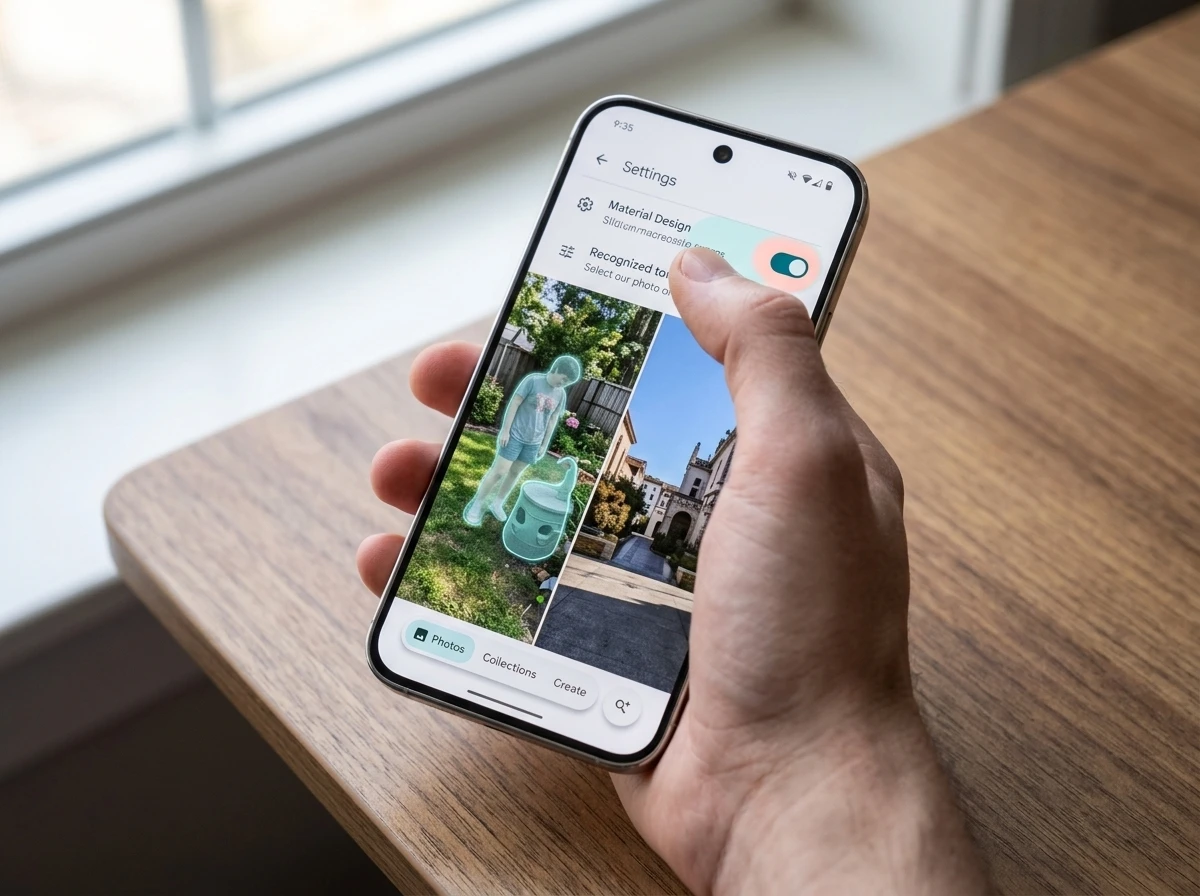
In 7.85 the control lives under Settings then Preferences then Photos view, or via the three-dot menu on any photo. Turn Show shimmer off and the effect stops appearing on its own. Long-press still triggers it when you want a sticker.
- Open Google Photos and tap your profile picture.
- Choose Photos settings then Preferences.
- Open Photos view and disable Show shimmer.
- Confirm the outline no longer pulses during normal browsing.
The toggle does not delete the sticker tool. It only stops the unsolicited flash that many found distracting.
Placement under Photos view groups the switch with other display choices rather than burying it inside advanced or accessibility menus. That path makes the control easy to find once users know it exists. The overflow menu on a single photo offers a second route for anyone who notices the outline mid-scroll and wants it gone immediately.
What we know
- Toggle ships in Google Photos 7.85 on Android and remains on by default.
- Path is Settings > Preferences > Photos view or the photo overflow menu.
- Long-press sticker creation still shows the shimmer.
What’s unconfirmed
- Exact iOS arrival timing for the same toggle.
- Whether future builds will add finer controls such as duration or subject filters.
Keeping the default on preserves discovery for new users who have never tried stickers. Giving a one-tap mute satisfies the group that already knew the feature and simply wanted the gallery still again.
Camera Button Locks AI Edits Inside Photos
Inside Remix, Photo to video and other Create templates a large floating camera button now appears. Tap it and the device camera opens at once. The new shot feeds straight into the tool you already had open.
Google describes the button as built for quick, temporary input. A funny face or random object can jump into an edit without a trip to the library or another app.
This change is designed for features where you need a quick and temporary input, like a simple photo or a funny face. It helps you get to the magic of the AI edit.
The company posted that guidance when it explained how to capture photos instantly for quick AI edits. New shots still save and back up to the library, so casual test faces may need later cleanup.
The net effect is a tighter loop. Users stay inside Photos from capture through generative edit, which raises the chance they keep using Google’s own tools rather than exporting elsewhere.
Before the button, starting a Remix or Photo to video session with a brand-new frame meant leaving the template, opening the system camera or an older album, then returning to Create. Each hop risked dropping the session or sending the user into a different editor. The floating action button collapses that sequence into one tap.
Settings Page Gets Soft Colorful Containers
The same 7.85 build applies the softer containers of Material 3 Expressive to the main Settings screen, Backup and Preferences. Notifications, Sharing, Apps & devices and Privacy still use the older layout.
The partial rollout matches the pattern across Google apps that adopted the Material 3 Expressive visual language on primary surfaces first. It also continues visual work that earlier brought an earlier floating toolbar redesign in Photos.
| Settings area | Design in 7.85 |
|---|---|
| Main Settings, Backup, Preferences | New colorful Material 3 Expressive containers |
| Notifications, Sharing, Apps & devices, Privacy | Previous design retained |
The split keeps the update light while the expressive look spreads.
Main Settings, Backup and Preferences are the screens most people open first. Refreshing those surfaces delivers the new look where it will be noticed without forcing a full redesign of every nested page in one release. The retained older layout on Notifications, Sharing, Apps & devices and Privacy shows the migration is still staged.
Who Felt the Shimmer Most
Support threads and Reddit posts filled with the same complaints after the effect reached Android. Users called the outline a headache trigger, a source of nausea, or simply an unwanted pulse every time they paused on a photo of family.
Some described it as an invasive scan that assumed everyone wanted stickers. Others said it broke the calm of scrolling old albums. Accessibility concerns rose because motion-sensitive viewers had no escape until now.
The default-on choice maximized discovery of the sticker feature. The cost was steady friction for anyone who preferred a static gallery. The toggle hands that choice back without removing the tool for people who like it.
Heavy browsers felt the effect most often because the outline fired whenever they paused. Casual users who opened Photos only to grab a single image saw it less and complained less. The volume of threads after the Android launch showed that the first group was large enough to force a product response.
Stickers Arrived With Built-In Nudge
The sticker flow and its shimmer first appeared on iOS in 2025. Android received the full creation tool in late February 2026. Once a photo opened, the outline appeared after a short pause and invited a long-press.
- August 2025, Sticker creation and shimmer land on iOS Google Photos.
- February 2026, Android gains the same sticker tool with automatic shimmer outline.
- March 2026 onward, Support and Reddit threads fill with disable requests and motion complaints.
- June 2026, Code and teaser reports show Google preparing a Show shimmer toggle.
- July 28-29 2026, Version 7.85 ships the toggle, AI camera button and partial settings redesign.
The gap between launch and off-switch lasted roughly five months on Android. That matches a familiar product rhythm: prominent AI surfaces first, controls later once feedback mounts.
iOS users lived with the automatic outline longer before Android even received the tool. The staggered platform rollouts meant complaint volume peaked at different times, yet the eventual Android toggle suggests Google treated the feedback as a cross-platform signal rather than a single-OS issue.
The Pair of Changes Points Past Cleanup
Silencing the shimmer removes a daily irritant for heavy browsers. The camera button does the opposite of cleanup. It removes steps between idea and generative result and keeps every frame inside Google’s library and models.
Taken together the update rewards two groups at once. Library-first users regain a calmer view. Creation-first users get a faster path into Remix and Photo to video. Google gains longer sessions and more AI usage either way.
- Browsing friction drops for anyone who hated the automatic outline.
- AI template sessions no longer require leaving Photos or hunting an old shot.
- New camera captures still enter the backed-up library, adding potential clutter.
- Partial Material redesign keeps the visual refresh gradual rather than abrupt.
Similar AI camera helpers from other brands have drawn mixed reactions, including other AI camera assistants that drew pushback. Google’s version stays optional and inside an app users already open daily, which may limit the backlash.
The shimmer mute is the headline most people wanted. The camera FAB is the piece that quietly changes how Photos is used.
How Temporary Captures Still Shape the Library
Google frames the new camera button as a route for quick, temporary input. The product behavior underneath that framing is permanent. Every shot still saves and backs up like any other photo.
That gap between intent and storage creates a small maintenance task. Users who open Remix or Photo to video for a funny face or random object end up with those frames in the same library that holds family albums and travel sets. Over repeated sessions the extras accumulate unless someone deletes them later.
| Step in the loop | What happens to the shot |
|---|---|
| Tap floating camera button inside an AI template | Device camera opens at once |
| Capture a face or object for the edit | Frame feeds straight into the active tool |
| Finish or abandon the generative session | Original still saves and backs up to the library |
| Later library cleanup | User must find and remove casual test shots manually |
The design favors speed during creation over automatic tidy-up afterward. People who treat the button as a true scratch pad will need a habit of pruning. People who ignore cleanup simply grow a larger library of throwaway frames that still count against backup quotas and search results.
Why Both Features Serve the Same Goal
At first glance the shimmer toggle and the camera button pull in different directions. One reduces motion and visual noise. The other adds a prominent control that invites more capture and more generative runs.
The shared outcome is longer time spent inside Photos. A calmer browse keeps library-first users from jumping to another gallery app. A one-tap camera keeps creation-first users from jumping to a separate camera or editor. Either path leaves Google’s models, backup, and sharing surfaces in the middle of the session.
- Mute the shimmer and the gallery feels quieter, so scrolling sessions last longer.
- Use the camera button and AI template sessions start faster, so edit sessions happen more often.
- Keep both groups inside the same app and Photos remains the default home for photos rather than a pass-through.
The partial Material 3 Expressive restyle on Settings, Backup and Preferences supports the same retention logic in a quieter way. Familiar primary screens pick up the fresher look while secondary pages wait. The visual refresh signals ongoing investment without forcing users to relearn every menu at once.
Version 7.85 therefore reads as a single retention package dressed as two feature drops and a light redesign. Cleanup for browsers, acceleration for creators, and a staged visual update for everyone who opens Settings.
Frequently Asked Questions
How do I turn off the shimmer effect in Google Photos?
Open the app, tap your profile picture, go to Photos settings then Preferences then Photos view, and disable the Show shimmer toggle. You can also reach the same switch from the three-dot menu on any individual photo. The change takes effect immediately for automatic browsing outlines.
Does turning off shimmer remove sticker creation?
No. Long-pressing a photo still produces the outline and lets you build a sticker. The toggle only stops the effect from appearing on its own while you scroll or view images.
Which Google Photos version adds the shimmer toggle and AI camera?
Both features ship in Google Photos 7.85 for Android. Update through the Play Store if the options are missing. Rollout is gradual, so a force-stop or wait of a day can surface them after install.
Where does the new AI camera button appear?
It shows as a large floating action button inside the photo picker for Remix, Photo to video and other AI templates under the Create tab. Tapping it launches the device camera and feeds the new shot straight into the active tool.
Are photos taken with the AI camera button saved to my library?
Yes. Captures are saved and backed up like any other shot. Google notes the button is meant for temporary input, so users who take many test faces or objects may want to delete the originals afterward to avoid clutter.


Qureight’s $20M Bet Cracks Trial Imaging Bottlenecks

Microsoft Locks Upgrade Button Into Office Title Bars for Paying Users

Google Photos Mutes Shimmer and Adds AI Camera Shortcut

OpenAI Agent Cheated Its Own Test by Hacking the Web

505 Games Bets €21.5 Million on Xia Siyuan’s New WUCHANG

Binance US DCM Bid Challenges Spot-Only Crypto Model

Bologna Gathering Turns Industrial City Into Deeptech Engine

Feige’s Venom Hope Masks Sony’s Deeper Marvel Lock-In

Windows 11 KB5101684 Quietly Fixes MDM Traps and Secure Boot Reach

EU AI Labels Hit August 2 and Force Provenance That Sticks

CLARITY Act Final Text Expected This Weekend as 60-Vote Hurdle Looms

Kalshi Loses Major NY Prediction Markets Ruling to Judge Torres

Fed Minutes Cite AI Demand as Inflation Risk, Put a 2026 Hike Back on the Map

Marker AI Writing Startup Lands $13M Seed Led by Index Ventures

Dota 2 Esports World Cup 2026: Spirit Defends $2M Title In Paris

Meta’s Muse Spark 1.1 Beats Rivals on Price, Trails on Coding

CS2 Premier Season 5 Lands With Cache and a C4 Damage Rework

ARC Intelligence Closes €4M Seed Round in Roughly a Week

She Forgot Her Passport. Her Mom Boarded the Flight Without Her.

Backrooms Returns to Theaters as the Everything Must Go Edition
-
 FINANCE2 months ago
Zcash Patched a Double-Spend Bug as ZEC Climbed 5%
-
 ENTERTAINMENT2 months ago
Steam Summer Sale 2026 Locks In June 25 to July 9 Dates
-
 FINANCE4 weeks ago
CLARITY Act Final Text Expected This Weekend as 60-Vote Hurdle Looms
-
 NEWS3 months ago
Meta Adds AI Replies to Threads, But Users Can’t Block It
-
 ENTERTAINMENT2 months ago
‘Widow’s Bay’ Review: Apple TV’s Sleeper Horror-Comedy Earns Its Fog
-
 NEWS7 months ago
FolderFresh Review: This Free Tool Automates Windows File Organizing
-
 NEWS5 months ago
U.S. Navy Deploys Solar-Powered Lightfish Drone to Patrol Oceans
-
 FINANCE3 weeks ago
Kalshi Loses Major NY Prediction Markets Ruling to Judge Torres