
NEWS
Chrome Android Finally Gets Desktop-Style New Tab Themes
Chrome for Android 151 rolls out an Appearance menu with colors, theme collections and custom image backgrounds, matching long-available desktop options.

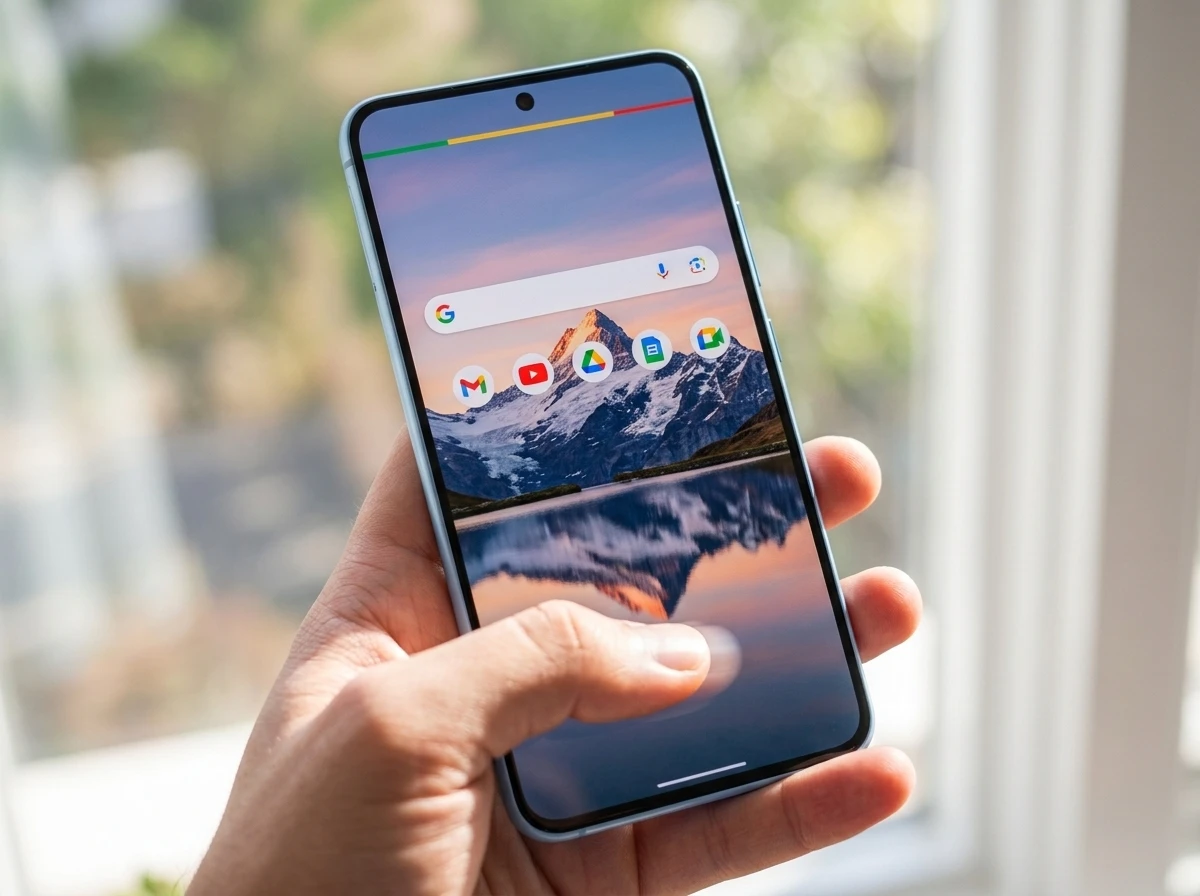
Chrome for Android 151 is rolling out an Appearance menu that lets users set color themes, curated wallpaper collections and personal image backgrounds on the New Tab page. The change brings options desktop Chrome has carried for years to the mobile browser most people open dozens of times a day.
The feature appears after a recent back-button addition and arrives via a server-side toggle tied to the latest stable build. Users who update and still miss the controls may simply need to wait a day or two for the flag to flip.
The Appearance Menu Lands With Four Clear Paths
Open a new tab, tap the customize control (often a pencil icon at the bottom right or the three-dot menu entry labeled Customize your new tab page), then choose Appearance. Four routes sit inside that panel.
| Option | What it does | Daily refresh |
|---|---|---|
| Chrome Default | Restores the standard clean look | No |
| Chrome Colors | Applies preset tri-color palettes that tint accents | Yes, optional |
| Theme Collections | Curated wallpapers in six categories | Yes, optional |
| Upload an image | Any photo from device storage becomes the background | No |
Theme Collections cover Landscape, Architecture, Earth, Patterns, Illustrations and Gradients. Each category holds multiple images. Chrome Colors offers a compact set of ready palettes. Android Authority confirmed the layout in version 151.0.7922.71.
The custom image path opens the system picker so any photo or downloaded wallpaper works. On larger foldable screens the full-bleed background turns the New Tab page into something closer to a desktop start surface.
How Users Turn the Feature On
The steps stay short once the update reaches a device.
- Update Chrome to the latest stable build through the Play Store.
- Open a new tab.
- Tap Customize your new tab page or the pencil icon.
- Select Appearance and pick Default, Colors, a collection or Upload an image.
If Appearance is missing after the update, force-stop the app and reopen it. Several early testers reported the server-side switch needs that nudge. The same menu also manages the existing content controls for shortcuts and Discover, so the new look options sit beside the older ones rather than replacing them.
Google’s own official Android New Tab help page still focuses heavily on shortcuts and Discover, which shows how recently the visual layer arrived in public documentation.
Desktop Had This Years Ago
Desktop Chrome has long treated the New Tab page as a personalization surface. Users click Customize Chrome at the bottom right, then pick backgrounds from collections, upload their own photos, change browser colors or even generate AI themes. Daily refresh has been available on desktop collections for some time.
That gap is the historical pattern. Mobile Chrome stayed utility-first: search box, shortcuts, Discover feed, minimal chrome. Desktop received the color and wallpaper playground while Android users kept the plain default. iOS Chrome picked up theming earlier this spring; Android followed in the 151 cycle.
- Desktop baseline, multi-year presence of backgrounds, colors and refresh toggles via the Customize Chrome button.
- Prior Android testing, appearance controls spotted in flags and Canary builds through 2025.
- iOS first, theming options reached iPhone and iPad Chrome earlier in 2026.
- Android stable, Appearance menu rolling out with Chrome 151 in late July 2026.
The desktop Chrome New Tab customization options remain richer (AI theme generation sits there), yet the core visual toolkit now matches on phones.
Back Button and Parallel Updates
The Appearance menu did not arrive alone. Chrome for Android recently gained a dedicated back button that had already lived on iOS. Google shuffled the top menu to make room, moving the info button into a new overflow spot without dropping core functions.
At the same time the company continues testing an AI-powered autofill upgrade that pulls data from Google products via Gemini. That work remains Canary-only with no stable date. The visual refresh therefore sits between a small usability win (back button) and a larger intelligence play still in testing.
Chrome’s broader feature cadence also includes the earlier vertical tabs and reading mode rollout on desktop. Mobile is catching selected pieces of that polish wave one at a time.
Foldables and Daily Openers Notice First
Hands-on reports single out larger displays. Chrome Unboxed tested the feature on a Galaxy Z Fold and described the custom background as giving the browser a polished, desktop-like feel that made every new tab more inviting. On a standard phone the change is subtler yet still turns a blank white or gray field into something personal.
Crowd reaction on X tracks the same split. One reviewer with solid engagement wrote that the theming options mirror the desktop version and that theme sync across devices is coming soon. Other posts simply ask whether people prefer minimal color accents or bold personal photos. Power users who already theme their home screens and lock screens treat the browser page as the last unstyled surface.
- Foldable and tablet owners gain the most visual real estate for a wallpaper.
- Heavy tab users see the custom page dozens of times a day.
- Users who already match wallpapers across apps finally close the Chrome gap.
- Casual users can ignore it and keep the default forever.
No one loses the Discover feed or shortcuts. The background simply sits underneath them.
Gradual Rollout and the Next Layer
Chrome 151 for Android reached the Play Store in late July 2026. The Chrome 151 for Android release notes list the build as 151.0.7922.71 and speak only of stability and performance, which is normal for these posts. The Appearance controls ride a separate server-side flag, so two phones on the identical version may show different menus for a short window.
What we know
- Feature requires a recent Chrome stable build and is rolling out gradually.
- Options include upload, color presets with optional daily refresh, and six themed collections with optional daily refresh.
- iOS received comparable controls earlier; desktop has had them far longer.
What remains unconfirmed
- Exact percentage of the user base that has the flag today.
- Public timeline for cross-device theme sync.
- Whether AI-generated themes will ever reach Android the way they exist on desktop.
Update through the latest Chrome app on Google Play, open a new tab, and check for the Appearance entry. If it is missing, wait or force-stop. The controls themselves are simple and permanent once they appear.
The long wait for mobile parity is over. Chrome for Android’s New Tab page can finally look like it belongs to the person holding the phone.
Frequently Asked Questions
Which Chrome version adds New Tab page themes on Android?
The Appearance menu is available in Chrome for Android 151 builds such as 151.0.7922.71 and later. The feature also depends on a server-side rollout, so the version number alone does not guarantee the menu is visible on every device the same day.
Can I use my own photo as the Chrome New Tab background?
Yes. Inside Appearance choose Upload an image and pick any photo from device storage. The image becomes the full New Tab background while shortcuts and the search box remain on top.
Do the theme collections change automatically?
Users can enable a daily refresh toggle on both Chrome Colors palettes and the Theme Collections. When turned on, Chrome rotates through images in the chosen set each day without further taps.
Does this work if Google is not my default search engine?
Core visual customization (colors, collections, uploaded backgrounds) appears independent of search engine choice in early reports. Some content modules on the New Tab page still require Google as default search and a signed-in account, matching long-standing desktop rules.
Will my custom theme sync to Chrome on other devices?
Early observers note that theme sync across devices is under development and expected later. At launch the Appearance choices stay local to the Android install that set them.


Capital Clusters and the Dual Tracks of European Tech Finance

Microsoft Shrinks Windows 11 Memory for 8GB PCs

XRP Ledger Brings Back Bugged Features Fixed for Institutions

The Shards Trailer Turns Ellis Nightmare Into Murphy Glamour

WhatsApp Folder Hides Business Messages After Hours

Mova LiDAX Ultra 3000 AWD Cracks the Robot Mower Moat

Urban Arrow FamilyNext Turns Costco Runs Into Bike Trips

Reddit Builds Spoken Video Layer to Reclaim Its Own Viral Stories

Nuggit £5m Fund Treats YouTube Channels as Real Businesses

Galaxy Z Fold 8 Makes Foldables Daily Drivers but Drops Flex Mode

CLARITY Act Final Text Expected This Weekend as 60-Vote Hurdle Looms

Kalshi Loses Major NY Prediction Markets Ruling to Judge Torres

Fed Minutes Cite AI Demand as Inflation Risk, Put a 2026 Hike Back on the Map

Marker AI Writing Startup Lands $13M Seed Led by Index Ventures

Dota 2 Esports World Cup 2026: Spirit Defends $2M Title In Paris

Meta’s Muse Spark 1.1 Beats Rivals on Price, Trails on Coding

CS2 Premier Season 5 Lands With Cache and a C4 Damage Rework

Finto Picks Munich Over Silicon Valley After YC, Raises $3.4M

Backrooms Returns to Theaters as the Everything Must Go Edition

ARC Intelligence Closes €4M Seed Round in Roughly a Week
-
 FINANCE2 months ago
Zcash Patched a Double-Spend Bug as ZEC Climbed 5%
-
 ENTERTAINMENT2 months ago
Steam Summer Sale 2026 Locks In June 25 to July 9 Dates
-
 NEWS3 months ago
Meta Adds AI Replies to Threads, But Users Can’t Block It
-
 FINANCE4 weeks ago
CLARITY Act Final Text Expected This Weekend as 60-Vote Hurdle Looms
-
 ENTERTAINMENT2 months ago
‘Widow’s Bay’ Review: Apple TV’s Sleeper Horror-Comedy Earns Its Fog
-
 NEWS5 months ago
U.S. Navy Deploys Solar-Powered Lightfish Drone to Patrol Oceans
-
 NEWS8 months ago
FolderFresh Review: This Free Tool Automates Windows File Organizing
-
 FINANCE3 weeks ago
Kalshi Loses Major NY Prediction Markets Ruling to Judge Torres