
NEWS
Windows 11 Catalogs Nine AI Models You Barely Uninstall
Windows 11 now lists nine Copilot+ AI packages in Settings. Uninstall works on a few optional downloads, while Phi Silica is already slated to be replaced.

Windows 11 now lists local AI models under Settings > System > AI Components, with an Uninstall control on some packages. The page first showed up hidden in Insider build 26300.8553. Microsoft’s own Copilot+ servicing table now names nine of those packages.
The Uninstall button is real. It still follows how Microsoft packages the models, not a general right to strip local AI from a Copilot+ PC.
A Hidden Settings Page Is Now Microsoft’s Catalog
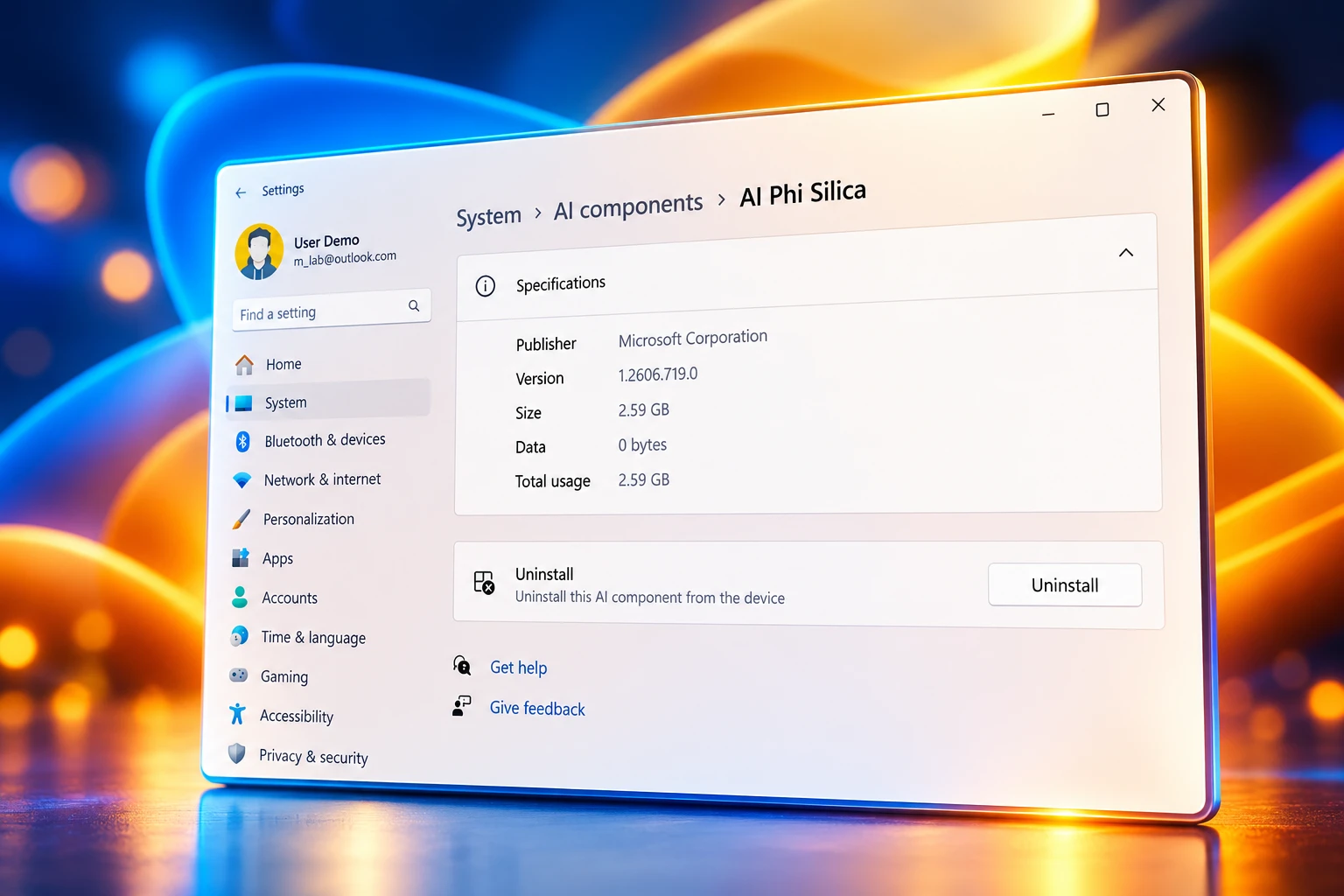
On June 1, 2026, Windows tester phantomofearth posted that Experimental build 26300.8553 had “hidden updates to AI components settings, with new subpages for models that include an uninstall button.” The screenshot, from techosarusrex, showed a Settings subpage with publisher, version, install date, size, and usage, plus Uninstall on at least Phi Silica.
Microsoft has since put that path in developer docs. Users manage installed models at Settings > System > AI Components. On a GPU download, the Phi Silica package shows up as “AI LanguageModel.” The company tells app makers to warn people before a first-run fetch, then point them at that same page if they want the files gone.
That is a clearer inventory than Windows offered when Copilot+ PCs began pulling local models through Windows Update. It is also how Microsoft now talks about the stack: not as extra apps, as OS parts with their own updates.
Nine Components Sit on the Servicing List
Microsoft’s consumer support page describes four built-in AI components on Copilot+ PCs: Image Creation, Image Processing, Image Transform, and Phi Silica. It says those parts of the OS run on the NPU, stay on the device, and get patched on their own track, apart from the big Windows feature drops.
The company’s release history of AI components is longer. Count the unique names on that table and you get nine. Image Creation first appears there with versions dated July 28, 2026. The newest rows on the fetched list are dated August 27, 2026, including version 1.2608.951.0 on several packages.
THE NINE COPILOT+ AI COMPONENTS
| Component | On the consumer support page | Uninstall in Settings |
|---|---|---|
| Image Creation | Yes | Yes, as optional Image Generation |
| Image Processing | Yes | No documented Remove control |
| Image Transform | Yes | No documented Remove control |
| Phi Silica | Yes | GPU download yes; Copilot+ NPU inbox |
| Execution Provider | No | No documented Remove control |
| Settings Model | No | No documented Remove control |
| Image Search | No | No documented Remove control |
| Semantic Analysis | No | No documented Remove control |
| Content Extraction | No | No documented Remove control |
Five of those names never show up on the consumer write-up. Image Search, Semantic Analysis, and Content Extraction are the ones that sound closest to reading a user’s own files and photos. They still land through the same Windows AI update stream as the friendlier imaging and language packages.
Which AI Models Can You Uninstall in Windows 11?
Microsoft’s Windows AI APIs page currently documents Uninstall for three cases, all tied to models that are not preloaded on every supported PC. GPU Phi Silica, Image Generation, and Speech Recognition on CPU can be pulled later from Settings > System > AI Components after an on-demand download.
MODELS MICROSOFT SAYS YOU CAN REMOVE
- GPU Phi Silica: Not preinstalled; a several GB Windows Update download after an app calls EnsureReadyAsync, then removable; the row is labeled AI LanguageModel.
- Image Generation: NPU only, also skipped at install because of size, fetched on first use, then removable from the same Settings page.
- Speech Recognition on CPU: Optional download on machines without the Copilot+ NPU path; Copilot+ PCs keep the NPU copy inbox.
GPU Phi Silica needs more than a Copilot+ badge. Microsoft lists NVIDIA GeForce RTX 30 series and newer with 6+ GB of vRAM, and AMD Radeon RX 9060 series and newer with the same memory floor. Developer Mode must be on. The docs pin GPU support to Windows Insider Experimental builds from 26300.8553 up, with Windows App SDK 2.2.2-experimental9 or later, plus a vendor GPU driver rather than the stock Windows Update package.
That is the audience the Uninstall button actually fits. A developer or power user who consented to a multi-gigabyte model can send it back. A Copilot+ laptop that shipped with Phi Silica on the NPU is a different machine.
Copilot+ PCs Keep the NPU Stack
On Copilot+ hardware, Microsoft says Phi Silica is preinstalled and “included inbox with Windows.” Image Processing and Image Transform are described as OS imaging plumbing: scaling, segmentation, object removal, background fill. They feed Click to Do, Photos, Paint, and other system features that expect the models to be there.
Microsoft’s public Q&A guidance matches that split. Some downloaded models can be removed from AI Components. Image Search, Semantic Analysis, Content Extraction, and Settings Model are treated as part of the Windows AI platform, with no documented complete removal path on a Copilot+ PC. Phi Silica on the NPU is the inbox copy, not the GPU download.
Phi Silica itself is a small Transformer language model tuned for the NPU. Microsoft’s 2024 Windows blog introduced it as the on-device language model for Copilot+ PCs, used for local rewrite and summarize work in apps such as Word and Outlook. The current support page adds Phi Silica J32, a Qualcomm-tuned servicing track of the same model, not a new family. Features are not available in China.
So the Settings page can look generous on a GPU tower that just ate a first-run download, and tight on the machines Microsoft sells as AI PCs. The difference is packaging. Optional packages get a Remove control. Inbox OS packages get a version number and a KB article.
November Is Already Phi Silica’s Exit Date
The Uninstall fight over Phi Silica also has a shelf life. Microsoft’s developer docs now open with a replacement notice, not a storage-saving tip.
Phi Silica is being replaced by Aion Instruct, a new on-device model. November 2026. Aion Instruct rolls out to retail devices and Phi Silica is removed.
Microsoft Learn, Get started with Phi Silica
PHI SILICA’S EXIT CALENDAR
- June 1, 2026: Testers find a hidden Uninstall control on Phi Silica in build 26300.8553.
- July 28, 2026: Image Creation shows up as its own versioned package on the Copilot+ release list.
- August 27, 2026: Microsoft’s table carries a fresh wave of component versions, including 1.2608.951.0.
- Early October 2026: A standalone Aion Instruct package is due for testing and LoRA training.
- October 2026: Aion Instruct is due on Windows Insider Preview devices, with Phi Silica still present and a Controlled Feature Rollout picking the active model.
- November 2026: Aion Instruct is due on retail devices, and Microsoft says Phi Silica is removed.
The same Learn page says Phi Silica is being replaced and that Aion Instruct drops the Limited Access Feature tokens Phi Silica still needs. During the Insider overlap, developers can test both through a registry key. Removing Phi Silica by hand in September 2026 is, on Microsoft’s calendar, a short-term storage tweak on a model the company already plans to delete.
Third-Party Scripts Still Strip What Settings Will Not
People who want a Windows 11 PC without local models have not waited for Settings. Third-party PowerShell tools still target Copilot, Recall, Appx and CBS packages, leftover files, and the AI Components page itself, then try to block Windows Update from putting the bits back. That work continues because the official Remove control never promised a clean machine.
A reply under the June discovery post asked for the inverse: a way to add AI later, on a system that shipped with none. Monthly updates are the other sore spot. Once models travel inside the same servicing stream as the rest of Windows, a Patch Tuesday payload can move Image Search and Semantic Analysis even when the user never opened an image generator.
The AI Components page answers a narrower complaint. It names the packages, shows a size, and lets you drop the ones Microsoft already built as optional downloads. Semantic Analysis, Image Search, Content Extraction, Settings Model, and the Execution Provider still read as OS. Phi Silica’s button is already on a countdown to Aion Instruct. The catalog is honest. The off switch still stops at the package boundary.

UPI MDR Delay Hands Traders the Calendar After Paytm Falls

Google Messages Builds Nine In-Chat Games After Samsung’s Exit

Anthropic’s $100 Million Academy Trains the Firms That Bill Both Sides

Toyota’s Electric C-HR Leaves the Cheap Twin to Subaru

Markets Bet the Fed Skips October After Hawkish Minutes

The Orchard Bug Forced Zcash to Open an Empty Pool

The $5.99 Game That Won Steam’s 2026 Summer Sale

Don Lee Joins Hemsworth as Extraction 3 Starts Shooting

Atlantic City Turned WWE’s Return Into a Civic Night

YouTube Shorts Retires Dislikes and Swaps Likes for Hearts
-
 NEWS5 months ago
The Orchard Bug Forced Zcash to Open an Empty Pool
-
 GAMING5 months ago
The $5.99 Game That Won Steam’s 2026 Summer Sale
-
 ENTERTAINMENT7 months ago
Don Lee Joins Hemsworth as Extraction 3 Starts Shooting
-
 NEWS6 months ago
Atlantic City Turned WWE’s Return Into a Civic Night
-
 NEWS5 months ago
YouTube Shorts Retires Dislikes and Swaps Likes for Hearts
-
 NEWS5 months ago
NEURA Robotics Is Spending Its $1.4B on a Machine Stack
-

 BUSINESS6 months ago
Norway’s Export Bank Backs Nscale’s $790 Million Narvik Loan
-

 GAMING5 months ago
Game of Thrones Dragonfire Follows Boston’s Conquest Playbook