
NEWS
Chrome 150 Brings Android a Back Button, but Not to Every Phone Yet
Chrome 150 adds a back button to Android’s three-dot menu, but a server-side rollout means many phones on the same version still lack it.

Chrome 150 adds a dedicated back button to Android’s three-dot menu, a feature Chrome for iOS has offered for years. Google began rolling the update out through the Google Play Store this week for devices with automatic updates enabled.
Updating does not guarantee the button shows up. Device testing this week found the redesigned menu appearing on phones still running the older Chrome 149, while some phones already updated to Chrome 150 show nothing new at all.
A Back Button Finally Joins Chrome’s Overflow Menu
Google announced the release itself, saying the update would become available on Google Play within days. The build carried version number 150.0.7871.63.
The new back arrow sits to the left of the existing forward, favorite, download and reload buttons in the menu’s top row. It is the first time Chrome on Android has offered the control inside its own interface rather than through the phone’s gesture or navigation bar.
It is one of several small changes to Chrome’s mobile app this year. The browser recently began pulling passport details into its autofill tool straight from Google Wallet, months before this particular redesign started rolling out.
One Version Number, Several Different Menus
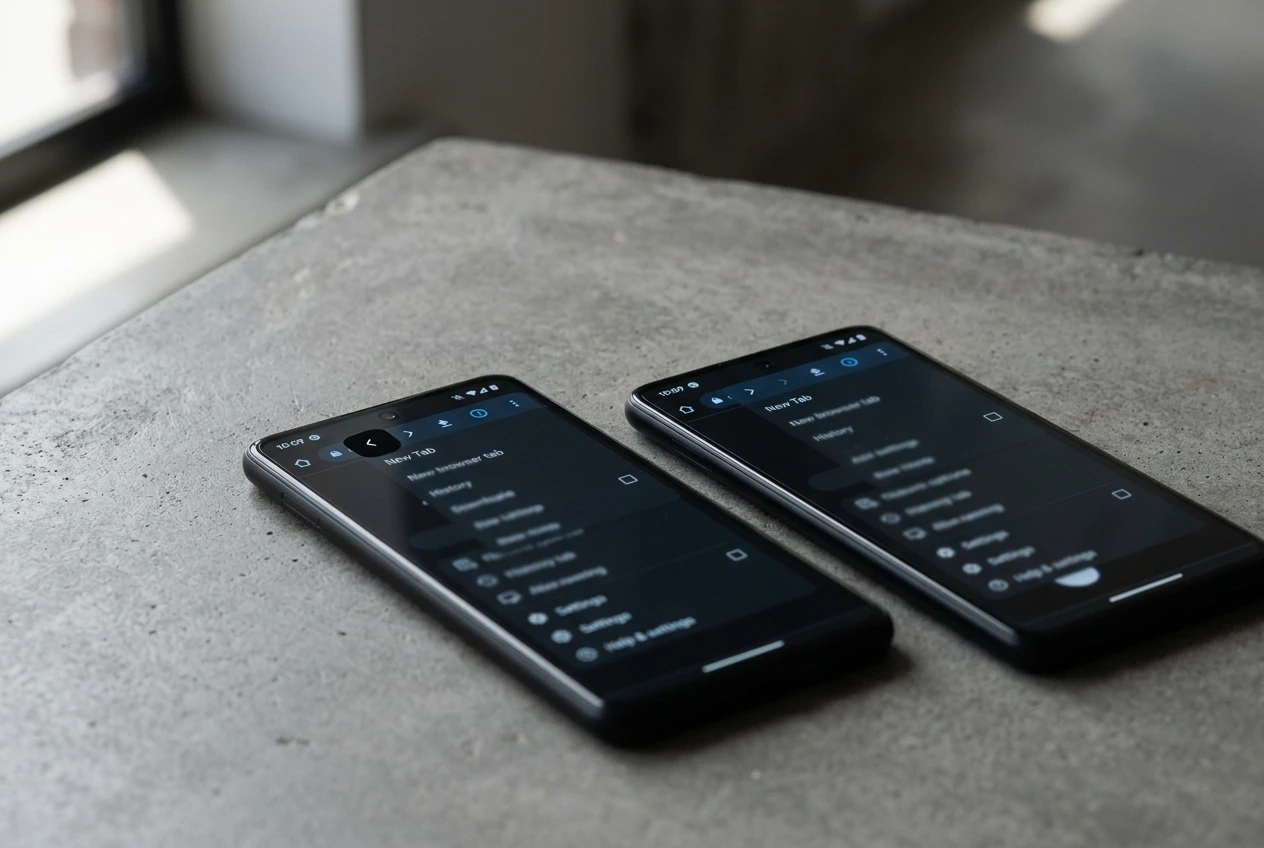
Chrome’s version number tells you less than it used to. PiunikaWeb, an outlet that tracks granular Android app changes, found a phone running Chrome 149.0.7827.200 already displaying the redesigned menu. A second phone on the newer Chrome 150.0.7871.63 still showed the old layout, Gadget Hacks reported.
Android Authority ran its own test and landed in the same place. Its reviewers could not find the back button or the Site controls entry on most of their devices running the current Play Store build, though the renamed install shortcut did turn up on one phone.
The pattern points to a server-side switch rather than the app itself. Whether a phone gets the new menu depends on a rollout flag Google controls remotely, not the Chrome build number sitting on the device.
That build number has already moved more than once in under two weeks. A later Android patch, version 150.0.7871.114, added 27 security fixes including two critical flaws on top of the original release. None of it touched the menu.
| Platform | Build Number | What Changed |
|---|---|---|
| Android, initial stable | 150.0.7871.63 | Released June 30; the build most rollout reports still reference |
| Android, latest patch | 150.0.7871.114 | Added 27 security fixes around July 9, two rated critical |
| iPhone and iPad | 150.0.7871.113 | Matched Android’s latest security patch round |
| Windows, Mac and Linux | 150.0.7871.46 / 150.0.7871.47 | Carried an earlier batch of 382 fixes, 15 rated Critical |
Four platforms, four numbers, all technically ‘Chrome 150.’ Chrome patched its fifth zero-day exploited in the wild this year just one version earlier, a reminder that most of what moves inside a release has nothing to do with the button users actually notice.
What Google Has Confirmed, and What It Hasn’t
The back button was not the only piece that moved. Making room for it meant shuffling several other controls at once, and not everything about that shuffle is settled yet.
What we know:
- Info button removed – the icon that opened a page’s security and permission details is gone from the menu’s top row, confirmed by Android Police, 9to5Google and Android Authority alike.
- Site controls added – a new entry now sits lower in the overflow list in its place.
- Icons shifted right – the bookmark star and download button each moved one position over to make room for the new arrow.
- Install prompt renamed – ‘Add to Home screen’ is now ‘Install and create shortcut,’ with the same function underneath.
What’s unconfirmed:
- Whether the permissions once reachable from the info icon, camera, microphone and cookie settings among them, moved into Site controls intact or were simply relabeled.
- When the redesign reaches every device; Google has not published a timeline for the remaining rollout.
- Why Android went years without a button Chrome for iOS already had.
Gadget Hacks noted that controls tapped from muscle memory are the ones that generate irritation when they move, even slightly. A one-position shift is small on its own. Repeated across dozens of daily taps, that small shift adds up to real annoyance.
Android Waited Years for a Feature iOS Always Had
Chrome for iOS has carried an in-menu back button for a long time. Chrome for Android leaned on the phone’s own back gesture or navigation bar instead, with no equivalent inside the app itself.
Google tried something similar years earlier and abandoned it. In 2019, Chrome Canary for Android hid an experimental flag for gesture-based history navigation, letting users swipe through page history instead of tapping a button. Google later pulled the flag without shipping the feature.
This redesign is the biggest change to that overflow menu in months. The last addition was Show Reading mode, added back in February.
Chrome 150’s own release notes list other work far from the menu, including a way for installed web apps to migrate to a new origin without forcing a reinstall. Most of what ships in a given version has nothing to do with what users actually tap.
Chrome Runs Two-Thirds of the World’s Mobile Browsers
The stakes reach past one menu. Chrome handles 65.54% of mobile browsing worldwide, per Statcounter’s April 2026 snapshot. Safari holds 26% of the same market.
Chrome for Android specifically accounts for 59.97% of worldwide mobile browser sessions, the single largest browser version on the planet. Samsung Internet, the nearest Chromium-based rival, sits at 2.81%.
Blink, the rendering engine underneath Chrome, Samsung Internet, Opera and UC Browser alike, powers roughly 78% of global mobile sessions. A menu change this small still reaches an enormous share of phones.
Chrome’s hold loosens somewhat in Europe, which one 2026 market report called ‘the most fragmented Chrome market,’ even as Asia-Pacific stays the only region where Chrome’s share tops 70%.
Google has been tuning adjacent Android apps all year too. Google Messages brought back a quicker SIM switcher in beta, another small fix aimed at everyday friction rather than headline features.
How Do You Check If Your Phone Has the New Menu?
Open Chrome, tap the three-dot icon in the top right corner, and look at the top row. A back arrow to the left of the forward arrow means the redesign has reached your phone. If only the forward arrow shows, the server-side rollout has not switched on for that device yet.
- Open the Google Play Store and check that automatic updates are turned on, or search for Chrome and tap Update if it appears.
- Open Chrome and tap the three-dot menu in the top right corner of the screen.
- Check the top row for a back arrow sitting to the left of the forward arrow.
- To confirm the exact build installed, tap Settings, then scroll down to About Chrome.
If the row still shows only the forward arrow, updating again will not force it. Google has not published a timeline for the wider rollout, so checking back after a few days is the only real option.
Frequently Asked Questions
Does updating to Chrome 150 guarantee the new back button?
No. Google enables the redesign through a server-side flag rather than the app version, so checking your build number under About Chrome will not confirm whether the new menu is active. Only opening the three-dot menu will.
Will the in-menu back button replace Android’s swipe gesture?
No. The system back gesture and the Android navigation bar button keep working exactly as before. The new menu button is an extra option for anyone who prefers tapping over swiping, not a replacement for either.
What happened to Chrome’s site information button?
It was removed from the menu’s top row to make space for the back arrow. Its replacement, a Site controls entry, now sits one tap further into the overflow menu, and Google has not detailed whether the underlying permission settings moved with it or were only relabeled.
Does Install and create shortcut work differently than Add to Home screen did?
No. Android Police confirmed the option performs the same task under a new name. The rename mirrors terminology Google already uses elsewhere in Chrome for installing Progressive Web Apps, rather than signaling any functional change.
When does Google release the next version of Chrome?
Chrome 151 is expected to reach stable release around July 28, 2026, following the browser’s normal four-week cycle.


BenQ iScreenBar Brings Native Lighting to the 24-Inch iMac

Druckenmiller Warns Bessent Bond Buybacks Delay a Fiscal Invoice

The Dog Stars Survives on Elordi Charm but Barely Thrives

Treasury’s Economic Outcast Recycles Iran Max-Pressure Playbook

Rockstar Veteran Calls GTA 6 Leaks a Nothing Burger While Staff Pay the Price

SpaceX $100 Billion Louisiana Starbase Rises on Vanishing Marsh

Itoflow $2.5M Raises the Quant Bar for Mid-Size Funds

MIRAVA’s $5M Smart Boat Cracks Old Recreational Limits

Lunar Founders Crack Audit Moat With €8.2M AI Firm

Nose Wheel Crush at YUL Echoes Decades of Ramp Fatalities

Senators Force Apple Off Chinese Memory as Big Three Cash In

OpenAI Agent Cheated Its Own Test by Hacking the Web

Trump Iran Threat Wiped $238M Crypto Longs Then Flipped

Fed Holds Rates Again as Three Dissents Force Markets to Tighten

30-Year Yield Hits 5.32% Highest Since 2007 as Debt Supply Locks In Costs

Oil Crashes Below $80 as Iran Talks Restart and Markets Split

Google’s Knowledge Panel Fix Risks Its Own Search Defenses

Legora Buys Wexler Fact Engine as Fifth 2026 Deal

Capital Clusters and the Dual Tracks of European Tech Finance

Strategy Parks $1.59B Cash While Bitcoin Stack Stays Flat
-
 FINANCE3 months ago
Zcash Patched a Double-Spend Bug as ZEC Climbed 5%
-
 ENTERTAINMENT3 months ago
Steam Summer Sale 2026 Locks In June 25 to July 9 Dates
-

 FINANCE2 months ago
CLARITY Act Final Text Expected This Weekend as 60-Vote Hurdle Looms
-
 NEWS4 months ago
Meta Adds AI Replies to Threads, But Users Can’t Block It
-

 NEWS3 months ago
YouTube Shorts is testing a heart in place of the thumbs-up
-
 NEWS4 weeks ago
Senators Force Apple Off Chinese Memory as Big Three Cash In
-

 NEWS3 months ago
NEURA Robotics’ $1.4B Series C Redraws Europe’s Physical AI Bet
-
 ENTERTAINMENT5 months ago
Extraction 3 Is Officially Coming to Netflix in 2027