
NEWS
The Play Store Pause Button Catches Up to 34 GB Apps
Play Store version 53.0 can pause app downloads, a late control after Google raised install size caps to 34 GB.

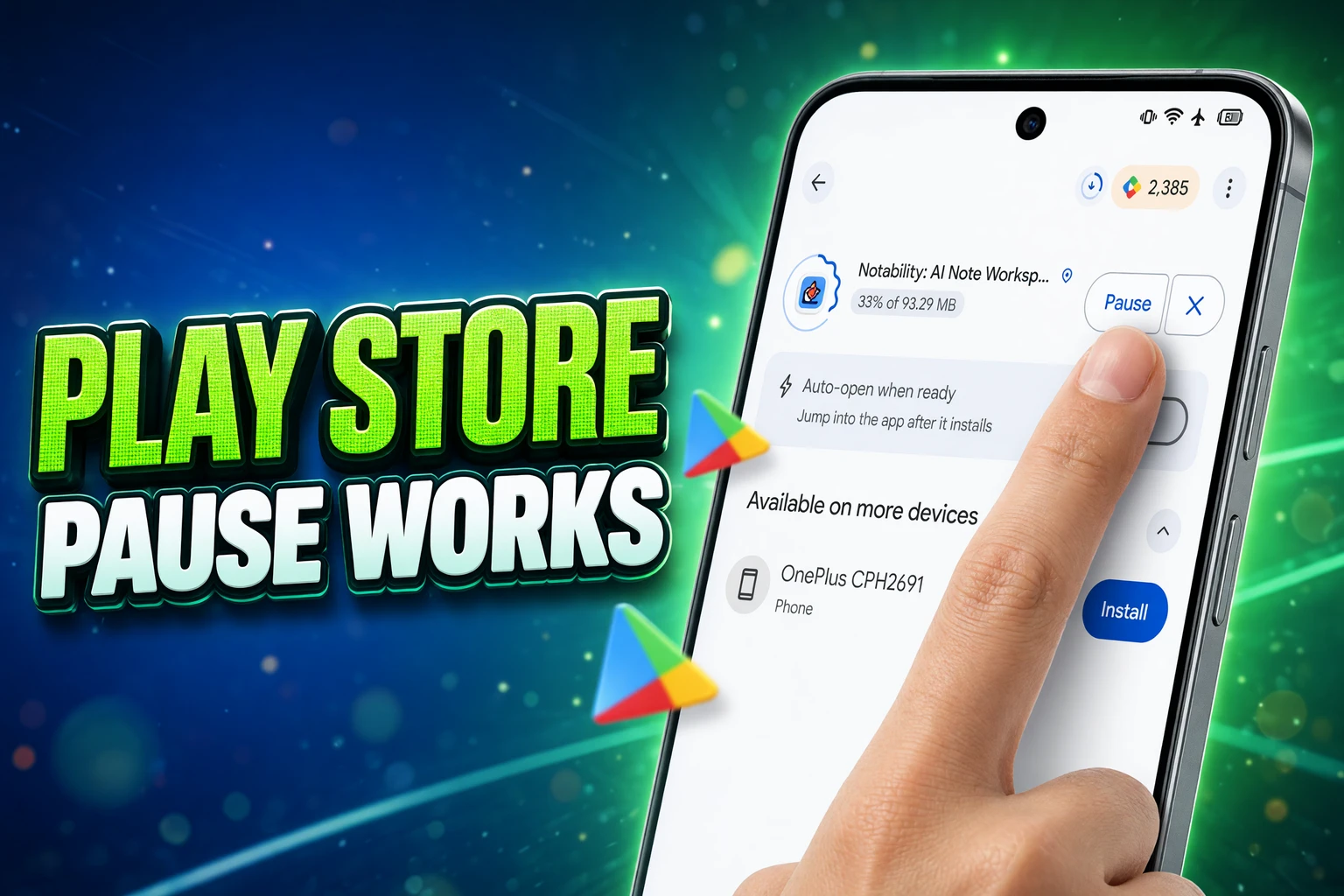
Google Play Store version 53.0 now contains a working Pause control for app downloads. Teardown researcher Akshay Gangwar, who posts as AssembleDebug, enabled it on a test phone on September 7, 2026, and recorded a demo. Google has not announced the feature, and there is still no public date.
The button is late in a store that already lets a title weigh tens of gigabytes. Cancel remains the only stop most people see, and cancel still throws away the partial file.
Play Store 53.0 Shows a Working Pause Control
Gangwar found the same pause/resume code again in v53.0 and, after extra flag work, got it to run. That is the change from August 14, 2026, when Tushar Mehta and AssembleDebug saw a Pause control that would not behave. Twenty-four days later, the demo shows Pause, then Resume, instead of a dead control.
On a live Play Store build, Install still leads to a single choice: cancel. There is no official Google post, help article, or staged rollout note that names pause. Code that runs on one test device after flag flips is not a ship date.
WHAT WE KNOW
- Working flag: Pause and Resume ran on a test phone in Play Store v53.0 after the researchers turned hidden switches on.
- Two places: The control appears on the app listing after Install, and again in the store’s download manager.
- No announcement: Google has not named the feature or given a release window.
WHAT IS UNCONFIRMED
- Public timing: Whether the next Play Store update shows Pause to everyone, to a slice of accounts, or to no one.
- Kept files: How long a paused download survives a reboot, a Play Store force-stop, or several days off Wi-Fi.
- Final UI: Whether the labels, manager list, and button placement stay as they look in the demo.
Gangwar wrote that the control “now seems to be fully working after some tinkering,” and that Google could start a rollout soon, with the usual chance it moves slowly. Teardown notes still warn that unfinished code can vanish before a public build.
How the Pause Button Works in Version 53.0
The public store still treats an install as a job you either finish or kill. The hidden UI in v53.0 adds a third state: hold the bytes, leave the listing, come back later.
WHAT THE DEMO SHOWS
- On the listing: After Install, a Pause button appears on the app page, so you do not have to hunt through settings.
- In the manager: Paused titles sit in Play’s built-in download manager, which means Resume does not require a search for the same app.
- The point of hold: You can stop a large title from chewing a mobile-data bucket, then continue on Wi-Fi or after a daily cap resets.
- Queue control: Pause also lets you park one title so another install can finish first.
That last job is small on unlimited home Wi-Fi and large on a metered plan. A 2 GB game that starts on the train is not a background nuisance. It is the rest of the day’s quota if you cannot stop it without wiping progress.
Until Google flips the same flags for everyone, the live store still offers cancel. Turning mobile data off has long been the folk workaround, because a dropped link sometimes lets Play continue later. A deliberate Pause is different. It is a control you choose, not a network failure you hope the store will forgive.
The Pause Google Already Ships for Game Assets
The missing button is not a missing download stack. Play already knows how to halt a large transfer when the radio changes. It does that for extra game files, not for the Install tap on a store listing.
games larger than 200MB are steered into Play Asset Delivery, which splits textures, audio, and level data into packs. Install-time packs arrive with the app. Fast-follow and on-demand packs keep downloading after the icon is on the home screen. Those later packs are where Play already treats mobile data as a consent problem.
If the download is larger than 200 MB and the user is not on Wi-Fi, the download does not start until the user explicitly gives their consent to proceed with the download using a mobile data connection. Similarly, if the download is large and the user loses Wi-Fi, the download is paused and explicit consent is required to proceed using a mobile data connection.
Android Developers, Play Asset Delivery integration guide
A pack in that state is paused with a WAITING_FOR_WIFI status. If the game never shows the consent dialog, the transfer stays parked until Wi-Fi returns. The store listing for the same title has not given people an equivalent hold. You could be blocked from pulling a 400 MB pack on cellular while the base install itself still had no Pause key.
That split explains the odd feeling of this teardown. Google did not invent pause for Android in 2026. It withheld a user-facing hold from the one download most people start with their thumb, the Install button, while the hidden half of a large game already knew how to wait.
A 34 GB Ceiling Makes Cancel a Data Trap
Play’s own size rules make that gap expensive. The live Play Console help page no longer talks like a 100 MB store. A base module may reach 500 MB. Each feature module may reach 500 MB. Each asset pack may reach 1.5 GB. Modules plus install-time packs may total 4 GB. On-demand and fast-follow packs may total 30 GB. Added together, that is Play’s 34 GB compressed download ceiling.
PLAY’S CURRENT DOWNLOAD CAPS
| Piece of the app | Compressed download limit |
|---|---|
| Base module | 500 MB |
| One feature module | 500 MB |
| One asset pack | 1.5 GB |
| All modules plus install-time packs | 4 GB |
| On-demand and fast-follow packs | 30 GB |
| Total for one Play title | 34 GB |
Apps over 1 GB must target Android 5.0 or later. A bundle may contain up to 100 asset packs. And the warning threshold is still 200 MB: on mobile data, Play shows a non-blocking dialog that the install is large. The dialog does not give you Pause. It tells you the file is big, then leaves cancel as the only stop.
A non-blocking warning plus a 34 GB ceiling is a strange pair without hold. You can be told the download is large, agree, walk out of Wi-Fi, and discover the only way to protect the rest of the day’s data is to throw away every megabyte already on disk.
Users Spent Years Burning Quota on Failed Installs
People asked for this control in plain language, and they asked because cancel costs money. The expensive failure is not a slow bar. It is a stop that deletes the partial file, so a data-cap trip becomes a full restart.
THE REQUEST TRAIL
- November 29, 2013: An Android Enthusiasts thread on pausing a Play download draws tens of thousands of views. Replies say there is no switch, and that cutting mobile data is the only way to hope Play continues later.
- December 21, 2021: A Play Community user named Halcyons split a download across two days of quota, and asked Google to put Pause and Resume in the store.
- August 14, 2024: User praise Yohanna wrote that a roughly 500mb game died after a data top-up, wiping a download that was almost finished. Diamond Product Expert Byteguy replied that Play had never offered pause and resume.
- August 14, 2026: AssembleDebug spots a Pause control that does not yet work.
- September 7, 2026: The same control runs in v53.0 on a test device.
Please update play store by adding (pause and resume) button because if I have not enough data I am unable to download big size apps and by resume and pause button I can easily download any app by using 2nd day data.
Halcyons, Google Play Community, December 21, 2021
Byteguy’s 2024 line was blunt: “The Play Store has never had pause and resume on downloads.” That was still true in public builds when the v53.0 demo landed. A March 2025 Android Enthusiasts post described the same trap in a different costume. Blocking Play in a firewall to save quota deleted the temp files; a retry through Aurora Store continued the same job. Sideload clients that keep the partial object already did the work the official store refused to expose.
The 24-Hour Undo That Never Replaced Pause
Google has been circling the same wound from another angle. An October 21, 2024 teardown of Play Store v42.9.16-31, then v43.2.16-29, turned on a download manager that listed in-progress and recently installed apps. It did not pause them. The write-up at the time said a manager without pause is a weak tool once app and game sizes keep rising, especially on a metered plan that refreshes daily.
A November 15, 2024 teardown of version 43.5.26-31 then surfaced Smart Resume flags. In that code, cancel would not always mean instant deletion. Cached pieces could stick around for 24 hours, for titles up to about 2 GB, if the phone had about 5 GB free. A notification path looked ready to bring the job back. That is an undo for cancel, not a hold you press on purpose.
THREE DIFFERENT STOPS
| Control | When it fires | What it keeps |
|---|---|---|
| Store Pause in v53.0 | You tap Pause during an install | The in-progress download, in the demo |
| Asset pack Wi-Fi wait | A pack over 200 MB leaves Wi-Fi | The pack, until you consent or Wi-Fi returns |
| Smart Resume (2024 code) | After you cancel | Temp files for about 24 hours, up to about 2 GB |
Smart Resume still assumes you were willing to cancel. Pause assumes you were not. A 24-hour safety net also does nothing for a 6 GB title if the cache cap really sits near 2 GB, and it does nothing if you needed to stop for two evenings, not one. The v53.0 button is the control people named in 2021. The 2024 flags were a narrower patch around the same deleted-temp-file design.
Home Screen Pause on iPhone Predates the Play Button
iPhone users have been able to pause an App Store job from the home screen for years, by tapping the icon while the progress ring is running. That is a crude hold, but it is a hold. Apple’s iOS 18.4 notes, shipped March 31, 2025, then described pause and resume from the App Store listing itself, without losing progress. iPhone settings still let you require permission for downloads over 200 MB on cellular, the same round number Play uses for its large-install dialog.
Play is now lining up the listing button and the manager list in one place, which is tidier than hunting an icon on a crowded home screen. It is also arriving after Play raised the legal size of a title into the tens of gigabytes, and after its own game pipeline already knew how to wait for Wi-Fi.
AssembleDebug’s September 7 note still reads like a first look, not a launch. Google could ship Pause in the next Play Store train, drip it to a fraction of devices, or change the labels before anyone sees them. Until that flag is on for the public, Install still means finish the transfer or throw it away. For a store that already warns at 200 MB and allows 34 GB, that is a thin pair of choices.


Veridue Raises $4 Million to Speed Energy Deal Diligence

Healey Adds a £150m Rung for Northern Scale-Ups

Ten Deals Took Most of Europe’s August Tech Money

Holmes Hired Fielder to Film Her Last Days

Molten Bets £100m of Plc Cash on Late-Stage Tech

Garlinghouse Cited Dutch Gold, and London Got the Bars

byFounders Bets $4.3 Million on Fluencify After $2M ARR

Alpha Gang Puts A-List Stars on a Zellner Wager

Angel Bets a Recut PG-13 Chase on Ritchson and Wilson

Flex IT and T1A Combine to Own Corporate Device Supply

Walter’s TWG Insists No Fraud as Insurer Probes Force Cleanup

30-Year Yield Hits 5.32% Highest Since 2007 as Debt Supply Locks In Costs

Evernorth S-4 Clears Path for Active XRP Treasury on Nasdaq

PCE Stays at 3.7% as Gas and Tariffs Outrun Coming Revisions

Astute’s $1.2M bet makes B2B creator deals feed AI discovery

Strategy Parks $1.59B Cash While Bitcoin Stack Stays Flat

Instinct Hits $2.5 Billion as AI Agent Access Sparks Trust Fights

Oracle’s 2.8 GW Bloom Deal Exposes the AI Power Bypass

Amber’s €7M locks Mittelstand knowledge inside Europe

CLARITY Act Cloture Opens a Door Ethics Still Blocks
-
 FINANCE3 months ago
Zcash Patched a Double-Spend Bug as ZEC Climbed 5%
-
 ENTERTAINMENT3 months ago
Steam Summer Sale 2026 Locks In June 25 to July 9 Dates
-

 FINANCE2 months ago
CLARITY Act Final Text Expected This Weekend as 60-Vote Hurdle Looms
-
 NEWS4 months ago
Meta Adds AI Replies to Threads, But Users Can’t Block It
-
 ENTERTAINMENT5 months ago
Extraction 3 Is Officially Coming to Netflix in 2027
-

 NEWS3 months ago
YouTube Shorts is testing a heart in place of the thumbs-up
-

 NEWS1 month ago
Senators Force Apple Off Chinese Memory as Big Three Cash In
-

 NEWS3 months ago
NEURA Robotics’ $1.4B Series C Redraws Europe’s Physical AI Bet