
NEWS
Deco BE25 Proves Dual-Band Wi-Fi 7 Is Enough for Most Homes
The dual-band Deco BE25 mesh system pairs Wi-Fi 7 speeds and twin 2.5G ports with stylish pucks, showing most homes skip the 6 GHz premium and still win.

The TP-Link Deco BE25 turns Wi-Fi 7 into a compact white puck that covers up to 6,600 square feet in a three-pack while adding twin 2.5 Gbps ports most homes can actually use. Reviewer Adam Doud at SlashGear ran five of them for a week after years on older Deco M5 units and found the mesh still simple enough for a self-described network toddler.
That result lands against the louder claim that real Wi-Fi 7 demands a 6 GHz band and tri-band radios. For the majority of households still on gigabit or multi-gig fiber with dozens of mixed devices, the dual-band BE25 already delivers the upgrade that matters.
The Puck That Replaces the Antenna Forest
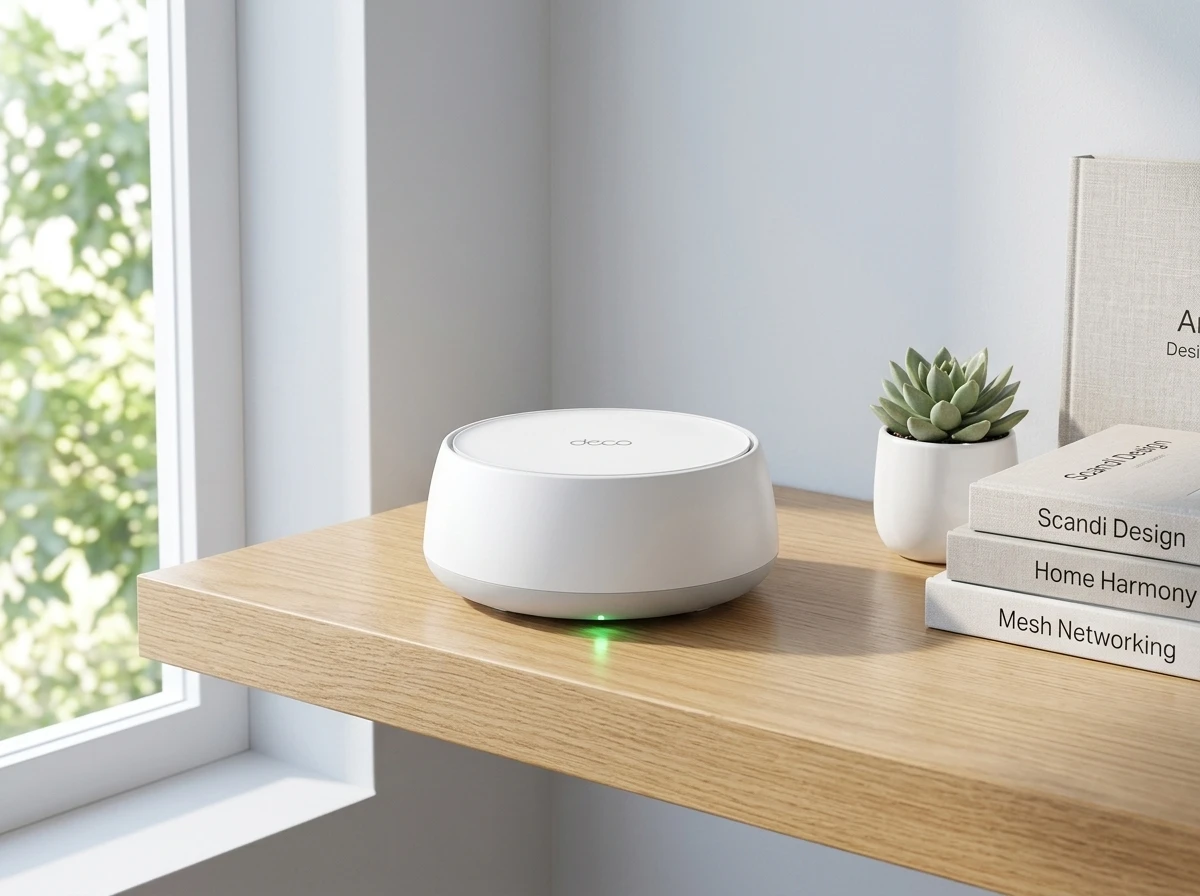
Each Deco BE25 unit measures roughly 5.91 by 5.91 by 2.44 inches and weighs about 1.12 pounds. No external antennas stick out. A soft LED peeks from the base. The white plastic disc blends into shelves, counters or a garage shelf without looking like networking gear.
Doud noted the design earns the Deco name. His wife accepted the look, a quiet win after years of black boxes. Two Ethernet jacks sit on every unit for wired backhaul or for plugging in a camera hub, smart-home base or desktop. Power arrives through a simple barrel plug.
One practical gap remains: no factory wall-mount. Doud 3D-printed a bracket for the garage and kitchen. The rest of the hardware stays deliberately simple so non-experts finish setup in minutes through the Deco app.
- Dual-band Wi-Fi 7 with Multi-Link Operation support
- Up to 150 simultaneous device connections in lab tests
- Smart roaming and AI path optimization between nodes
- Guest and separate IoT networks with isolation options
- Voice control via Alexa or Google Assistant
Older Deco units join the same network. Full Wi-Fi 7 and multi-gig benefits appear only on the new hardware, yet the mixed mesh still works for gradual upgrades.
Twin 2.5G Ports Matter More Than an Extra Band
Official specs list 4,324 Mbps on 5 GHz and 688 Mbps on 2.4 GHz for a combined up to 5 Gbps dual-band Wi-Fi 7 total. Channel width reaches 240 MHz on 5 GHz. MLO lets compatible clients use both bands at once.
The absence of 6 GHz is the point most premium reviews treat as a flaw. RTINGS testing found strong apartment and small-home speeds with the ability to add nodes, yet called out the missing band as the place where headline Wi-Fi 7 gains usually live. Dong Ngo at Dong Knows Tech measured real-world throughput near 2.2 Gbps on a 10 Gbps fiber line when using the multi-gig ports, a figure single-gigabit routers cannot match.
| Feature | Deco BE25 | Typical Older Deco (M5-era) |
|---|---|---|
| Wi-Fi standard | Wi-Fi 7 dual-band | Wi-Fi 5 / early 6 |
| Max combined rate | ~5 Gbps | ~1.3 Gbps class |
| Ethernet ports per unit | 2 × 2.5 Gbps auto-sensing | Usually 2 × 1 Gbps |
| Backhaul options | Wired multi-gig or wireless | Mostly wireless or 1G |
| 3-pack coverage claim | Up to 6,600 sq ft | Lower, often under 5,000 |
Wired backhaul turns the second 2.5G port into a clean high-speed link between nodes. Homes with existing Ethernet already win. Wireless backhaul still works; the extra 5 GHz width simply gives more breathing room than previous generations.
Most current phones, laptops and TVs still lack 6 GHz radios. The band stays empty for those devices. The BE25 therefore spends its silicon on the spectrum and ports that actually carry traffic today.
App Controls Stay Simple While Security Layers On
The Deco app walks users through modem connection, node placement and SSID creation. Device lists, priority ranking, per-node steering and full blocks sit a few taps away. An on-device speed test and interference optimization tools round out the basics.
Network-level VPN client support arrives for NordVPN, Surfshark, IPVanish, PureVPN or custom configs. One toggle covers every device. Camera isolation keeps security cameras talking only to local gear. Basic threat scanning and device identification ship free.
I’m a fan of these devices since they look good, and blanket your home with Wi-Fi. … At $269.99, a three-pack is a solid way to go. The app is very easy to use and intuitive as well.
Adam Doud wrote that verdict after living with the system. Advanced parental controls and deeper intrusion prevention sit behind the paid HomeShield network protection tools. Free tools already handle IoT separation and basic scanning for many households.
Security+ starts around $4.99 per month or $35.99 per year according to TP-Link’s plan page. A higher Total Security tier exists for broader coverage. The free tier already includes router and wireless scans plus camera and device isolation options.
Automation news also matters. TP-Link announced that IFTTT services end August 1 2026 for Tapo and Kasa products, with a pivot toward local Smart Actions and AI features. Deco router IFTTT support ended years earlier; the broader smart-home shift still affects mixed TP-Link households.
Everyday Roamers and Multi-Device Homes Gain First
Doud’s original basement-corner router left kitchen and upstairs dead zones. Five older Deco units fixed that. The BE25 pack replaced them and still let one legacy M5 stay online. Coverage extended to a sun porch and garage without drama.
Users on X describe similar outcomes: full studio coverage, automatic node handoff, and simple app setup even for first-time mesh owners. One long-time Deco owner added BE25 and outdoor nodes onto an existing system and kept everything running on a 5G backup link when fiber lagged.
The system suits households that roam room to room with laptops and phones, run multiple 4K streams, keep a growing IoT collection, or finally want multi-gig ready Ethernet drops without buying a separate switch. Competitive multiplayer gaming still prefers a direct cable to the main node, a limit shared by almost every mesh.
Homes already deep into 6 GHz client devices or needing maximum wireless backhaul capacity may still look at tri-band options. Everyone else gets the practical step up.
The Price Point That Makes Older Mesh Feel Expensive
SlashGear listed a single unit from $89.99 and a three-pack at $269.99. Launch pricing sat near $300 for three. Recent Amazon tracking and deal posts show three-packs dipping to the $180-$250 range depending on the day. Two-packs and singles fill the gaps.
That math retires many Wi-Fi 6 and early mesh kits still sitting on shelves. The twin 2.5G ports alone future-proof the wired side when an ISP upgrades the drop. Coverage scales by adding more identical pucks. Backward compatibility protects prior Deco investment.
Compare that to premium tri-band Wi-Fi 7 systems that often clear $400-$600 for three nodes. The BE25 trades unused 6 GHz spectrum for ports and price most buyers notice every month.
- Single unit: entry coverage for apartments or small floors, roughly $90 street
- Three-pack: whole-home claim of 6,600 sq ft, recent deals under $250
- Add-on nodes: expand later without replacing the whole set
- Subscription optional: free HomeShield basics suffice for many; paid tiers available
Simplicity remains the quiet advantage. Plug in, open the app, follow the prompts. Advanced toggles exist for those who want them. Most users never open them.
What the Numbers Mean for the Next Upgrade Cycle
Wi-Fi 7 features such as 4K-QAM, Multi-RU and improved OFDMA arrive on the dual-band radios. Clients must also support them for full benefit. MLO already helps capable devices. The 2.5G ports remove the common bottleneck when a household finally gets multi-gig service.
Power draw stays modest. One test logged roughly 195 Wh per day for the main unit and 135 Wh for a satellite. No USB ports appear for storage or 5G dongles; the design stays focused on pure networking.
Placement still follows mesh basics: keep line-of-sight reasonable between nodes, use Ethernet backhaul where walls are thick, and let the app’s optimization run after the first week of device learning. Dead zones that once required another entire router now disappear with one more puck.
The larger pattern is clear. Entry Wi-Fi 7 no longer requires a four-figure budget or empty 6 GHz spectrum. TP-Link put multi-gig ports and modern mesh into the form factor people already accept on a bookshelf. For the next couple of years that combination will retire more old gear than any flagship tri-band announcement.
Frequently Asked Questions
What speeds and coverage does the TP-Link Deco BE25 actually claim?
Official figures list 4,324 Mbps on 5 GHz plus 688 Mbps on 2.4 GHz. A single unit covers up to 2,600 square feet; a three-pack reaches 6,600 square feet under ideal conditions. Real throughput depends on client capability, interference and whether wired backhaul is used, with multi-gig ports enabling over 2 Gbps when the internet plan supports it.
Does the Deco BE25 support the 6 GHz band?
No. It is a dual-band 2.4/5 GHz Wi-Fi 7 system. Many premium Wi-Fi 7 units add 6 GHz for extra clean spectrum, but most current devices cannot use that band yet. The BE25 instead prioritizes wider 5 GHz channels and multi-gig Ethernet ports that work with today’s hardware.
How difficult is setup for a non-technical user?
The Deco app guides the process in three main steps: connect one unit to the modem, power the others, and follow on-screen placement and naming prompts. Units in a multi-pack arrive pre-synced. Most people finish initial configuration in under fifteen minutes without opening a web browser.
Can I use Ethernet cables between the Deco BE25 units?
Yes. Each unit carries two auto-sensing 2.5 Gbps ports. One can serve as WAN on the main node while the second becomes LAN; between nodes the ports enable full multi-gig wired backhaul without an extra switch. The system automatically prefers the wired link when present.
Is HomeShield free or do I need a subscription?
Basic network scans, device identification, IoT isolation and camera security features ship free. Advanced parental controls, deeper intrusion prevention and on-the-go protection require a paid tier. The Security+ plan pricing details start at roughly $4.99 monthly or $35.99 yearly, with a higher Total Security option also listed.


ChapsVision Quiet Roll-Up Now Holds French and German Intel Keys

Culkin’s Home Alone Pitch Flips Kevin Into the Locked-Out Dad

Sigvi’s €1.2M AI Layer Cracks Idle Fleet Rental Moat

Tapo C675D Dual Lenses Cut Multi-Camera Install Costs

Tapo DL130 Palm Vein Lock Delivers Jedi Fun at a Cost

LiberNovo Maxis Gives Big Frames a True Fit Before Deal Ends

Google Find Hub Remove Button Clears Years of Ghost Earbuds

Nadella Warns Single AI Reliance Kills Firms He Also Funds

Robinhood Faces Earnings Test After Slide Toward 93

Apple’s 194-CVE Drop Quietly Shields Older Macs Too

CLARITY Act Final Text Expected This Weekend as 60-Vote Hurdle Looms

Kalshi Loses Major NY Prediction Markets Ruling to Judge Torres

Fed Minutes Cite AI Demand as Inflation Risk, Put a 2026 Hike Back on the Map

Marker AI Writing Startup Lands $13M Seed Led by Index Ventures

Dota 2 Esports World Cup 2026: Spirit Defends $2M Title In Paris

Meta’s Muse Spark 1.1 Beats Rivals on Price, Trails on Coding

CS2 Premier Season 5 Lands With Cache and a C4 Damage Rework

ARC Intelligence Closes €4M Seed Round in Roughly a Week

Finto Picks Munich Over Silicon Valley After YC, Raises $3.4M

Backrooms Returns to Theaters as the Everything Must Go Edition
-
 FINANCE2 months ago
Zcash Patched a Double-Spend Bug as ZEC Climbed 5%
-
 ENTERTAINMENT2 months ago
Steam Summer Sale 2026 Locks In June 25 to July 9 Dates
-
 NEWS3 months ago
Meta Adds AI Replies to Threads, But Users Can’t Block It
-
 FINANCE4 weeks ago
CLARITY Act Final Text Expected This Weekend as 60-Vote Hurdle Looms
-
 ENTERTAINMENT2 months ago
‘Widow’s Bay’ Review: Apple TV’s Sleeper Horror-Comedy Earns Its Fog
-
 NEWS7 months ago
FolderFresh Review: This Free Tool Automates Windows File Organizing
-
 NEWS4 months ago
U.S. Navy Deploys Solar-Powered Lightfish Drone to Patrol Oceans
-
 FINANCE3 weeks ago
Kalshi Loses Major NY Prediction Markets Ruling to Judge Torres