
NEWS
Windows 11 Battery Widget Puts Charge on the Lock Screen
Windows 11 preview builds hide a battery widget for the PC and wireless accessories, aimed at the lock screen.

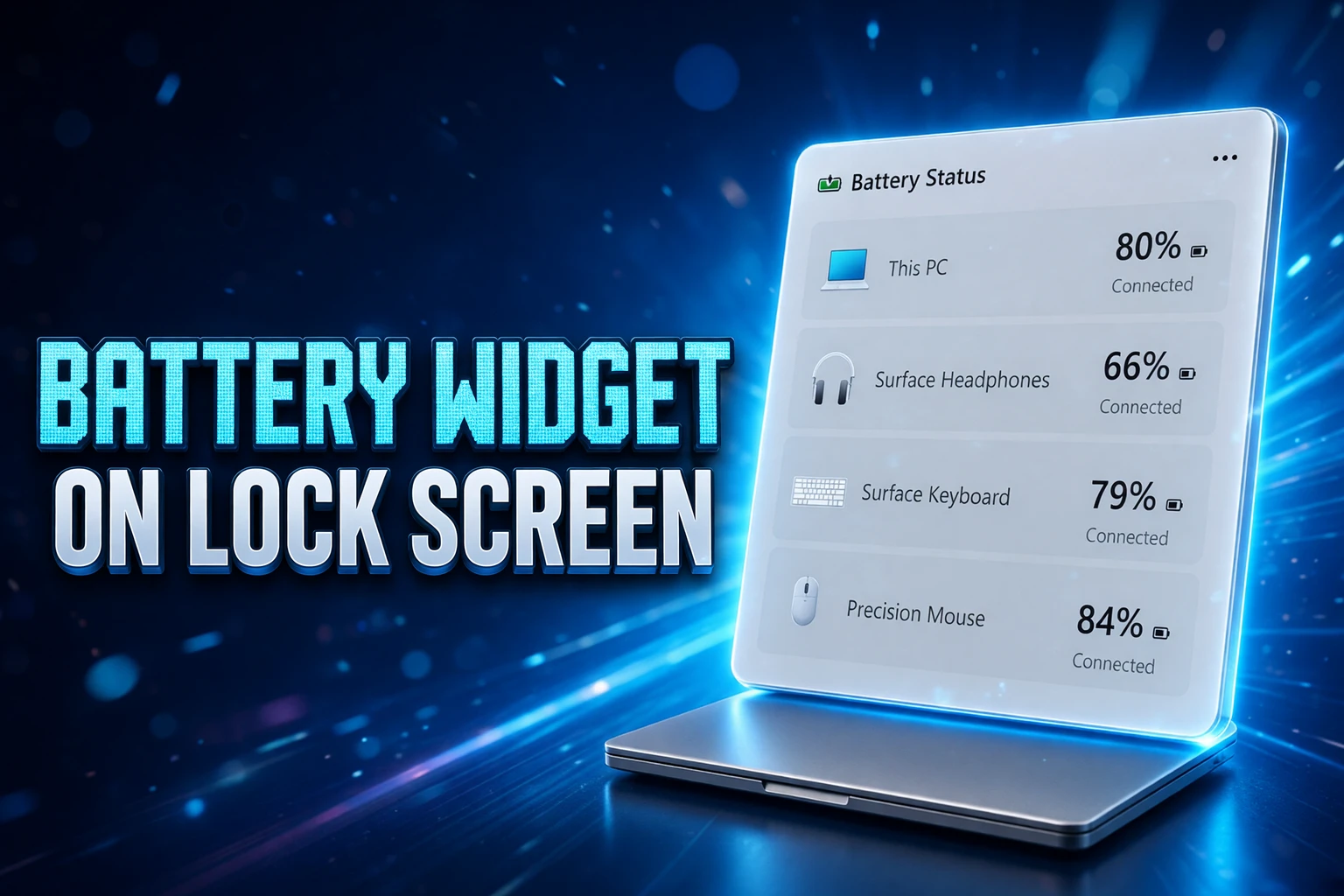
Windows 11 preview builds now contain a battery widget that lists the PC and connected wireless devices on the lock screen and the Widgets Board. The card is not running yet. Strings and art showed up in Insider bits, first found on Discord by a user credited as one.shiningstar, and Microsoft has not announced it.
The useful copy is the lock-screen one. You see that surface after sleep, before a PIN, and the charge list is data Windows already keeps in Settings.
What the Hidden Assets Draw
The art shows a vertical stack, not a single laptop meter. The PC battery sits at the top. Each row under it is meant to be one wireless accessory, with an icon, a name, and a percentage. Light and dark themes are both in the files.
The same mockups mark charging and Energy Saver. That is more than a bar. It is a status strip for the machine and the gear around it, which is why people keep comparing it to the phone cards that already do this job.
WHAT EACH ROW IS DRAWN TO SHOW
- Device icon: A glyph for the PC or the accessory type in that slot.
- Device name: The label Windows already uses for that hardware.
- Charge level: A percentage for that row, not a single combined figure.
- Charging state: A flag for a device that is on a cable or a pad.
- Energy Saver: An on or off mark where the system exposes that mode.
None of that UI is live in the builds that hold the files. Preview features also get cut. Treat the layout as the current design, not a store listing.
A Lock Screen Built for Quick Status
Microsoft has been rebuilding the lock screen as a widget host since March 2024, when Weather and related cards first landed on that surface. Later updates let you add, remove, and rearrange those cards in Settings under Personalization, then Lock screen. The battery leak sits on that path, not on a brand-new shell.
On 21 August 2026, Windows Insiders in the Experimental channel received build 26340.9233, based on Windows 11 version 26H2. A 2 September 2026 note for that same build said Microsoft was making the default lock-screen widget set quieter, with Weather first and fewer suggested cards.
As part of our continued commitment to making Windows calmer and higher quality, we’re updating the default lock screen widget experience for Insiders on newer builds. With this change, Weather will be the primary widget shown on the lock screen, reducing recommended widget content and making the experience feel more focused.
Microsoft, Windows Insider notes for build 26340.9233, 2 September 2026
A battery list fits that brief better than another sports or traffic tile. It is local hardware, not a feed. Users already curate lock-screen cards, and Microsoft is pushing more focused widgets on the lock screen toward the ones people pick themselves.
There is a size catch. Microsoft’s own lock-screen help says only small-size widgets can be added there. The leaked art is a tall stack. If the shipping lock-screen card has to be small, the long list will have to compress, or the full layout will live on the Widgets Board and a shorter cousin will sit beside Weather.
LOCK SCREEN WIDGETS, 2024 TO 2026
- March 2024: Lock-screen widgets arrive, with Weather and related cards as the default set.
- 2025: Settings grows controls to add, remove, and reorder those lock-screen cards.
- 21 August 2026: Experimental build 26340.9233 ships on Windows 11 version 26H2.
- 2 September 2026: Microsoft tells Insiders Weather is the primary lock-screen widget and suggested cards are reduced.
- 7 September 2026: Preview assets for a battery widget that can sit on the lock screen and the Widgets Board surface in Discord.
The battery card is not named in that Insider note. It showed up in preview files days later, which is how unannounced Windows UI usually leaks: strings first, a working toggle later, if it survives.
Bluetooth Settings Already Carry the Same Numbers
Open Settings, then Bluetooth & devices, and supported gear already prints a percentage under the device name. The Devices page repeats those figures in a longer list. That path has been in Windows 11 since at least 2021, which is also the year the Widgets Board launched.
The widget does not invent a new battery protocol. It is a new place to read numbers the OS already stores when a mouse, keyboard, or headset tells Windows how full it is. The lock screen is the change that matters, because you can read it without signing in and without digging through Settings.
Vendor apps still sit beside that. Logitech, Jabra, and other makers ship their own dashboards for lights, pairing, and charge. Windows is trying to pull the one number people actually hunt for into a system card. The rest of those apps can stay for the extras.
How Accessory Firmware Limits the List
Microsoft publishes host rules for Bluetooth accessories that want those percentages to show up in Windows UX. Classic audio gear can send charge through Hands-Free Profile indicators. Bluetooth LE gear is pointed at Battery Service. In both cases Microsoft asks for at least 11 steps of battery resolution, enough to show 0 through 100 by tens, and it rejects a crude low/high lamp as the only signal.
Starting with Windows 11 version 24H2, accessories that implement Battery Service 1.1 can raise their own low and critical alerts. Windows then shows those states, and for paired sets it can show each member. Older Battery Service 1.0 gear still gets a Windows low-battery alert when the reported level hits 5%.
HOW WINDOWS IS TOLD ABOUT CHARGE
| Link | What the accessory sends | Windows rule on file |
|---|---|---|
| Bluetooth LE | Battery Service (BAS) | At least 11 steps; BAS 1.1 alerts on 24H2 and newer |
| Bluetooth Classic (HFP) | Hands-Free Profile battery indicators | At least 11 steps, 0 through 100 by tens |
| BAS 1.0 fallback | Battery Level characteristic | Windows low alert at 5% |
| Dual HFP and BAS | Both transports | The two readings must stay in sync |
Those rules do not cover every wireless mouse on a desk. Microsoft’s published guidance is about Bluetooth. Gear that uses a proprietary 2.4 GHz dongle still tends to hide charge inside the maker’s app, and older Bluetooth devices that never implemented Battery Service stay blank in Settings. A widget that only reads what Windows already knows will inherit those gaps.
Firmware quality is the other quiet limit. Microsoft tells makers to treat the 0 to 100 reading as decrease-only unless the accessory is on a charger or the cell was replaced, so a mouse that idles and recovers a few points of voltage does not bounce the UI. Bad firmware still produces nuisance alerts. A lock-screen list will make those jumps more visible, not less.
Energy Saver Flags and Charging Icons
The leaked strings call out charging and Energy Saver on the same card as the percentages. That is the part of the design Microsoft had already described as future work for accessory makers, before these assets appeared.
Battery Charge State, Wired External Power Source Connected and Wireless External Power Source Connected may be used in a future version of Windows to display charge state indicator icons.
Microsoft, Bluetooth accessory guidelines for battery profiles and services
The same page says Time until Recharged and Time until Discharged might later feed remaining-time estimates. The widget art does not prove those timers are coming. It does show charging as a first-class mark, which is the icon work Microsoft had parked as a later Windows version.
Energy Saver is a PC power mode, not a mouse setting. If the card shows it beside the laptop row, that is a system flag riding along with accessory charge. If it also appears on accessory rows, that would mean Windows is mapping a device-level saver state some peripherals already report. The assets do not settle which of those two layouts ships.
The Widgets Board Gets Another System Card
The same widget is wired for the Widgets Board, the panel Windows 11 has carried since 2021. Phone Link, OneDrive, and Weather are the cards people still open. A system battery list would join that short useful set, and it would give the board something that is not a news feed.
A 2026 redesign already split widgets from Discover so the panel is less of a headline dump. That does not mean people open it. The lock screen is still the surface you cannot avoid after the lid opens. Parking the same card on both hosts lets Microsoft reuse one component, but the lock-screen pin is the one that changes the morning glance.
Third-party tools have been filling the hole. Battery Flyout, a native Windows 11 power app from developer Michał Łeptuch, added its own Widgets Board card in early September 2026, along with ARM64 support and per-app energy use. People who wanted a battery tile did not wait for the OS. Microsoft’s version, if it ships, is the one that can also sit on the lock screen without extra software.
WHAT WE KNOW
- The files: Light and dark assets and strings for a battery widget are in recent Windows 11 preview builds.
- The hosts: Those strings point at the Widgets Board and the lock screen.
- The rows: PC charge on top, then named accessories with icons, percentages, charging, and Energy Saver marks.
- The state: The widget is not functional in the builds described on 7 September 2026.
WHAT IS UNCONFIRMED
- Ship date: Microsoft has not announced when, or whether, the card reaches a stable release.
- The build flag: Public write-ups have not pinned the assets to one named Insider flight.
- The lock-screen size: A tall list may not fit the small-widget contract without a compact layout.
- The device list: Blank Settings rows will stay blank on the widget until the hardware reports charge.
Leaked assets get treated as a launch more often than they should. Windows Insider notes even warn that preview ideas can be removed and never leave the lab. This card is still in that bin.
Years of Phone Battery Widgets
iPhone users have been able to pin a Batteries widget on the Home Screen that watches the phone and connected accessories, including AirPods. Apple’s Mac widget gallery has a Batteries card for connected Beats as well. Android has shipped the same idea for years. Windows is late to the glance, not to the underlying data.
The Windows version still has a job those phone cards never had to do. A PC talks to a mess of Bluetooth stacks, USB receivers, and vendor utilities. The lock-screen list will look complete on a laptop with a Bluetooth mouse and a BAS headset. It will look thin on a desk full of dongle keyboards that never learned to speak Battery Service.
Until Microsoft turns the feature on, the practical check is unchanged: Settings, Bluetooth & devices, then the percentage under each name. The preview art is a promise that the same list might greet you on the lock screen. It is not a promise with a date.


Veridue Raises $4 Million to Speed Energy Deal Diligence

Healey Adds a £150m Rung for Northern Scale-Ups

Ten Deals Took Most of Europe’s August Tech Money

Holmes Hired Fielder to Film Her Last Days

Molten Bets £100m of Plc Cash on Late-Stage Tech

Garlinghouse Cited Dutch Gold, and London Got the Bars

byFounders Bets $4.3 Million on Fluencify After $2M ARR

Alpha Gang Puts A-List Stars on a Zellner Wager

Angel Bets a Recut PG-13 Chase on Ritchson and Wilson

Flex IT and T1A Combine to Own Corporate Device Supply

Walter’s TWG Insists No Fraud as Insurer Probes Force Cleanup

30-Year Yield Hits 5.32% Highest Since 2007 as Debt Supply Locks In Costs

Evernorth S-4 Clears Path for Active XRP Treasury on Nasdaq

PCE Stays at 3.7% as Gas and Tariffs Outrun Coming Revisions

Astute’s $1.2M bet makes B2B creator deals feed AI discovery

Strategy Parks $1.59B Cash While Bitcoin Stack Stays Flat

Instinct Hits $2.5 Billion as AI Agent Access Sparks Trust Fights

Oracle’s 2.8 GW Bloom Deal Exposes the AI Power Bypass

Amber’s €7M locks Mittelstand knowledge inside Europe

CLARITY Act Cloture Opens a Door Ethics Still Blocks
-
 FINANCE3 months ago
Zcash Patched a Double-Spend Bug as ZEC Climbed 5%
-
 ENTERTAINMENT3 months ago
Steam Summer Sale 2026 Locks In June 25 to July 9 Dates
-

 FINANCE2 months ago
CLARITY Act Final Text Expected This Weekend as 60-Vote Hurdle Looms
-
 NEWS4 months ago
Meta Adds AI Replies to Threads, But Users Can’t Block It
-
 ENTERTAINMENT5 months ago
Extraction 3 Is Officially Coming to Netflix in 2027
-

 NEWS3 months ago
YouTube Shorts is testing a heart in place of the thumbs-up
-

 NEWS1 month ago
Senators Force Apple Off Chinese Memory as Big Three Cash In
-

 NEWS3 months ago
NEURA Robotics’ $1.4B Series C Redraws Europe’s Physical AI Bet