
NEWS
Samsung’s One UI 9 Home Up Adds Dock Makeover and Five-Finger Gestures
Samsung’s leaked One UI 9 Home Up module adds customizable Favorites dock backgrounds, depth blur, and a multi-finger gesture system not matched on Pixel.

Samsung’s One UI 9 update, built on Android 17, brings what SammyFans calls one of the most advanced gesture customization systems Samsung has offered, inside the Home Up module of its Good Lock suite. A leak captured July 7 by insider GalaxyTechie shows two new pillars arriving on the Galaxy S26 beta: a fully customizable Favorites dock and a gesture system that reads swipes from two to five fingers.
The features reverse a phone-software trend toward simpler, more locked-down launchers, and they arrive on the only major Good Lock module still missing native One UI 9 support.
Two Pillars Pulled From a Beta Build
Insider GalaxyTechie posted early One UI 9 Home Up screenshots on July 7, showing the two flagship additions in action. Android Authority writer Stephen Radochia picked through the leak and laid out both features; SammyFans published its own feature-by-feature walkthrough the same day. The two pillars are tightly distinct: one changes how the home screen’s bottom dock looks, and the other changes how every part of it is reached.
Home Up sits inside Samsung’s Good Lock, a sandbox of modules that let power users strip back the launcher without flashing a custom ROM. Inside Home Up today, Galaxy owners can already customize app folders, the home screen grid, the share menu, and widget sizes to an extent Android Authority describes as unprecedented. The One UI 9 build adds new graphics controls and a fresh gesture system on top of that foundation.
The Favorites Tray Gets a Full Aesthetic Overhaul
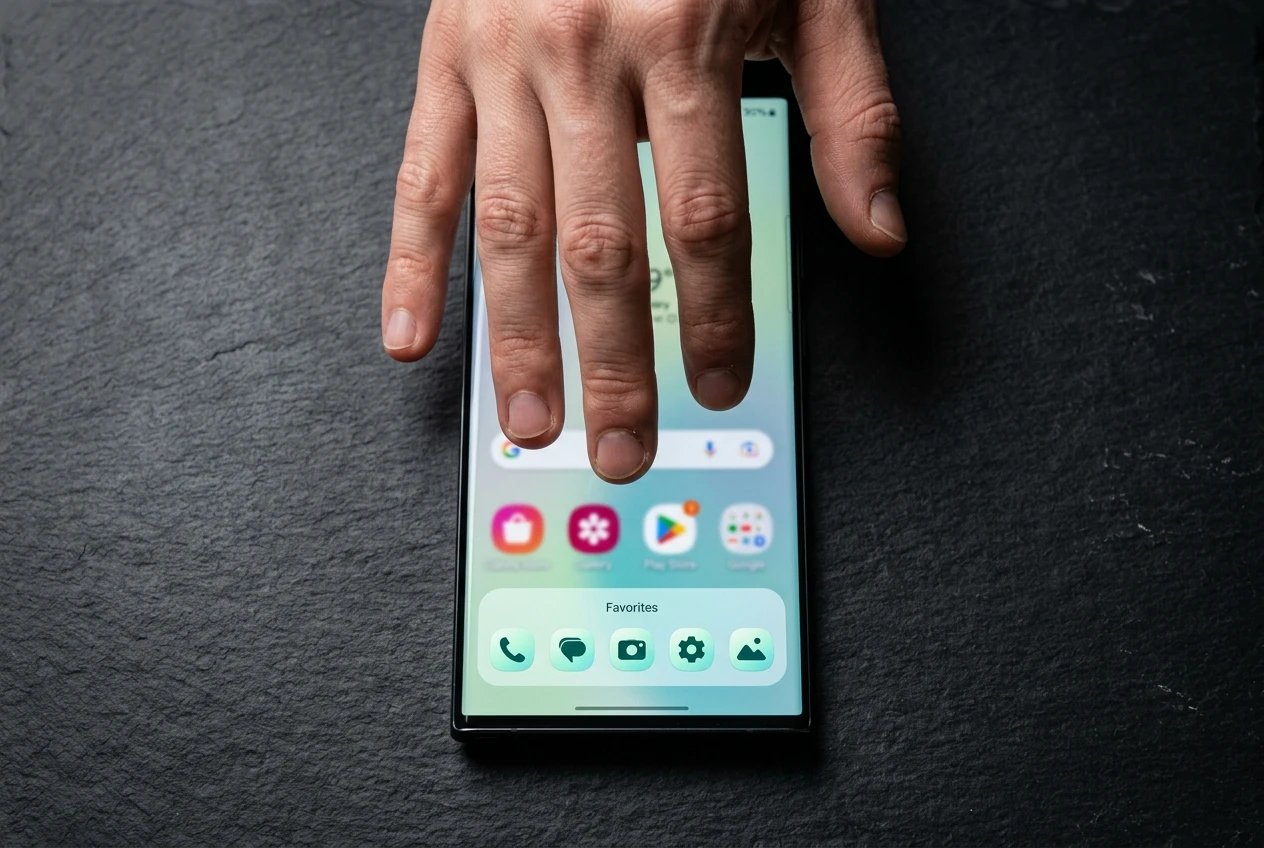
The Favorites tray, the persistent dock at the bottom of every Galaxy home screen, gets a redesign pass in One UI 9. The new Home Up dock settings expose toggles for a custom background, a configurable corner radius, vertical and horizontal padding, depth blur, drop shadows, and solid color tints, plus the option to load a custom background image behind the tray. GalaxyTechie’s leak shows the dock sitting on a translucent surface with its own pastel coloring, completely separate from the wallpaper above.
The tray’s app count is now independent of the main home screen grid, so a six-by-five grid can sit above a five-icon dock or an eight-icon dock as the user prefers. Samsung is also pre-loading three design themes, Mint Flow, Metal, and Pastel Brush, as named starting points. The change pushes the dock from a thin transparent strip into a designed surface that can match an icon pack or wallpaper without third-party apps.
| Setting | What is exposed |
|---|---|
| Dock background | Custom image, solid color tint, drop shadow toggle |
| Depth effect | Toggle on or off, intensity controlled by blur |
| Corner radius | Adjustable, independent of icon pack |
| Padding | Vertical and horizontal spacing sliders |
| Pre-built themes | Mint Flow, Metal, Pastel Brush |
| Tray capacity | App count chosen independently of home screen grid |
The result is a dock that is no longer a thin transparent strip but a designed surface, sized and styled by the user.
A Five-Finger Gesture System Mapped Your Way
The second pillar is Home Up’s gesture builder, which SammyFans calls one of the most advanced gesture customization systems Samsung has offered. Users can configure swipes, pinches, taps, and long presses across two-, three-, four-, or five-finger inputs, each carrying its own action. The action list pulls from the rest of the system: open Recents, go Home, switch to the previous or next app, take a screenshot, pull up Finder Search, drop the notification shade, or launch a chosen app shortcut.
Below those bindings sits a layer of fine-tuning SammyGuru walks through. Users can adjust the swipe distance required to trigger a gesture, opt in to a glow effect and vibration when a gesture fires, disable gestures while the keyboard is open, exclude specific apps, and re-enable gestures in full-screen mode during games.
I imagine the three-finger swipe down for screenshots will be a particularly popular combo for users who previously had OnePlus devices or phones from other major Chinese brands. By contrast, Samsung phones have long stuck with a palm swipe gesture for screenshots.
Stephen Radochia wrote for Android Authority that the three-finger screenshot swipe, common on OnePlus and other Chinese-brand phones, will now land for Galaxy owners who had wanted it for years. The same article notes that Home Up already lets users freely customize the home screen layout to a depth the writer calls unmatched on any mainstream launcher.
Why Samsung Doubles Down as Pixel Locks Down
Android Headlines frames customization depth as one of Samsung’s key selling points, and the same outlet notes that Pixel phones still lock down their software launchers in the name of simplicity, restricting user agency by default. Samsung’s approach has been the opposite: deep optional layers bolted on through Good Lock, so a casual user can ignore the controls and a power user can rebuild the screen.
The trade-off sits in plain sight. A wider settings surface means more to learn, more to break, and more failure modes in beta software. For buyers who never open Good Lock, the Home Up upgrade will be invisible; for buyers who live in it, it removes another reason to flash a third-party launcher.
Samsung keeps its base software lean and routes depth into Good Lock modules, a design call Android Headlines points out lets buyers skip the complexity when they want to. The Home Up additions extend that modular strategy rather than rewriting the default Settings app.
Where Home Up Sits in the One UI 9 Rollout
The Home Up module is still waiting on native One UI 9 support, even as the rest of the Good Lock suite catches up. SammyFans reports that the total count of One UI 9-supported Good Lock apps has reached around 21, and Samsung has been releasing One UI 9.0-compatible versions of LockStar, NavStar, Display Assistant, ClockFace, RegiStar, and One Hand Operation + through the Galaxy Store. The Galaxy S26 beta program details were laid out in the official One UI 9 beta announcement in May. Home Up remains the holdout, with Samsung holding it back during testing of the dock and gesture changes.
The Beta itself has been running exclusively on the Galaxy S26 series since May 13, 2026, and the fourth beta release was gearing up the week of July 7. Stable One UI 9 is expected to surface with Samsung’s next foldables at the Unpacked event expected on July 22, which lines up with the wider foldable debut tied to One UI 9. Global sales of those foldables are expected to begin August 5.
- May 13, 2026: One UI 9 Beta launches on Galaxy S26 series
- July 7, 2026: Home Up dock and gesture features leak via GalaxyTechie
- July 22, 2026: Galaxy Unpacked expected to showcase One UI 9 alongside new foldables
- August 5, 2026 (expected): Global sales of the new foldables begin
What Galaxy Owners Are Asking
What is Home Up inside Samsung’s Good Lock?
Home Up is one of the modules inside Samsung’s Good Lock customization suite for Galaxy phones. Alongside Camera Assistant, Sound Assistant, Theme Park, and others, Home Up controls the home screen, task changer, share menu, edge panel, and widget behavior, with options for grid size, folder style, and dock layout.
When does Samsung One UI 9 leave beta?
As of coverage in early July 2026, the One UI 9 Beta is running on the Galaxy S26 series with a fourth beta update gearing up for release that week. Stable One UI 9 is expected to land first on Samsung’s new foldables at the Unpacked event on July 22, with global sales of those foldables expected from August 5.
Can Google Pixel run a five-finger gesture system?
No. Pixel phones use Google’s stock launcher, which Android Headlines describes as locking customization down in the name of simplicity. Multi-finger gesture mapping is a Good Lock Home Up feature, available only on Galaxy devices running One UI 9.
Do existing Galaxy apps and modules need an update for One UI 9?
Some do. Samsung has been releasing One UI 9.0-compatible versions of LockStar, NavStar, Display Assistant, ClockFace, RegiStar, and One Hand Operation + through the Galaxy Store. Home Up is the remaining major Good Lock module still awaiting One UI 9 support.


Nvidia Buys Hugging Face, the Platform That Turned It Down

OpenAI Names GPT-6 Astra AGI, Then Locks It Down

Relay Q Bets a $150 Puck Can Beat Dictation Apps

Accel Backs Atira to Automate Industrial Sales Engineering

Beyerdynamic Hides a Spare Battery in the Aventho Y

Lummis Pushes the CLARITY Act to Export Wyoming’s Crypto Banks

AI Exposure Turns a Cloud Beat Into a Selloff

Citadel’s XRP ETF Filing Looks Like Dealer Inventory

Revolut’s OCC Nod Starts an 18-Month US Bank Clock

British Business Bank’s Zinc Fund Will Mint 80 Startups

Walter’s TWG Insists No Fraud as Insurer Probes Force Cleanup

30-Year Yield Hits 5.32% Highest Since 2007 as Debt Supply Locks In Costs

PCE Stays at 3.7% as Gas and Tariffs Outrun Coming Revisions

Astute’s $1.2M bet makes B2B creator deals feed AI discovery

Strategy Parks $1.59B Cash While Bitcoin Stack Stays Flat

SpaceX Stock Rebound Tests Real Demand Before Huge Unlock

The 20% Savings Ideal Meets a 2.7% Reality Check

Amber’s €7M locks Mittelstand knowledge inside Europe

Monzo chair Gary Hoffman exits after board revolt fallout

AI data centers win as RAM kits jump nearly 500 percent
-
 FINANCE3 months ago
Zcash Patched a Double-Spend Bug as ZEC Climbed 5%
-
 ENTERTAINMENT3 months ago
Steam Summer Sale 2026 Locks In June 25 to July 9 Dates
-

 FINANCE2 months ago
CLARITY Act Final Text Expected This Weekend as 60-Vote Hurdle Looms
-
 NEWS4 months ago
Meta Adds AI Replies to Threads, But Users Can’t Block It
-

 NEWS3 months ago
YouTube Shorts is testing a heart in place of the thumbs-up
-

 NEWS1 month ago
Senators Force Apple Off Chinese Memory as Big Three Cash In
-

 NEWS3 months ago
NEURA Robotics’ $1.4B Series C Redraws Europe’s Physical AI Bet
-
 ENTERTAINMENT5 months ago
Extraction 3 Is Officially Coming to Netflix in 2027