
NEWS
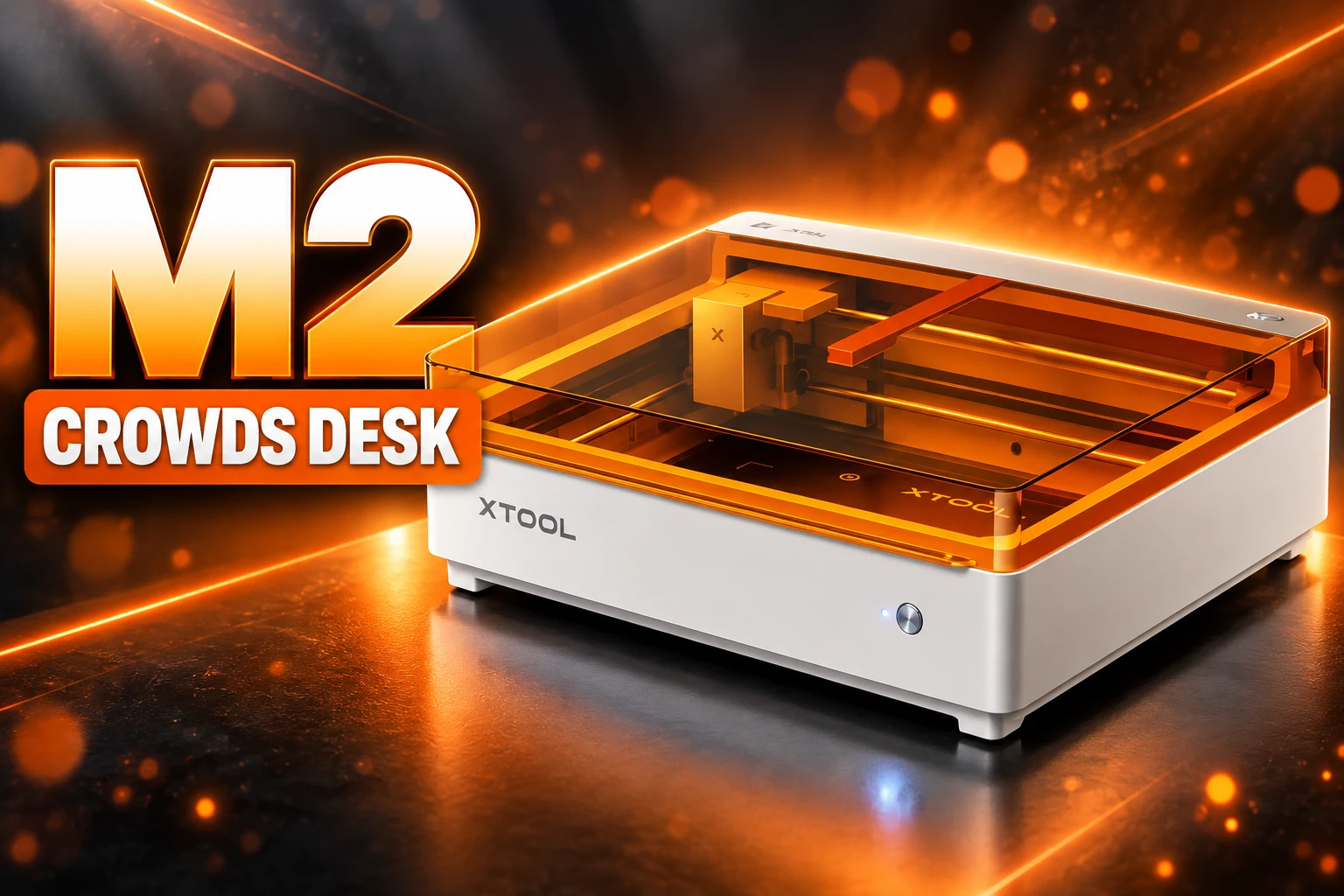
The xTool M2 Combines Tools and Still Crowds the Desk
xTool lists the M2 from $549 as a print-and-cut laser, but the 24.0 x 22.4 inch box is wider than the M1 Ultra and still wants a vinyl cutter beside it.

xTool lists the M2 from $549 as a color craft laser that prints and cuts on one 24.0 x 22.4 inch chassis. The older combo, the M1 Ultra, sat on a 24.4 x 19.6 inch footprint and is no longer sold by the company.
The pitch is less clutter on a craft bench that already holds a vinyl cutter, a printer, and a diode laser. The new box is wider, the magnetic heads skip blades, and xTool’s own buying guide still sends heat-transfer vinyl to a second machine.
The Space-Saver Occupies More Desk Than the Last One
Closed, the M2 is 24.0 x 22.4 x 7.1 inches (610 x 569 x 180 mm) and weighs 12.3 kg. The M1 Ultra is 24.4 x 19.6 x 7.0 inches (620 x 498 x 178 mm) and 12 kg. Depth shrinks a fraction. Width grows. The occupied rectangle is 12 percent larger.
You do get more usable bed for that extra width. The 10W and 20W diode heads cover 16.7 x 12.6 inches (426 x 320 mm). The M1 Ultra’s laser and pen mode stayed at 11.8 x 11.8 inches. Inkjet on the M2 is 11.8 x 11.5 inches, close to the older printer path, so the gain is in laser work, not in sticker sheets.
M2 AND M1 ULTRA ON THE BENCH
| Machine | Outside size | Diode bed | Inkjet bed | Weight |
|---|---|---|---|---|
| xTool M2 | 24.0 x 22.4 x 7.1 in | 16.7 x 12.6 in | 11.8 x 11.5 in | 12.3 kg |
| xTool M1 Ultra | 24.4 x 19.6 x 7.0 in | 11.8 x 11.8 in | 11.7 x 11.3 in | 12 kg |
Lauren Liu’s xTool comparison, updated July 2, 2026, still lists the M2 from $549 and the M1 Ultra from $899, then adds that the Ultra is no longer available for purchase through xTool. The leftover SKU on that page is a map for people who already own one, not a machine you can still put on the card.
Why xTool Dropped Blades on the M2
Swap a head on the M2 and you unplug a USB-C lead, pull a magnet-held module, click the next one on, and plug the lead back in. Hands-on checks of that dock found it fast. The same dock cannot take a tool that has to press into the material, so pens, foil tips, and blades stay off the menu.
xTool framed that as a choice, not a miss. The M2 is built around color print-then-cut and diode work. The M1 Ultra kept the four-in-one set: laser, inkjet, blade cutting, pen drawing, and foiling. Vinyl, heat-transfer film, and thin fabrics that should not meet a laser still want a blade. Laser-cut vinyl can throw fumes xTool does not want in this box.
The company’s own fit guide says the M2 is the right buy if you already own a vinyl cutter, or if you do not plan to work HTV and fabric. That sentence is the space problem in plain words. The “one machine” pitch holds only if your bench never needed a Cricut-style cutter. If it did, the M2 sits beside that cutter, and the footprint math runs the wrong way.
A former Cricut on-air trainer quoted on xTool’s product page, writing as craftybarastudios, said stacked felt and crepe cut in a way a blade machine never managed. That is a real gain for applique and leather. It is not a gain that retires the vinyl cutter for shirts.
Print-Then-Cut Is the Job This Chassis Won
Where the M2 is strong is the path from a full-color print to a laser cut on the same registration. The inkjet is CMYK with a true black channel. The M1 Ultra mixed black from CMY. xTool says the larger 40 ml cartridge is rated about 800 pages at 5 percent coverage under ISO/IEC 24712, against about 400 pages for the Ultra’s 15 ml pack. The cartridge’s list price is $99; xTool’s store had it at $59 on September 10, 2026.
Hands-on prints on paper, cardstock, and temporary tattoo stock held up. Wood, canvas, glass, acrylic, and satin needed primer or sealer, and results were mixed. The ink is water-based dye. Washed fabric is not a fair test, and the prints smear in water unless you seal them. There is no paper tray and no roller feed. You print one blank at a time, then swap to the diode head for the cut.
xTool’s June 18, 2026 launch line still sells that loop as a single box.
Print. Cut. Create. All on ONE machine! 🤯
xTool M2 features Integrated Color Print-then-Cut for perfectly aligned, full-color laser crafts.
Say hello to your new creative sidekick! 🙌
👉https://t.co/TrTOjcBP1X#xTool #xToolM2 #smallbusinessideas #lasercut #cmykprinting pic.twitter.com/wsJReg0Nel— xTool Official (@xToolOfficial) June 18, 2026
WHAT THE THREE HEADS CAN DO
- 10W diode: Cuts basswood plywood up to 8 mm in one pass, with a 0.06 x 0.04 mm spot and a top speed of 600 mm/s.
- 20W diode: Cuts basswood up to 10 mm, and opaque black acrylic up to about 8 mm; clear acrylic still will not cut on a diode.
- 3W infrared: Marks stainless, copper, aluminum, and some plastics at 1064 nm, on a 16.2 x 12.2 inch bed, and ships as an M2-only add-on.
- CMYK inkjet: Prints at 1200 DPI on a 11.8 x 11.5 inch field, with a 26 mm max thickness and an auto cap so the nozzles do not dry in the dock.
The 10W diode in early tests cut cleanly, with no functional complaints on the basic laser path. Dual cameras (5 MP distant, 2 MP close) plus xTool’s ACS mode photograph the bed, pick a material preset, and focus when you close the orange lid. The M1 Ultra had no onboard camera and used pinpoint marks, or a phone snapshot, to place a design.
Beth Morse, quoted on the product page after running color work, called the M2 “an excellent addition to my studio, especially for color print projects.” Addition is the right noun. It joins a studio. It does not empty one.
M1 Ultra Is Already Off the Store
xTool shipped the M1 Ultra on July 11, 2024. The M2 followed on May 27, 2026. By June 29, 2026, the 20W laser kit for the Ultra was listed sold out. The July 2 comparison later added the line that xTool itself had stopped selling the Ultra.
Heads do not travel with you. The M2 FAQ, updated September 9, 2026, is blunt about the dock.
The xTool M2’s processing module is not compatible with processing modules from other xTool devices.
xTool M2 FAQ, support.xtool.com, September 9, 2026
The 3W IR guide repeats the same fence in the install steps: use that head only with the M2. Exclusive extras on the new chassis include the RA3 Lite rotary, the CMYK inkjet, and the IR module. The M2 will take M1 Ultra slats. It will not take a riser, a conveyor, or a honeycomb panel. Rotary work from 0 to 100 mm fits without a riser, which is one accessory you do not have to store.
THE M LINE ON AND OFF THE SHELF
- July 11, 2024: xTool ships the M1 Ultra as a four-in-one craft station with laser, ink, blades, and pens.
- May 27, 2026: xTool launches the M2 as a print-and-cut laser with magnetic heads and a larger diode bed.
- June 29, 2026: the 20W module kit for the M1 Ultra is sold out on xTool’s listing.
- July 2, 2026: xTool’s comparison lists the M2 from $549 and later notes the Ultra is off the store.
- September 8, 2026: xTool Japan puts a clean-cut panel on sale, a bed accessory the original FAQ said the M2 did not have in honeycomb form.
Two years is a short life for a modular platform if the next box will not take the last box’s heads. Anyone who bought the Ultra for blades now has a machine xTool will not keep stocking parts for in the same way, and a successor that will not fit other xTool machines’ modules. The space you saved by combining tools is the space you may spend again when the heads go orphan.
xTool Studio Still Works When the Router Dies
Software is the one place the M2 actually shrinks a dependency. It runs xTool Studio on Windows or macOS over USB or Wi-Fi. Hands-on use found a desktop app that does not need a live internet link or a browser tab to drive a job. The machine can also repeat the last task from the button, with no new file drop.
That is a hard split from Glowforge. Glowforge’s own Wi-Fi article says you need Wi-Fi and internet connectivity to use the machine, because features run through cloud servers hosted by Google. The design app is a browser client. Glowforge says there is nothing to download in the browser, which is tidy until the WAN drops and the laser becomes furniture.
You need Wi-Fi and internet connectivity to use your Glowforge. This lets you connect to the cloud servers hosted by Google, which we use to make many of the coolest features possible.
Glowforge Support, Wi-Fi requirements
Studio is not an open shop. LightBurn is out. So is xTool’s older XCS package. File drop is the usual set, SVG, DXF, JPG, PNG, BMP. For a craft desk that already fights for outlets and for a clean Wi-Fi channel, a local app is the quieter win, and it has nothing to do with how many inches the lid covers.
Cartridges, Primers, and a Panel That Was Not in the Box
A combo chassis still trails a shopping list. The base $549 kit is a 10W laser. Color work wants the CMYK head. Metal marking wants the 3W IR, which some regional stores still list as notify-me. Cylinders want the RA3 Lite. Smoke wants a desktop purifier and an adapter. Wood print wants a pre-print primer and a post-print sealer. The bed wants a silicone mat or a black-coated plate, because there is no cutting mat in the box, and the M2 does not ship a honeycomb.
On September 8, 2026, xTool Japan added a clean-cut panel so thin stock sits flat and the baseplate takes fewer scorch marks. That is a useful plate. It is also one more rectangle to park when the lid is closed. The space argument never counted the stack of blanks, the spare cartridge, or the primer cans.
WHAT STILL LANDS NEXT TO THE M2
- Ink lock: the 40 ml pack is M2-only. A shop already posted an ink cartridge error, code 5022, that halted jobs until a new tank went in.
- Water-based ink: dye prints need sealer if they will see a sink, a wash, or a damp hand.
- Air path: a pump is built in, so you skip a separate air-assist brick, which is one accessory the M1 Ultra still needed.
- Care cycle: xTool wants a vibration-suppression calibration about every 50 hours, and the diode is rated 8,000 hours with under 10 percent power loss in the first 720.
Launch-week viewers of the first M2 walkthroughs asked a blunt shop question: what would they actually make that fills a $549-and-up box. That question still sits on the bed. If your work is stickers, labels, wood signs, and the odd metal tag, one enclosed Class 1 chassis with a local app is a cleaner loop than a Glowforge tab plus a desktop printer. If your work is HTV shirts, foil cards, and pen drawing, the M2 does not pick those jobs up, and the Ultra that did is off the store.
The M2 is a good print-and-cut laser at a price that undercuts the old four-in-one kit. It is also a wider object that leaves the vinyl cutter where it was, locks its heads to this generation, and already invites a new panel, a new cartridge, and a new IR brick onto the same square of desk it was meant to free.
Frequently Asked Questions
Does the xTool M2 work with LightBurn?
No. xTool says the M2 is not compatible with LightBurn or with XCS, the older xTool Creative Space app. Control is through xTool Studio on a Windows or macOS PC, over USB or Wi-Fi, and the only onboard repeat is the last job stored on the machine.
Can the xTool M2 cut clear acrylic or HTV?
A diode on the M2 can cut opaque acrylic (about 3 mm in one pass on 10W, about 8 mm on 20W for black stock) but cannot cut clear acrylic, which transmits the blue beam. Heat-transfer vinyl is a blade job; xTool warns that laser-cut vinyl can release fumes and points those projects at the M1 Ultra’s blade mode or at a separate cutter.
How long is the M2 diode rated to last?
xTool’s spec table lists an 8,000-hour service life, with power loss under 10 percent inside the first 720 hours. That figure is for the laser module, not the inkjet head, and it assumes the enclosed Class 1 path with the lid closed.
What happens if you open the M2 lid mid-job?
The M2 is a Class 1 product in normal use because the beam stays behind a cover. Safety interlock switches on the lid and the baseplate shut the laser down if you open the cover or pull the plate while it is running, which is why xTool markets it as safe around pets and kids under those conditions.
How often does xTool want the M2 recalibrated?
The company recommends a vibration-suppression calibration about every 50 hours to keep belt and frame drift from showing up in cuts. Z-axis calibration is a separate leveling step for an uneven baseplate. Neither routine means the machine is failing; both are listed as upkeep.

UPI MDR Delay Hands Traders the Calendar After Paytm Falls

Google Messages Builds Nine In-Chat Games After Samsung’s Exit

Anthropic’s $100 Million Academy Trains the Firms That Bill Both Sides

Toyota’s Electric C-HR Leaves the Cheap Twin to Subaru

Markets Bet the Fed Skips October After Hawkish Minutes

The Orchard Bug Forced Zcash to Open an Empty Pool

The $5.99 Game That Won Steam’s 2026 Summer Sale

Don Lee Joins Hemsworth as Extraction 3 Starts Shooting

YouTube Shorts Retires Dislikes and Swaps Likes for Hearts

NEURA Robotics Is Spending Its $1.4B on a Machine Stack
-
 NEWS4 months ago
The Orchard Bug Forced Zcash to Open an Empty Pool
-
 GAMING4 months ago
The $5.99 Game That Won Steam’s 2026 Summer Sale
-
 ENTERTAINMENT6 months ago
Don Lee Joins Hemsworth as Extraction 3 Starts Shooting
-
 NEWS4 months ago
YouTube Shorts Retires Dislikes and Swaps Likes for Hearts
-
 NEWS4 months ago
NEURA Robotics Is Spending Its $1.4B on a Machine Stack
-
 AUTO6 months ago
Kawasaki Bets the New Z1100 Against Its Own Supercharger
-

 BUSINESS5 months ago
Norway’s Export Bank Backs Nscale’s $790 Million Narvik Loan
-

 GAMING4 months ago
Game of Thrones Dragonfire Follows Boston’s Conquest Playbook