
NEWS
Google May Add Push-to-Talk Mode to Gemini Live on Android
A Google app beta leak shows Gemini Live testing an optional Push-to-Talk mode, swapping the always-on mic for a hold-to-speak button aimed at noisy rooms.

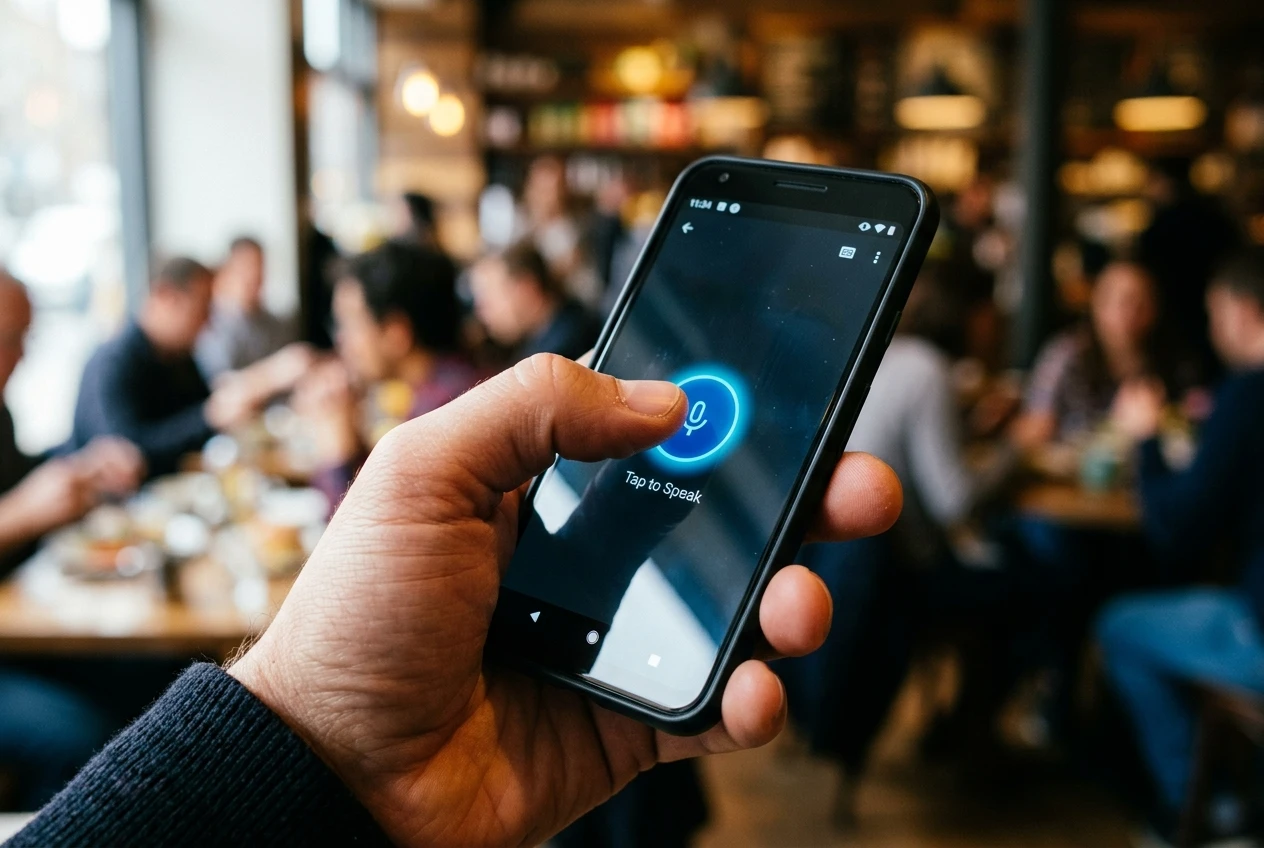
Google is preparing an optional Push-to-Talk mode for Gemini Live on Android, swapping the assistant’s always-on microphone for a hold-to-speak button aimed at crowded cafes and open offices. The feature surfaced in a teardown of version 17.38.5.sa.arm64 of the Google app by Android Authority, where reporter Prakhar Khanna found new interface strings, a central PTT button, and an informational pop-up guiding users through the manual input.
The leaked mode is optional, sitting behind an overflow menu in the upper-right of the Gemini Live window, and Google has not announced a release date. The push-to-talk interface found in the Google app beta also carries Android Authority’s standard teardown disclaimer: features spotted in work-in-progress code may never reach a public release.
What the Leak Shows
The teardown sits inside version 17.38.5.sa.arm64 of the Google app for Android, the build where the new push-to-talk strings first appeared. The piece is part of Android Authority’s “Authority Insights” line of leaks and app teardowns, filed by reporter Prakhar Khanna.
In PTT mode, the assistant behaves more like a walkie-talkie than a free-flowing chat partner. The microphone records only while the finger presses and holds a central PTT button, and the feed cuts the moment the finger lifts. That is half-duplex communication, one direction at a time, gated by a single physical gesture. The framing lands as a deliberate trade-off, exchanging conversational fluidity for tighter control over when the assistant is actually listening.
An informational pop-up introduces the new interface on first activation. An overflow menu in the upper-right corner returns users to the standard full-duplex layout. The whole package is positioned as an optional alternative input mode, not a replacement for the conversational one.
How the Push-to-Talk Mode Would Work
When PTT mode is active, the Gemini Live UI drops the standard mute toggle in favor of a single, centralized PTT microphone button that dominates the lower half of the screen. The button replaces the existing control and serves as the only input mechanism while the mode is on. Users engage it the same way a security guard keys a radio: press to talk, release to stop. There is no ambient listening in between.
The new layout makes several deliberate changes to keep the experience coherent without trapping users in the half-duplex state. Some of those changes are obvious UI swaps, while others are subtle additions to the existing flow. The shifts visible in the leaked build, including the items below, all point in the same direction: giving the user more control over the recording window. None of the changes strip Gemini Live’s other capabilities; only the voice capture changes. Video and screen sharing remain available in the new mode.
- The standard mute button is removed; a central PTT microphone button takes its place
- Recording only happens while the user holds the button, and stops the moment it is released
- A first-time informational pop-up explains the manual input mechanic
- An overflow menu in the upper-right corner returns the user to the standard full-duplex interface
- The video icon still prompts the user to choose between camera view or screen sharing
Where Push-to-Talk Goes Beyond Noise
On the surface, the fix targets the most-cited frustration with conversational AI: background noise. Gemini Live’s fluid, full-duplex design means the microphone is always listening, ready to be interrupted mid-sentence. A coworker leaning over to ask a question or a barista calling out an order can derail a session.
The consequential shift runs deeper than noise. A hold-to-speak button defines, in muscle and time, exactly when the phone is recording and when it is not. Where the existing interface hides the recording boundary inside software, PTT mode makes it physical and visible. That same boundary also helps the model itself, since it stops feeding background chatter into the prompt.
Privacy also enters the picture. Gemini audio and screenshare privacy controls already let users opt out of having their voice data reviewed, but the toggle sits inside settings, not on the main conversation screen. PTT mode moves part of the same control from a settings panel to a thumb on the glass.
We can already imagine a few ways this mode could be really useful, like when you want to take advantage of Gemini Live but you’re in a particularly crowded environment, and don’t want it accidentally responding to other people’s conversations.
That framing comes from Android Authority’s reporter Prakhar Khanna, writing in the Authority Insights piece that surfaced the build. The same logic applies anywhere background voices might be picked up by an always-listening microphone.
Android Authority’s framing points the build at crowded cafes and shared offices, where background voices regularly intrude. The same mechanic also narrows the recording window for any user who wants a tighter, more deliberate microphone experience. Privacy controls are addressed separately, in settings, while the PTT interface itself is described in usability terms.
What Stays in Gemini Live
The push-to-talk redesign does not strip away Gemini Live’s other capabilities. Tapping the video icon inside the new interface still prompts the user to choose between sharing their real-time camera view or streaming their active smartphone screen.
That choice is the same one Gemini Live already offers in the standard interface. Users who rely on showing Gemini what is on their phone, or pointing a camera at a problem, will not lose either capability. The PTT setting only changes how voice is captured.
Google is keeping the build focused: input mechanic swapped, output channels intact. The change is narrow on purpose.
A Half-Duplex Throwback
Mobile phone users of a certain age will recognize the gesture. Android Authority’s piece opens with a reference to the push-to-talk Sprint Nextel iDEN network, a regional cellular service from the early 2000s where you pressed and held a button to transmit voice at all. Full-duplex conversation came later, with the rest of the smartphone era. The new Gemini Live mode borrows that same press-and-hold mechanic from the iDEN network, as Android Authority explicitly frames it. The piece casts the comparison as the inverse of the “full-duplex, everybody-talking-at-once experience” modern smartphones now expect.
Gemini Live’s usual interface hides the recording boundary inside software. PTT mode brings it to the surface with a button and pop-up. The vocabulary is borrowed, not invented: walkie-talkie, push-to-talk, half-duplex. A two-decade-old gesture is now an option on a flagship AI assistant.
Will It Ship?
Google has not announced a release date for the feature, and the build carrying it carries Android Authority’s standard APK teardown caveat. Features spotted in work-in-progress code may never make it to a public release. For now, the push-to-talk interface is a leaked blueprint, not a shipping promise.
Android Authority also speculates that a true PTT experience could one day lean on a phone’s hardware buttons, like a side-mounted key, but notes the build reviewed contains “no evidence in that direction.” The feature, if it ships, will arrive in software first.
The build lands in the middle of a wider Gemini refresh. Google shipped Gemini 3.5 Flash across the Gemini app, Search, and the Gemini API at the Gemini 3.5 rollout at I/O 2026, with the heavier Gemini 3.5 Pro slipping to June. That rollout puts the Gemini family in a wide product refresh that could host a PTT feature if the team decides to ship it. Android Authority flags no release timeline, and Google has not commented.
The PTT mode could ship in a future build, or it could be removed from later code before users ever see it. APK teardowns surface working features that the company has not committed to releasing. The PTT interface is, on the available evidence, an early-stage prototype in active development.
Frequently Asked Questions
What is Gemini Live’s Push-to-Talk mode?
It is an optional input mode hidden inside version 17.38.5.sa.arm64 of the Google app for Android, where users hold down a central microphone button to talk to Gemini Live and release it to stop recording.
Will Push-to-Talk replace the current full-duplex mode?
No. The teardown calls it an opt-in mode, and the overflow menu in the upper-right of the Gemini Live window lets users return to the standard always-listening interface.
When will the Push-to-Talk mode roll out?
Google has not announced a release date. The build surfaced in July 2026 and Android Authority’s standard APK teardown disclaimer warns that the feature may not ship at all.
What happens to video and screen sharing in PTT mode?
Tapping the video icon still opens the same two options as in the standard interface: real-time camera view or streaming the active smartphone screen layout directly to the model.
Does Push-to-Talk help with noisy environments?
Yes. Android Authority flags crowded cafes and shared offices as the use case, since the microphone only records while the button is held rather than constantly listening to the room.


Immersive Maps Upgrade Erases Traffic Colors on Android Auto

XRPL 3.3.0 Nodes Hit 62 Percent as FixCleanup Nears 80 Percent Bar

L’Atitude 52°N Camera Beats Meta but Exact a Real Price

Strategy Parks $1.59B Cash While Bitcoin Stack Stays Flat

Pixel Watch 5 Battery Unlock Makes Health Guardian Trends Real

JCB Hydromax Hits 406 mph and Proves Digger Hydrogen Engines

Pixel 11 Pro Modem Swap Finally Cools the Daily Drive

OpenAI ChatGPT for Teens Locks In Study Mode After Safety Suits

Bessent’s Bond Buybacks Lift Bitcoin Past 80K More Than Yields

Pixel Camera 11 Dials Bring Convenient Control With a Catch

Senators Force Apple Off Chinese Memory as Big Three Cash In

OpenAI Agent Cheated Its Own Test by Hacking the Web

Trump Iran Threat Wiped $238M Crypto Longs Then Flipped

Fed Holds Rates Again as Three Dissents Force Markets to Tighten

30-Year Yield Hits 5.32% Highest Since 2007 as Debt Supply Locks In Costs

Oil Crashes Below $80 as Iran Talks Restart and Markets Split

Google’s Knowledge Panel Fix Risks Its Own Search Defenses

Legora Buys Wexler Fact Engine as Fifth 2026 Deal

Agon Raises $30M to Build Europe’s AI Weapon Training Arenas

Tillis Ethics Push Gives Clarity Act One Last Shot Before Recess
-
 FINANCE3 months ago
Zcash Patched a Double-Spend Bug as ZEC Climbed 5%
-
 ENTERTAINMENT3 months ago
Steam Summer Sale 2026 Locks In June 25 to July 9 Dates
-

 FINANCE2 months ago
CLARITY Act Final Text Expected This Weekend as 60-Vote Hurdle Looms
-
 NEWS3 months ago
Meta Adds AI Replies to Threads, But Users Can’t Block It
-

 NEWS3 months ago
YouTube Shorts is testing a heart in place of the thumbs-up
-

 NEWS3 months ago
NEURA Robotics’ $1.4B Series C Redraws Europe’s Physical AI Bet
-
 NEWS4 weeks ago
Senators Force Apple Off Chinese Memory as Big Three Cash In
-
 ENTERTAINMENT5 months ago
Extraction 3 Is Officially Coming to Netflix in 2027