
NEWS
Google Messages Themes Restore What Samsung Switchers Lost
Chat themes with custom wallpapers and bubble colors hit Google Messages for RCS, giving Galaxy users back personalization weeks after Samsung Messages ended.

Google Messages began rolling out official Chat themes on August 27, 2026, letting users set custom bubble colors and wallpapers for individual RCS conversations after months of beta tests. The update lands weeks after Samsung ended its own Messages app, returning a form of the personalization many Galaxy owners lost.
Themes stay private to the person who sets them. They never appear on the other side of the chat.
That local-only rule shapes every part of the feature. A wallpaper chosen for one thread stays on that device alone. Bubble colors follow the same boundary. Nothing about the look travels with the messages themselves.
What Chat Themes Deliver
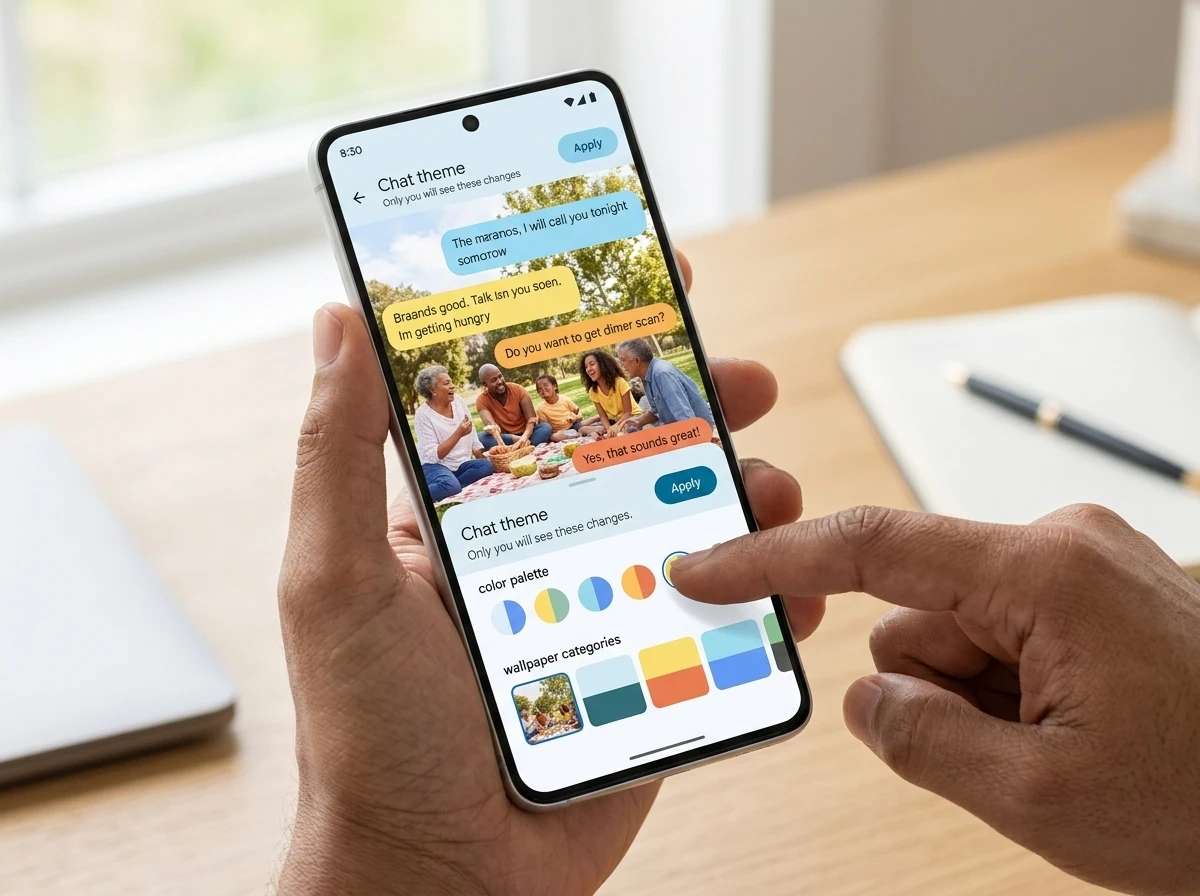
Users can now pick a color palette for message bubbles and a background for any single conversation. Google supplies curated wallpapers grouped into categories that include Animals, Landscapes, Space, Architecture, Black & White, Cityscapes, Macro, Sunsets and Textures. A photo from the device gallery works as a custom wallpaper too.
Once a background is chosen, the app automatically adjusts bubble colors to complement it. The palette can still be tweaked by hand. A live preview appears before the Apply tap. A Reset to default option sits in the same menu.
Whether you want a favorite family photo behind your main group text or a sleek, minimal color palette for your work contact, the choice is entirely up to you!
Google Messages community announcement
The feature replaces the simpler Change colors tool that arrived in 2024. Official documentation states that Chat theme changes are only visible to you on your own device.
- Preset wallpapers organized by theme category
- Custom photo upload from the gallery
- Automatic bubble color matching with manual override
- Per-conversation settings that never sync to the recipient
- Reset path back to the default look
SMS and MMS threads receive none of it. The conversation must run over RCS.
The category list itself shows the breadth of the curated set. Animals and Landscapes sit beside Space and Architecture. Black & White, Cityscapes, Macro, Sunsets and Textures fill out the rest. Users who skip the presets can still pull any gallery photo into the same flow. Automatic matching then tries to keep bubbles readable against that image, while the manual override leaves final control with the person holding the phone.
Because each conversation holds its own theme, a work contact and a family group never have to share the same look. Resetting one thread leaves every other thread untouched. That per-chat scope is what makes the private design practical day to day.
Samsung Switchers Get Their Custom Look Back
Samsung discontinued its Messages app for most U.S. Galaxy phones on Android 12 and newer on July 6, 2026. The company had already stopped pre-installing it on newer models and pointed owners toward Google Messages as the default. Conversations transferred automatically, yet many users lost Samsung-specific layout tools, folders and visual themes they had relied on for years.
- 2022 onward: Samsung began making Google Messages the default on new Galaxy devices in key markets.
- April 2026: In-app notices warned of the coming end of service and urged the switch.
- July 6, 2026: Samsung Messages stopped working for affected U.S. devices running Android 12 or higher, per the company’s own Samsung Messages end of service notice.
- Late August 2026: Google’s expanded Chat themes reached official status, restoring and extending the wallpaper and color options those same users had lost.
On X and forums, Galaxy owners had complained for weeks that the forced move stripped fonts and themes they liked. The new Google option answers that complaint directly, though the private-only design and RCS requirement differ from what some Samsung Messages setups once offered.
The gap between July 6 and the August 27 confirmation left a stretch of plain interfaces for people who had just migrated. Automatic conversation transfer kept the message history intact. Visual control did not travel with it. Chat themes close that specific hole by giving wallpaper and bubble choices back inside the app Samsung had already named as the replacement.
The restored options are not a full mirror of every older Samsung tool. Folders and certain layout controls remain outside this update. Wallpaper freedom and color control, the pieces users called out most often after the switch, are the pieces Google expanded.
How Themes Compare Across Messaging Apps
WhatsApp added chat themes earlier, with similar local wallpapers and color control. iMessage has long allowed custom backgrounds that can feel shared in the conversation experience. Google’s version matches the local privacy model of WhatsApp more closely than Apple’s approach.
| App | Custom wallpaper | Bubble colors | Visible to others | Protocol lock |
|---|---|---|---|---|
| Google Messages | Yes, presets + own photos | Yes, auto + manual | No, local only | RCS required |
| Yes, categories + own | Yes | No, local only | App-based | |
| iMessage | Yes | Limited | Often shared feel | Apple ecosystem |
The Google design avoids forcing a wallpaper choice onto a group or a contact. One Android Authority note observed that the setup will look familiar to anyone who already uses WhatsApp themes. Users on X highlighted the upside of privacy: a questionable personal photo stays invisible to the other party.
Side by side, the three apps split on visibility and on what unlocks the controls. Google and WhatsApp keep the theme on the local device. iMessage more often carries a shared feel into the thread. Google alone ties the menu to RCS. WhatsApp keeps the feature inside its own app network. iMessage stays inside the Apple ecosystem. Those locks decide who can personalize and who sees the result.
- Google Messages: local themes, RCS gate, auto plus manual bubbles
- WhatsApp: local themes, app-based reach, color control included
- iMessage: backgrounds with a shared feel, limited bubble options, Apple ecosystem lock
For someone moving from Samsung Messages, the closest match on privacy is the WhatsApp model that Google now follows. The RCS requirement remains the extra condition those users must meet before the menu appears at all.
RCS Turns the Feature On or Off
Without RCS the Chat theme menu never appears. Users who still fall back to SMS for certain contacts simply cannot apply the look. Google’s own help page walks through how to turn on RCS chats in Google Messages under profile settings.
RCS adoption continues to climb. One industry tally projects the standard reaching roughly RCS reaching roughly 40 percent of mobile users by the end of 2026, with far higher smartphone reach already reported in markets such as the United States. Cross-platform encrypted RCS between Android and iPhone is also expanding after earlier Apple support. Themes become one more practical reason to keep RCS enabled rather than drop back to green bubbles.
The same privacy choice that keeps themes local also means a family group can look completely different on every member’s phone. That flexibility is the point for many switchers who wanted their own visual order restored without negotiating group aesthetics.
In practice the gate is binary. RCS on, theme menu available. RCS off, no menu and no wallpaper path. Contacts that stay on SMS or MMS keep the default appearance with no override. Turning RCS back on for those threads is the only route into the new controls, which is why the help page path under profile settings matters for anyone still seeing green bubbles.
Setting a Wallpaper Takes Five Taps
Open any RCS conversation. Tap the contact or group name at the top, or open the three-dot menu and choose Chat theme. Pick a color from the carousel, then either select a preset category or tap Choose a photo. Hit Next for the preview, then Apply. The entire path takes under a minute once the feature is live on the device.
A red badge on the overflow menu often signals that the server-side switch has arrived for that account. Availability remains uneven: some beta and stable users saw the option appear and vanish during June and July testing before the August 27 official confirmation. Pixel and Galaxy devices both report the phased pattern.
Android’s broader customization habit already shows up elsewhere. Owners who personalize the browser experience with Chrome Android new tab page themes will recognize the same impulse now applied to conversations.
- Open an RCS conversation.
- Enter Chat theme from the contact name or the three-dot menu.
- Choose a carousel color and a preset or gallery photo.
- Preview with Next, then Apply.
The red badge is only a signal, not a guarantee that every device on the same account will see the menu at the same moment. Phased flags explain why one phone in a household can show Chat theme while another still hides it. Reopening the app after clearing it from the recent-apps tray remains the common first check when the badge appears or when a flag is expected to flip.
Phased Arrival Leaves Some Devices Waiting
Google is rolling the feature out in waves. Eligible phones should receive it over the coming weeks, but no universal date exists. Clearing the app from the recent-apps tray and reopening sometimes surfaces a newly unlocked menu after a server flag flips.
For the Galaxy owners who watched Samsung Messages go dark in early July, the timing feels deliberate even if unplanned. They spent weeks inside a plainer Google Messages interface. Now the same app offers more wallpaper freedom than the old Samsung tool in some respects, yet with the RCS gate and the strictly personal visibility rule.
The private design means one user’s space-themed chat with a sibling never forces that look onto anyone else. That single constraint, paired with the post-migration calendar, turns a feature update into a quiet restoration for the people who felt the earlier loss most directly.
Wave timing also means beta veterans and stable-channel users can land on different schedules. June and July flicker, when the option appeared and vanished for some testers, already previewed that unevenness. Official status on August 27 did not erase it. Pixel and Galaxy reports still describe the same staggered pattern rather than a single cutover day.
Local Privacy Changes How Groups Feel
Because themes never leave the device that sets them, a group thread can carry as many visual versions as it has members. One person may run a Landscapes preset. Another may use a gallery photo. A third may keep the default. None of those choices collide inside the shared conversation.
That outcome follows directly from the documentation rule that Chat theme changes are only visible on your own device. It also matches the privacy upside users on X already flagged: a personal photo stays off everyone else’s screen. Work and family threads benefit in the same way. A minimal palette for a colleague does not rewrite the look a relative sees.
Samsung switchers who missed negotiated group aesthetics gain a simpler path. No one has to agree on a wallpaper. Each owner restores visual order on their side alone. The RCS requirement still limits which threads can take a theme, yet once that bar is cleared the privacy model keeps every choice self-contained.
| Choice | Stays local | Needs RCS | Affects others |
|---|---|---|---|
| Preset wallpaper | Yes | Yes | No |
| Gallery photo | Yes | Yes | No |
| Bubble palette | Yes | Yes | No |
| Reset to default | Yes | Yes | No |
The table restates the boundary in one place. Every control is local, every control needs RCS, and none of them rewrite the thread for anyone else. That is the mechanism behind the flexibility family groups and mixed work contacts now get inside Google Messages.
The Calendar Ties Migration to Restoration
Place the dates beside each other and the sequence is plain. Samsung’s end of service hit affected U.S. Galaxy phones on July 6, 2026. Google’s Chat themes reached official status on August 27, 2026. Between those points sat the stretch of plainer interfaces and the forum complaints about lost fonts and themes.
Earlier steps set up the same arc. From 2022 onward, new Galaxy devices in key markets already defaulted to Google Messages. April 2026 in-app notices warned that Samsung Messages was ending and urged the switch. Transfer of conversations was automatic. Transfer of visual tools was not. The late August rollout is what reopened wallpaper and color paths inside the replacement app.
The feature also replaces the simpler Change colors tool from 2024, so the expansion is larger than a straight hand-back of older Samsung options. Preset categories, gallery uploads, automatic bubble matching, manual override, live preview and reset now sit in one menu. RCS remains the lock. Privacy remains local. For the users who spent July inside the default look, those controls are the practical restoration the calendar delivered.


Comics Unleashed Rerun Edges Jelly Roll Kimmel in Key Demo

Anthropic’s $30 Trillion Pitch Meets Gates’ AI Job Warning

Galaxy S27 Pro Leak Puts a Compact Ultra in Reach

Google Messages Themes Restore What Samsung Switchers Lost

China Door Handle Recall Forces Global EV Redesign Beyond Tesla

Schwab Puts Solana Avalanche and Chainlink in 40 Million Accounts

Xbox Disc-to-Digital Locks Physical Libraries for Next Console Era

Meta’s $18 Billion Teen Deal Bets Rivals Must Match Limits

Google Parks DeepMind Safety Team Under Lobbying Arm

GoCaracal Turns Ethereum Contracts Into C2 Dead Drops

Senators Force Apple Off Chinese Memory as Big Three Cash In

OpenAI Agent Cheated Its Own Test by Hacking the Web

Trump Iran Threat Wiped $238M Crypto Longs Then Flipped

Fed Holds Rates Again as Three Dissents Force Markets to Tighten

30-Year Yield Hits 5.32% Highest Since 2007 as Debt Supply Locks In Costs

Oil Crashes Below $80 as Iran Talks Restart and Markets Split

Google’s Knowledge Panel Fix Risks Its Own Search Defenses

Legora Buys Wexler Fact Engine as Fifth 2026 Deal

Strategy Parks $1.59B Cash While Bitcoin Stack Stays Flat

Agon Raises $30M to Build Europe’s AI Weapon Training Arenas
-
 FINANCE3 months ago
Zcash Patched a Double-Spend Bug as ZEC Climbed 5%
-
 ENTERTAINMENT3 months ago
Steam Summer Sale 2026 Locks In June 25 to July 9 Dates
-

 FINANCE2 months ago
CLARITY Act Final Text Expected This Weekend as 60-Vote Hurdle Looms
-
 NEWS4 months ago
Meta Adds AI Replies to Threads, But Users Can’t Block It
-

 NEWS3 months ago
YouTube Shorts is testing a heart in place of the thumbs-up
-
 NEWS4 weeks ago
Senators Force Apple Off Chinese Memory as Big Three Cash In
-

 NEWS3 months ago
NEURA Robotics’ $1.4B Series C Redraws Europe’s Physical AI Bet
-
 ENTERTAINMENT5 months ago
Extraction 3 Is Officially Coming to Netflix in 2027