
NEWS
Pixel Quick Settings Finally Gets Full Layout Reorder in Canary 2608
Canary 2608 lets Pixel owners stack the brightness bar, tiles and media player six ways, restores multi-app lock, teases AI clocks.

Android Canary 2608 lets Pixel owners fully reorder the Quick Settings panel for the first time, stacking the brightness bar, tile block and media player in any of six layouts. The same build restores native multi-app lock and surfaces unfinished AI lockscreen clocks, while cutting off further Canary updates for the Pixel 6 and 6 Pro.
The release, tagged ZP11.260717.006 with the August 2026 security patch, reaches every still-supported Pixel from the 6 series through the Pixel 10 family, plus the Pixel Tablet and Fold. It is experimental by design.
The Layout Editor Lands on Pixel
Tap the pencil icon in Quick Settings and a new Layout tab appears at the bottom. Drag the three main blocks, Brightness, Tiles and Media player, into the order you want. That is the whole feature. The tiles stay grouped as one movable unit rather than individual icons you can scatter.
Other Android makers have offered comparable panel freedom for years. Samsung’s Quick panel, for instance, has long let users arrange multiple pages of toggles, keep Wi-Fi and Bluetooth pinned, and park brightness plus device controls at the bottom. Stock Pixel Quick Settings stayed more rigid until this Canary drop. Users on X called the change overdue the moment screenshots appeared.
The editor works on the current Canary build for all listed devices. Whether the exact six-layout system survives into a stable Android 17 quarterly release remains open, as Canary features often shift or vanish.
The three-block design keeps the shade predictable. Individual tile scattering would let power users bury critical toggles under rarely used ones. Grouping them as a single unit preserves the glanceable grid Material You already established while still answering the reachability complaint.
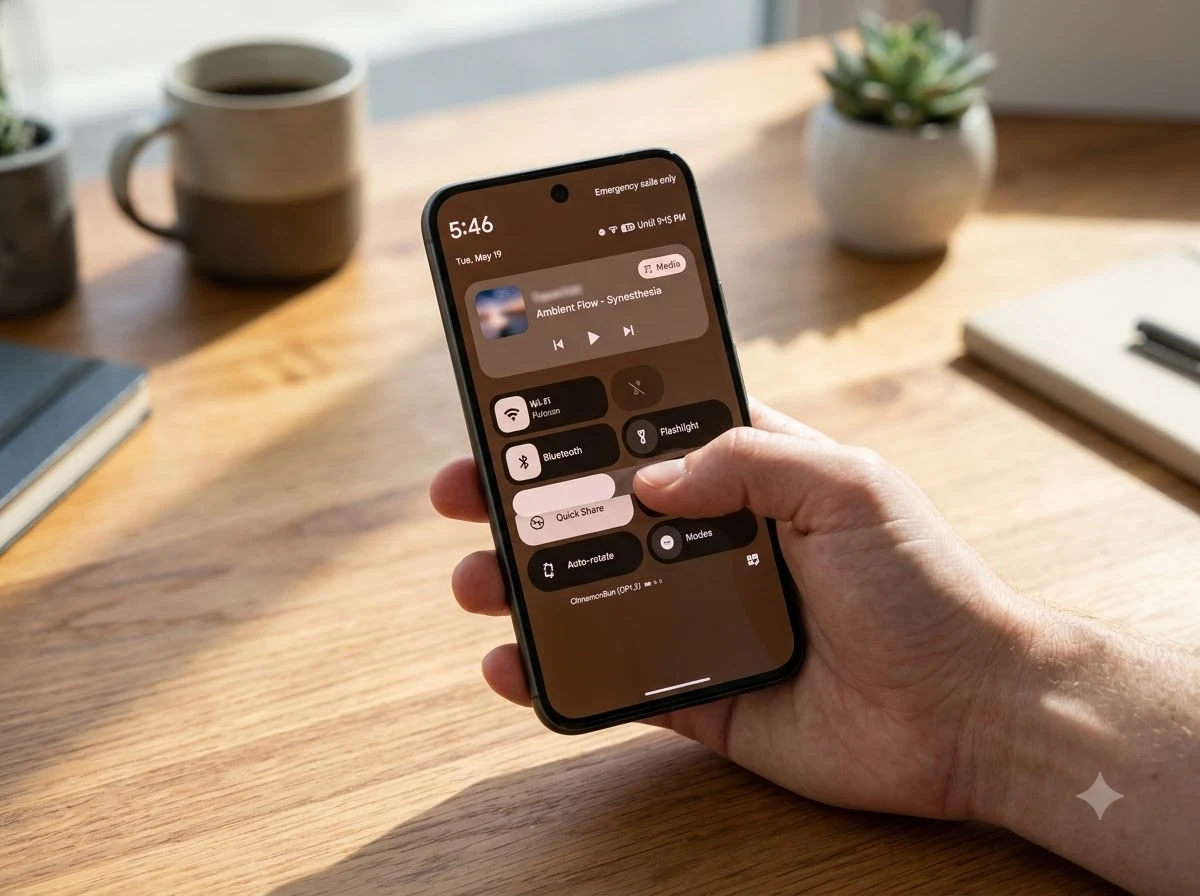
Six Ways to Stack the Blocks
The three blocks produce exactly six possible vertical arrangements. Default puts brightness on top, tiles in the middle and media at the bottom. You can push brightness all the way down or park media between the other two.
| Position 1 (top) | Position 2 | Position 3 (bottom) |
|---|---|---|
| Brightness | Tiles | Media player |
| Brightness | Media player | Tiles |
| Tiles | Brightness | Media player |
| Tiles | Media player | Brightness |
| Media player | Brightness | Tiles |
| Media player | Tiles | Brightness |
That limited set still solves the common complaint that brightness sat too high or the media card wasted space when nothing was playing. Power users who live in the shade now get a cleaner one-handed reach to the controls they actually touch.
Media-at-top layouts suit users who jump between podcasts and music all day. Brightness-at-bottom layouts suit anyone who constantly adjusts outdoor visibility. The middle positions give a balanced compromise when both needs compete.
App Lock Returns With Multi-Select
Native app lock is back under Settings > Security & privacy > App lock. Earlier Canary and beta teardowns showed one-by-one locking. Build 2608 lets you select and lock several apps from a single list view. Sort locked apps to the top, by recent use, or alphabetically.
You need a device PIN, pattern or password first. Opening a locked app demands that credential or biometrics. Locked apps hide notification content, drop their widgets and shortcuts, and blank out in the recents overview. Google notes that AI agents or other apps you previously authorized can still reach the locked app’s data. A pop-up warns when locking Files by Google that other apps retain photo access and names them.
- Multi-select list replaces earlier one-app-at-a-time flow
- Notification content hidden once locked
- Widgets and shortcuts removed for locked apps
- Private Space remains the suggested path if you prefer full hiding instead of locking
Pixel phones lacked a first-party app lock for years. Owners relied on Private Space, third-party lockers or OEM skins. Xiaomi and vivo already shipped similar tools. Samsung steers users toward Secure Folder rather than drawer locks. The Canary version finally closes that gap for stock Android.
The multi-select change is the practical leap. Locking a banking app, a messaging app and a work email client in one pass removes the friction that made earlier single-app teardowns feel unfinished. Sorting options then keep the locked list readable as it grows.
AI Lockscreen Clocks Stay Server-Side
The same build exposes UI for AI-generated lockscreen clocks. An “Enter AI Prompt” field appears, plus an Ideas button and an option to upload a reference image. A gallery stores multiple finished designs so you can swap them. The system generates a unique 0-9 digit set in any visual style or material, limited for now to digital clocks.
Server-side pieces are not live. Submitting a prompt returns “Service not connected.” The interface is ready; the generation backend is not. Features that reach Canary do not always ship. Expanded Dynamic Color options from an earlier Canary still have not appeared in recent Android 17 QPR betas.
The approach mirrors AI wallpapers: prompt in, styled asset out. Google has left the eight stock Pixel clock styles untouched for a long stretch, so the AI route would give owners fresh looks without waiting for manual design updates. It also sits beside other Google AI surface experiments that test how far generative tools reach into everyday UI.
Because the gallery can hold multiple finished designs, the eventual feature would let users rotate clocks by mood or season without regenerating each time. The current digital-only limit keeps the first wave of generation simpler while the backend catches up.
Pixel 6 Hits the Canary Wall
Canary 2608 is the final experimental build offered to the Pixel 6 and Pixel 6 Pro. Google’s own note tells owners they may move to the latest stable production build, which requires a full data wipe. The devices remain on the supported list for this one drop and then drop off future Canary OTAs.
- Pixel 8 and later: seven years of OS and security updates from original Google Store availability, including Pixel Drops
- Pixel 7 series, Pixel 6 series, Pixel 6a, Pixel Fold: five years of OS and security updates from launch
- Canary 2608: last bleeding-edge build for Pixel 6 / 6 Pro; stable path still open via wipe and flash
The Pixel software update support periods make the cutoff expected rather than sudden. Five-year devices simply age out of the earliest test channel first. Owners who want to keep testing must move to newer hardware. Those who only want monthly security can stay on the production track after wiping.
The wipe requirement is the real friction. Moving off Canary is never a simple toggle. Anyone who treated the Pixel 6 as a long-term daily driver now faces a clean choice between staying on the last experimental build or resetting to stable and losing the layout editor until it graduates.
Stock Android Plays Catch-Up Again
The pattern is familiar. Custom ROM and OEM skins pioneered dense Quick Settings editors, per-app locks, and heavy lockscreen theming. Stock Android and Pixel absorbed the ideas later, often in cleaner but narrower form. One-handed mode, notification channels, and now layout blocks followed the same arc.
Samsung users have rearranged Quick panel sections and toggles for multiple generations. Other skins let brightness live anywhere and tiles scatter freely. Pixel’s version keeps the three-block constraint, which keeps the shade simple and consistent with Material You. That restraint is deliberate. It also explains why the “finally” reaction spread so fast among long-time Pixel owners.
App lock follows the same history. Private Space arrived first as a fuller isolation tool. Native lock now gives a lighter option that still sits inside the main app drawer. The multi-select list is the practical improvement over the earlier single-app Canary attempts.
Even the install path mirrors past experimental channels. Developers flash via the Android Flash Tool for Canary installs, after which OTAs continue automatically. Leaving Canary still demands a wipe and a return flash to beta or stable. The official Android Canary channel details stress that these builds carry breaking changes and are not for daily drivers.
- Quick Settings freedom: OEMs first, Pixel later with a three-block limit
- App lock: third-party and OEM tools first, native multi-select now
- Lockscreen theming: heavy OEM options first, AI clocks still unfinished here
- Isolation tools: Private Space first, lighter drawer lock second
Foldable Handles and the Road to Stable
Canary 2608 also adds interactive app handles aimed at foldables and large screens. The handles make resizing and multitasking more direct, a clear nod to the next Pixel Fold generation. That change sits outside the shade and lockscreen story yet shows the same build testing multiple UX fronts at once.
For everyday Pixel owners the practical question is timing. Layout reordering and multi-app lock look polished enough to reach a future Android 17 QPR or Pixel Drop. AI clocks need backend work and could slip or shrink. Nothing in Canary is guaranteed. Past expanded theming options have already lagged behind their first Canary sighting.
The net result for most users is a quieter shade that finally bends to personal preference, a simple way to lock banking or messaging apps without third-party tools, and a reminder that Pixel 6 hardware is entering its final support chapters. The same forces that once left stock Android looking bare next to One UI or HyperOS now push Google to close the gaps one Canary at a time. A parallel similar shift of controls into modern Settings on Windows shows the industry-wide move toward cleaner, more flexible system UI.
What Survives the Jump to Stable
Canary packs several unfinished threads into one drop. Layout reordering and multi-app lock already feel complete enough for daily use. AI clocks still return “Service not connected.” Foldable handles target a narrower device set. The support cutoff for Pixel 6 is final for this channel.
History supplies the filter. Expanded Dynamic Color options appeared in an earlier Canary and then stalled in recent Android 17 QPR betas. Features that require only client-side UI tend to graduate faster than those that need live server generation. The six-layout editor and the multi-select lock list both fit the client-side pattern.
- Likely near-term: three-block Quick Settings reordering and multi-app lock
- Needs backend: AI lockscreen clocks with prompt and gallery
- Device-specific: interactive app handles for foldables and large screens
- Already decided: end of Canary OTAs for Pixel 6 and 6 Pro
Owners who flash today therefore get two polished tools and one visible promise. The polished pair can shape habits immediately. The promise stays a gallery of empty slots until Google connects the service.
Who Should Flash Canary 2608 Now
The build rewards two groups. Testers who want the six layouts and multi-app lock before any stable drop can wipe, flash and start rearranging today. Foldable owners who care about the new handles gain an early look at multitasking changes aimed at the next Pixel Fold generation.
Everyone else can wait. Stable and beta channels avoid the wipe tax and the risk of breaking changes the official Canary notes already flag. Pixel 6 and 6 Pro owners face an extra fork: stay on this final experimental build or reset to production and lose Canary features until they reappear, if they reappear, on the regular track.
The August 2026 security patch travels with the build either way. Security posture does not force a Canary install. Curiosity about shade order and native app lock does.
Pixel owners who stay on stable builds will wait for the features to graduate. Those willing to wipe and flash can try the six layouts and the multi-app lock today, knowing the AI clocks remain a promise rather than a finished tool.


Majors Fights Campus Caliphate as Daily Wire Ambitions Fray

Uber Bets $10 Billion Cash on Robotaxi Platform Play

Ahbstra ARK Pulls 500 Litres Daily From Dry Mediterranean Air

Nest Thread 1.4 Quietly Unifies Multi-Brand Smart Home Meshes

Cable Gateways Push Wi-Fi 7 Past Early Adopters in the US

Pixel Quick Settings Finally Gets Full Layout Reorder in Canary 2608

WhiteBIT Spot Bots Fill UK Gap Left by Derivatives Ban

Motorola Edge 70 Neo Leak Doubles Down on Bold Pantone Colors

Platter Turns Food Spreadsheets Into Sticky Supply Infrastructure

Circle Puts Native USDC on OKX X Layer for AI Rails

Marker AI Writing Startup Lands $13M Seed Led by Index Ventures

Meta’s Muse Spark 1.1 Beats Rivals on Price, Trails on Coding

CS2 Premier Season 5 Lands With Cache and a C4 Damage Rework

Trump Iran Threat Wiped $238M Crypto Longs Then Flipped

Bessent’s No-CBDC Applause Line Can’t Save the CLARITY Act

Nintendo’s Switch 2 Battery Fix for Europe Comes With a Catch

CLARITY Act Odds Crash as Democrats Reject DOJ Ethics Plan

Audi’s 2026 S5 Bets That Restraint Beats the Horsepower Wars

OpenAI Agent Cheated Its Own Test by Hacking the Web

Quantum Systems’ $1.2 Billion Round Exposes Defense Tech’s Winner Gap
-
 FINANCE2 months ago
Zcash Patched a Double-Spend Bug as ZEC Climbed 5%
-
 ENTERTAINMENT2 months ago
Steam Summer Sale 2026 Locks In June 25 to July 9 Dates
-

 FINANCE1 month ago
CLARITY Act Final Text Expected This Weekend as 60-Vote Hurdle Looms
-
 NEWS3 months ago
Meta Adds AI Replies to Threads, But Users Can’t Block It
-
 NEWS5 months ago
U.S. Navy Deploys Solar-Powered Lightfish Drone to Patrol Oceans
-
 ENTERTAINMENT3 months ago
‘Widow’s Bay’ Review: Apple TV’s Sleeper Horror-Comedy Earns Its Fog
-
 FINANCE2 months ago
CLARITY Act Floor Vote Likely Shifts to August, Lummis Says
-

 FINANCE1 month ago
Kalshi Loses Major NY Prediction Markets Ruling to Judge Torres