
NEWS
MSI Crosshair A16 HX Packs Power That Keeps It Plugged In
The MSI Crosshair A16 HX E8W with Ryzen 9 8940HX and RTX 5070 delivers strong gaming as a desk machine, yet its battery and weight lock it to the wall.

The MSI Crosshair A16 HX E8W ships with an AMD Ryzen 9 8940HX, an Nvidia GeForce RTX 5070 Laptop GPU and a 16-inch QHD+ 240 Hz panel, yet the same hardware that crushes desktop-class games forces most owners to leave the charger permanently attached. SlashGear’s Cameron Aubernon lived with the $2,999 as-tested unit (later listed near $2,699 on Amazon) for two weeks and found a capable all-rounder that simply refuses to roam.
Notebookcheck’s parallel test of the similar E8WGK configuration scored the machine a solid 83 percent, praising the Zen 4 CPU’s unexpected edge over newer AI-focused chips while flagging the plastic chassis, weak speakers and constant power hunger.
What the Crosshair A16 HX Puts on the Desk
Base MSRP for the AMD A16 HX E8W starts at $1,599. The reviewed configuration jumped to 32 GB DDR5 and a 1 TB NVMe drive. Intel sibling 16 HX E14W opens lower at $1,299. Competitors sit in the same band: Lenovo Legion 5i around $2,277 before discounts, Acer Predator Helios Neo 16 near $2,049, Asus TUF A16 or F16 and Gigabyte A16 near $1,550.
| Model | CPU / GPU | Base / As-Tested | Display |
|---|---|---|---|
| MSI Crosshair A16 HX E8W | Ryzen 9 8940HX / RTX 5070 | $1,599 / ~$2,699 | 16″ QHD+ 240 Hz IPS |
| MSI Crosshair 16 HX E14W | Intel variant / similar GPU | $1,299 | 16″ similar |
| Lenovo Legion 5i | varies / RTX class | ~$2,277 | often OLED options |
| Asus TUF A16 | AMD / RTX 5070 class | ~$1,550 | 16″ high-refresh |
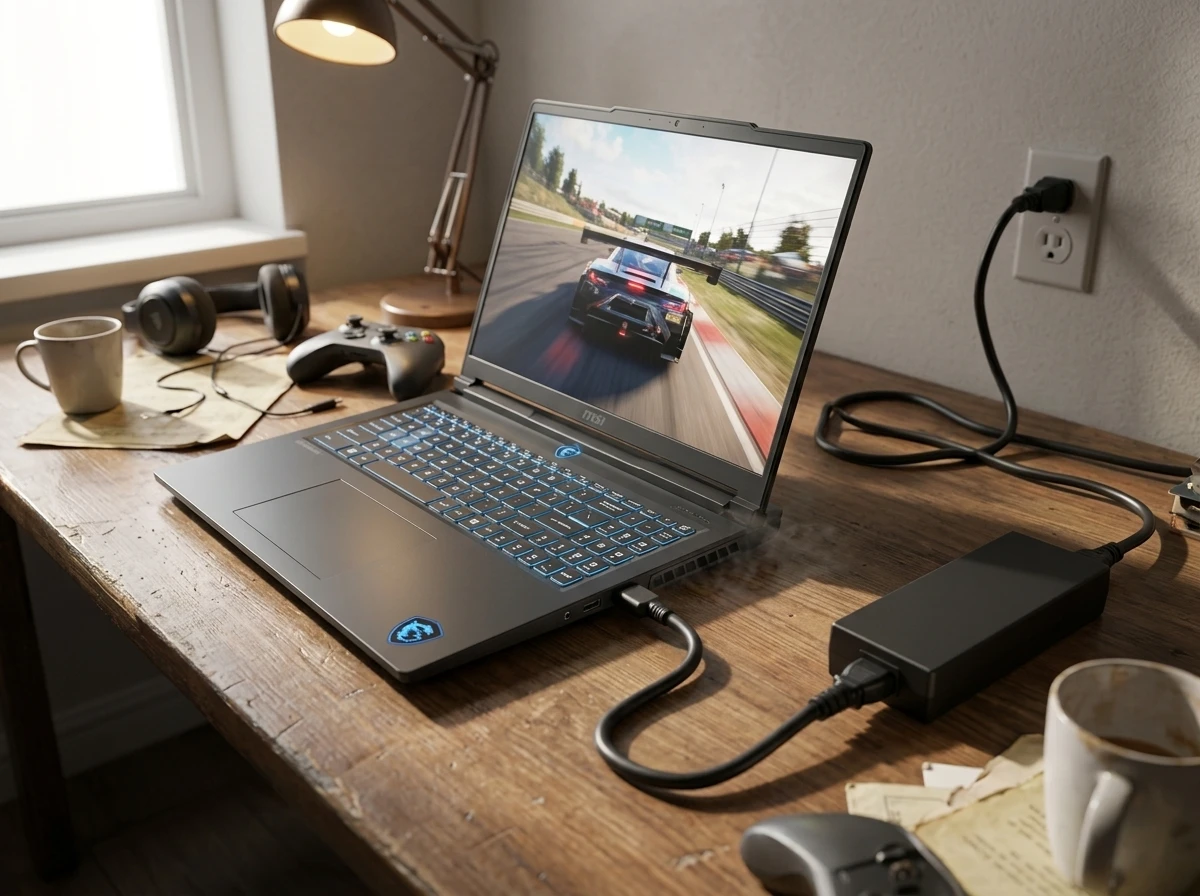
Dimensions run 14.29 × 10.62 × 0.86-1.01 inches. Weight lands at 5.07 lb in SlashGear’s sample and 4.98 lb (2.259 kg) in Notebookcheck’s, plus a 1.65 lb 240 W brick. The matte graphite lid carries a blue dragon badge. Underside vents show the dual-fan Cooler Boost setup.
Ports stay practical: rear Gigabit Ethernet, HDMI 2.1 and one USB-A; right side DC-in plus USB-C; left two more USB-A and the 3.5 mm jack. Two SODIMM slots reach 96 GB DDR5. Dual M.2 slots support Gen 4 and Gen 5 SSDs. Windows 11 Home ships with Copilot.
Ryzen 9 8940HX Still Punches Above Its Zen Generation
The 16-core, 32-thread Ryzen 9 8940HX (Zen 4 Dragon Range refresh) boosts to 5.3 GHz with 80 MB cache. MSI’s OverBoost total power up to 190W combines CPU and GPU headroom under Apex mode. The RTX 5070 Laptop runs at 115 W TGP with 8 GB GDDR7 (some SKUs list 12 GB) and a MUX switch.
SlashGear’s Geekbench 7 numbers: CPU single-core 2428 (near Ryzen 7 7700’s 2524 baseline), multi-core 16317 (ahead of the 7700’s 15441). OpenCL hit 126538 versus a 100000 RTX 4060 baseline; Super Resolution scored 173095.
Notebookcheck saw the 8940HX beat the newer Ryzen AI 9 HX 470 Zen 5 in multi-core Cinebench loops and stay within 5-10 percent of the pricier Intel Core Ultra 9 275HX. Sustained power sits near 102 W PL1. That older high-TDP silicon still delivers when the chassis and cooling allow it full rein.
- Cinebench multi-core edge over several current AI HX parts in the same class
- 115 W RTX 5070 with Dynamic Boost and discrete mode available
- Easy service access to both SODIMMs and both M.2 slots
- Cooler Boost dual fans, five heat pipes, under 50 dBA claimed gaming noise
Aubernon ran an 80-minute iRacing endurance at Misano in the Audi R8 LMS EVO II without hitch, though the 16-inch panel packed the UI tightly and blacks looked more dark gray than true black. American Truck Simulator from Chicago to California over two real hours looked clean on the decade-old title. The RGB keyboard felt solid for typing; the 2 W speakers were merely adequate before a headset took over.
Battery Life Lasts an Hour of Real Gaming
The four-cell 80 Wh pack is the clearest limit. Economy mode stretches to two or three hours of light work. Gaming drops it to roughly one hour. Aubernon watched the charge stop at 95 percent and never fully recover while the machine sat under load. Notebookcheck noted the 240 W adapter runs warm because the system averages near 250 W in games, so the brick itself becomes a heat source and the battery rarely tops off under heavy use.
Size and mass finished the argument. The reviewer could not keep the machine in a bedroom the way a thin ThinkPad once lived. It moved to a permanent desk spot with the charger always home. That is the ironic core: the same OverBoost and cooling that keep frame rates high also make unplugged life short enough that most buyers will treat the laptop as a foldable desktop.
Noise peaks around 50 dBA. A good headset masks it. Thermals stay controlled enough for long sessions once the fans spin up, yet the plastic shell picks up fingerprints fast and feels less premium than the asking price suggests.
Display Ports and the Missing Luxuries
The 16-inch AU Optronics IPS panel runs 2560 × 1600 at 240 Hz. Notebookcheck measured average brightness near 476 nits (peak over 512), 95 percent DCI-P3, 99.6 percent sRGB, contrast about 1314:1. Response times suit fast games. Calibration out of the box sits a bit warm; after correction delta-E improves sharply. No G-Sync, no Advanced Optimus, no HDR certification. Blacks stay elevated. Still, every SKU including base RTX 5060 models gets the same strong panel, a quiet win.
Rear I/O placement helps cable management when the machine sits docked. USB-C supports DisplayPort and Power Delivery. HDMI 2.1 handles 8K60 or 4K120. Gigabit Ethernet remains useful for stable online play or large downloads.
The Crosshair A16 is a very capable gaming laptop, ready for everything from filing taxes to blowing up dudes, then making the clips to put on your YouTube Shorts channel. It’s a heavy guy with a thirst for electrons, but those of you who do use laptops like these are likely used to always leaving them plugged into the wall.
Cameron Aubernon, SlashGear review
How It Stacks Against the Midrange Field
Asus TUF models often bring tougher chassis ratings. Lenovo Legion units discount hard and sometimes add OLED. Acer leans into longer battery claims. Alienware and higher MSI Raider or Titan lines cost more for better build and features. The Crosshair’s edge is raw CPU multi-core and the consistent high-quality IPS across the range, plus simple upgradability.
An MSI Claw 8 EX AI+ handheld alternative exists for pure portable play, but it cannot match the 16-inch QHD+ canvas or the full RTX 5070 desktop-replacement horsepower. Buyers chasing true bag-and-go gaming will look thinner or lighter; those who want one machine that stays on the desk and occasionally travels will find the Crosshair competent.
MSI also launched an MLG Edition in Stellar White with pearl shift and red accents. The MLG Edition Stellar White launch details confirm the same core OverBoost cooling and up to RTX 5070 with 12 GB options in some markets, plus limited figure bundles.
Who Should Buy the Crosshair A16 HX
Sim racers, content creators who edit short clips after sessions, and anyone who already owns a good external monitor and USB hub gain the most. Plug HDMI, Ethernet and peripherals once and the laptop becomes a quiet high-refresh workstation that still folds shut. Base 16 GB RAM works; 32 GB felt better in the review unit. The second SSD slot invites cheap storage expansion.
Skip it if you need all-day battery, premium aluminum, per-key RGB, G-Sync or a machine that lives in a backpack five days a week. The plastic, the 50 dBA fans under load and the one-hour gaming runtime are not bugs; they are the cost of the performance MSI chose to deliver at this price.
As of late August 2026 the reviewed config hovered near $2,699 on major storefronts while lighter SKUs and Intel variants undercut it. Discounts appear regularly on the broader Crosshair family. The machine does exactly what its power budget and cooling allow: it plays hard while the wall outlet stays busy.
Frequently Asked Questions
What processor and graphics does the MSI Crosshair A16 HX E8W use?
The AMD configuration pairs a Ryzen 9 8940HX (16 cores, 32 threads, up to 5.3 GHz, 80 MB cache) with an Nvidia GeForce RTX 5070 Laptop GPU typically at 115 W TGP and 8 GB GDDR7; some regional SKUs list 12 GB. Integrated graphics are Radeon 610M class. MSI OverBoost can push combined CPU-plus-GPU power to 190 W in supported modes.
How much does the MSI Crosshair A16 HX weigh and what is its battery capacity?
Review samples weighed 4.98 to 5.07 pounds (about 2.26-2.3 kg) without the 240 W adapter, which adds roughly 1.65 pounds. The battery is an 80 Wh four-cell pack. Light work lasts two to three hours; gaming typically lasts about one hour before the charger is required again.
Can you upgrade the RAM and storage on the Crosshair A16 HX?
Yes. Two SODIMM slots support up to 96 GB DDR5. There are two M.2 slots, one Gen 4 and one Gen 5 compatible, so a second SSD can be added without removing the primary drive. Access is straightforward once the bottom panel is removed.
What display does the Crosshair A16 HX ship with across configurations?
All current SKUs use a 16-inch QHD+ (2560 × 1600) IPS panel at 240 Hz with roughly 95-100 percent DCI-P3 coverage and about 500 nits peak brightness. No G-Sync or Advanced Optimus is included. The same panel appears even on lower RTX 5060 models.


VITURE Phantom Beast Glasses Turn Phantom Blade Zero Into Wearable Collectible

Nvidia’s Hugging Face Deal Secures the Model Choice Layer

Porsche Cayenne Electric Turbo Owns Its Two-Ton Mass

Tab S9 Series Grabs August 2026 Security Fixes Ahead of Newer Models

MSI Cyborg 15 Max Finally Unlocks Thin Gaming Power

Galaxy A35 One UI 9 Beta Firmware Spotted on Servers

Xiaomi Smart Privacy Display Auto-Hides Passwords and Payments

Hammack Warns Delay on Rate Hikes Will Deepen Household Pain

Ali G Boycott Campaign Hands Cohen Free Publicity Ahead of October Release

Samsung Quietly Queues Galaxy A56 for One UI 9 Beta

Senators Force Apple Off Chinese Memory as Big Three Cash In

OpenAI Agent Cheated Its Own Test by Hacking the Web

Trump Iran Threat Wiped $238M Crypto Longs Then Flipped

30-Year Yield Hits 5.32% Highest Since 2007 as Debt Supply Locks In Costs

Oil Crashes Below $80 as Iran Talks Restart and Markets Split

Legora Buys Wexler Fact Engine as Fifth 2026 Deal

Strategy Parks $1.59B Cash While Bitcoin Stack Stays Flat

Agon Raises $30M to Build Europe’s AI Weapon Training Arenas

Tillis Ethics Push Gives Clarity Act One Last Shot Before Recess

Astute’s $1.2M bet makes B2B creator deals feed AI discovery
-
 FINANCE3 months ago
Zcash Patched a Double-Spend Bug as ZEC Climbed 5%
-
 ENTERTAINMENT3 months ago
Steam Summer Sale 2026 Locks In June 25 to July 9 Dates
-

 FINANCE2 months ago
CLARITY Act Final Text Expected This Weekend as 60-Vote Hurdle Looms
-
 NEWS4 months ago
Meta Adds AI Replies to Threads, But Users Can’t Block It
-

 NEWS3 months ago
YouTube Shorts is testing a heart in place of the thumbs-up
-
 NEWS4 weeks ago
Senators Force Apple Off Chinese Memory as Big Three Cash In
-

 NEWS3 months ago
NEURA Robotics’ $1.4B Series C Redraws Europe’s Physical AI Bet
-
 ENTERTAINMENT5 months ago
Extraction 3 Is Officially Coming to Netflix in 2027