
NEWS
Windows 11 Gives Win32 Apps Individual Camera and Mic Controls
Experimental build 26340.9212 lets users revoke camera, mic and location access per desktop program, closing a long gap with Store apps and phones.

Windows 11 Insider Preview Build 26340.9212, released August 17, 2026 to the Experimental channel for version 26H2, adds individual toggles that let users revoke camera, microphone, location and voice-activation access for specific Win32 desktop programs. Microsoft’s own release notes omit the change; an X user spotted the Settings panels first.
Until now a single global switch controlled every non-Store app. The new layout puts browsers, chat clients and other classic software on the same per-app footing Store apps have long enjoyed.
An X User Found the Toggles First
On August 18, 2026, @jakub25050 posted screenshots of the new Win32 toggles and wrote: “Huge changes are coming to Windows 11 privacy & security. In the latest Experimental Insider Build (26340.9212) you can now revoke access to the camera & microphone for specific Win32 apps!” The post tagged Windows and Devices lead Pavan Davuluri and the official Insider account. It drew roughly 3,500 views and multiple Insider replies.
Huge changes are coming to Windows 11 privacy & security. In the latest Experimental Insider Build (26340.9212) you can now revoke access to the camera & microphone for specific Win32 apps!
@jakub25050 on X, August 18, 2026
Several testers reported the panels missing on their machines, matching Microsoft’s controlled feature rollout practice. Windows watcher @phantomofearth said the options appeared only after enabling the feature flag Win32SignatureIdentity (ID 60730253). Jakub said no flag was required on his install. The inconsistency is normal for Experimental builds.
WindowsLatest reproduced the behavior on the same build and confirmed the new centered permission dialog that appears the first time a desktop app requests the microphone or camera.
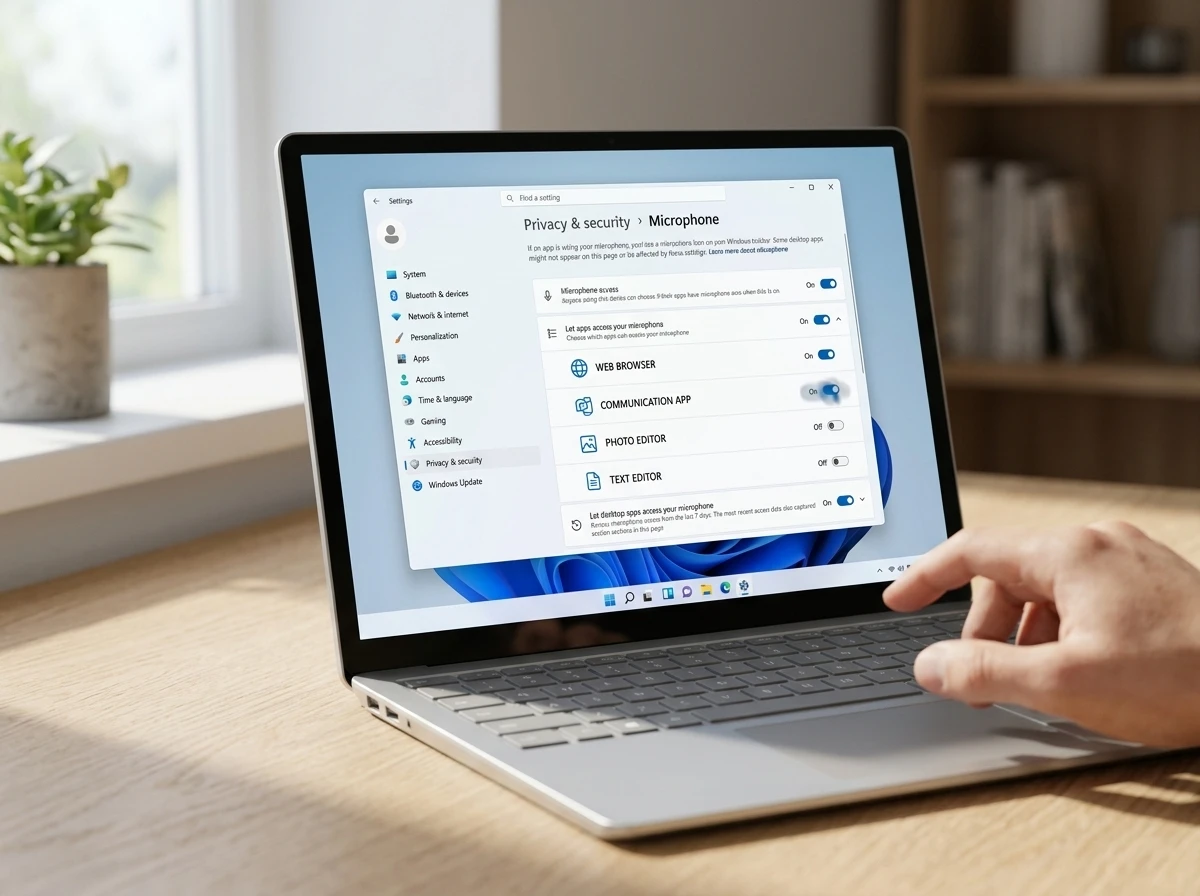
How the Privacy Panels Changed
Store apps already listed individually under Settings > Privacy & security. Desktop programs sat behind one collective switch labeled “Let desktop apps access your microphone” (or camera or location). Turning Discord on left every other Win32 program on as well.
In build 26340.9212 the shared switch disappears for users who receive the feature. Edge, Brave, Chrome, Discord, Steam and any other desktop executable now appear as separate rows with their own toggles, listed alongside Store apps. The same treatment extends to location and voice activation.
| Permission type | Before (public Windows 11) | In build 26340.9212 (feature on) |
|---|---|---|
| Microsoft Store apps | Individual toggles | Individual toggles |
| Win32 / desktop apps | Single global “Let desktop apps access…” switch | Per-app toggles for each program |
| First-use prompt | Rare or absent for classic apps | Centered system dialog asking allow/deny |
| Location & voice activation | Global desktop bucket | Per-app entries appear |
Windows already logged recent camera, microphone and location use. That log remains, but users can now block future access without third-party tools.
The Same Build Finishes Killing WMIC
Microsoft’s Experimental Preview Build 26340.9212 release notes do mention one security-related change: complete removal of the Windows Management Instrumentation Command-line tool, WMIC.
Ransomware groups have long abused WMIC to delete volume shadow copies, query antivirus products and run commands without dropping new binaries. The utility had been deprecated for years.
- 2016: Deprecated in Windows Server 2012.
- 2021: Deprecated in Windows 10 version 21H2.
- 2022-2024: Became a Feature on Demand, then disabled by default in later Windows 11 releases.
- 2025: Removed on upgrade to 25H2 but still reinstallable as FoD.
- 2026: Fully removed in the next feature update and no longer available even as FoD; the Experimental build implements that step early.
Microsoft’s WMIC removal timeline and migration guidance tells admins to switch to PowerShell cmdlets such as Get-CimInstance. WMI itself stays; only the legacy command-line wrapper is gone. The company called the step part of reducing complexity while keeping systems secure.
Putting granular hardware controls and the WMIC kill in the same flight is not accidental. Both shrink the surface that classic software and attackers could freely use.
Why Desktop Apps Stayed Behind for So Long
Microsoft Store (UWP/MSIX) apps run in containers that make per-capability prompts straightforward. Classic Win32 programs load directly, call APIs freely and often ship unsigned or self-updated. Enforcing the same model required new identity and capability plumbing.
Windows researcher Rafael Rivera noted on X that desktop apps have appeared in the privacy lists since roughly Windows 10 version 1903. What changed is the ability to toggle each one individually rather than only viewing them under a shared master switch. He also flagged a signed-versus-unsigned distinction and cautioned that the checks still run in-process and store state in the current-user registry hive, which limits their strength against determined malware.
Per-app camera and microphone controls have been standard on iOS and Android for more than a decade. Windows users who wanted the same granularity for Discord or Chrome previously needed third-party firewalls or camera blockers. The Experimental change removes that requirement for anyone who receives the feature.
What the New Controls Still Leave Open
- The feature is Experimental only and can be redesigned, delayed or dropped before any general release.
- Not every Insider on build 26340.9212 sees it; some need the ViVeTool flag 60730253.
- Enforcement strength against unsigned or malicious code remains limited by the in-process design.
- Microsoft has issued no public statement or shipping timeline.
- Enterprise Group Policy or MDM coverage for the new toggles is unconfirmed in the notes.
Testers who want the panels early can enable the flag with ViVeTool, restart, then open Settings > Privacy & security > Camera (or Microphone, Location). The undo command disables the same ID.
Who Gains Control and Who Must Adapt
Everyday users who run a mix of browsers, voice-chat clients and productivity tools gain the ability to keep Zoom or Teams live while locking a less-trusted browser or game launcher out of the webcam. That distinction was previously impossible without extra software.
Developers of classic Win32 applications now face system-level consent dialogs on first hardware access. Apps that assumed silent access may need code or documentation updates. Security researchers and IT admins gain a clearer picture of which programs request sensors, though the registry-stored state means determined attackers can still attempt to bypass it.
Third-party privacy utilities that sold per-app camera or microphone blockers lose part of their unique selling point if the native controls reach stable Windows. The larger hardening package that includes the deprecated features resources page continues Microsoft’s multi-year effort to retire legacy attack surfaces.
For now the controls sit only in the Experimental channel on build 26340.9212 and later. Users who want them must join the Windows Insider Program and accept the usual risks of pre-release software. Whether the per-app model survives testing and reaches the next feature update remains Microsoft’s decision.


GTA 6 Fuel Meters Deliver the Immersion Fans Wanted and the Friction They Fear

Aisel’s €1.7M Builds Psychiatry OS Beyond Note Writing

Pixel 11 Pro Fold Makes Durability the Foldable Bet That Counts

Maher and Stewart Force Democrats Into a Hard Reckoning

Injective Secures SEC Transfer Agent Status and Shifts RWA Records Onchain

Amazon Drops Alexa+ Paywall on Fire TV for Free AI Access

Flip’s $25M Bet Puts AI on the Factory Floor at Last

Windows 11 Gives Win32 Apps Individual Camera and Mic Controls

Genesis GV90 Brings Coach Doors to Production Luxury EV

2026 Jeep Cherokee Hybrid Standard AWD Cracks Compact Rivals

Senators Force Apple Off Chinese Memory as Big Three Cash In

Revolut Hits $115 Billion While Storonsky’s Stake Keeps Growing

OpenAI Agent Cheated Its Own Test by Hacking the Web

Trump Iran Threat Wiped $238M Crypto Longs Then Flipped

CLARITY Act Odds Crash as Democrats Reject DOJ Ethics Plan

30-Year Yield Hits 5.32% Highest Since 2007 as Debt Supply Locks In Costs

Fed Holds Rates Again as Three Dissents Force Markets to Tighten

Memory Shortage Now Dictates Apple’s Two-Year Mac Roadmap

Oil Crashes Below $80 as Iran Talks Restart and Markets Split

Google’s Knowledge Panel Fix Risks Its Own Search Defenses
-
 FINANCE3 months ago
Zcash Patched a Double-Spend Bug as ZEC Climbed 5%
-
 ENTERTAINMENT3 months ago
Steam Summer Sale 2026 Locks In June 25 to July 9 Dates
-

 FINANCE2 months ago
CLARITY Act Final Text Expected This Weekend as 60-Vote Hurdle Looms
-
 NEWS3 months ago
Meta Adds AI Replies to Threads, But Users Can’t Block It
-

 NEWS2 months ago
NEURA Robotics’ $1.4B Series C Redraws Europe’s Physical AI Bet
-

 NEWS2 months ago
YouTube Shorts is testing a heart in place of the thumbs-up
-
 ENTERTAINMENT3 months ago
‘Widow’s Bay’ Review: Apple TV’s Sleeper Horror-Comedy Earns Its Fog
-

 FINANCE1 month ago
Kalshi Loses Major NY Prediction Markets Ruling to Judge Torres