
NEWS
One UI 9.5 Leak Revives Samsung’s Classic Polish Cycle
Early One UI 9.5 screenshots on a Galaxy S26 reveal frosted glass effects, a bottom dialer search, and native App Lock.

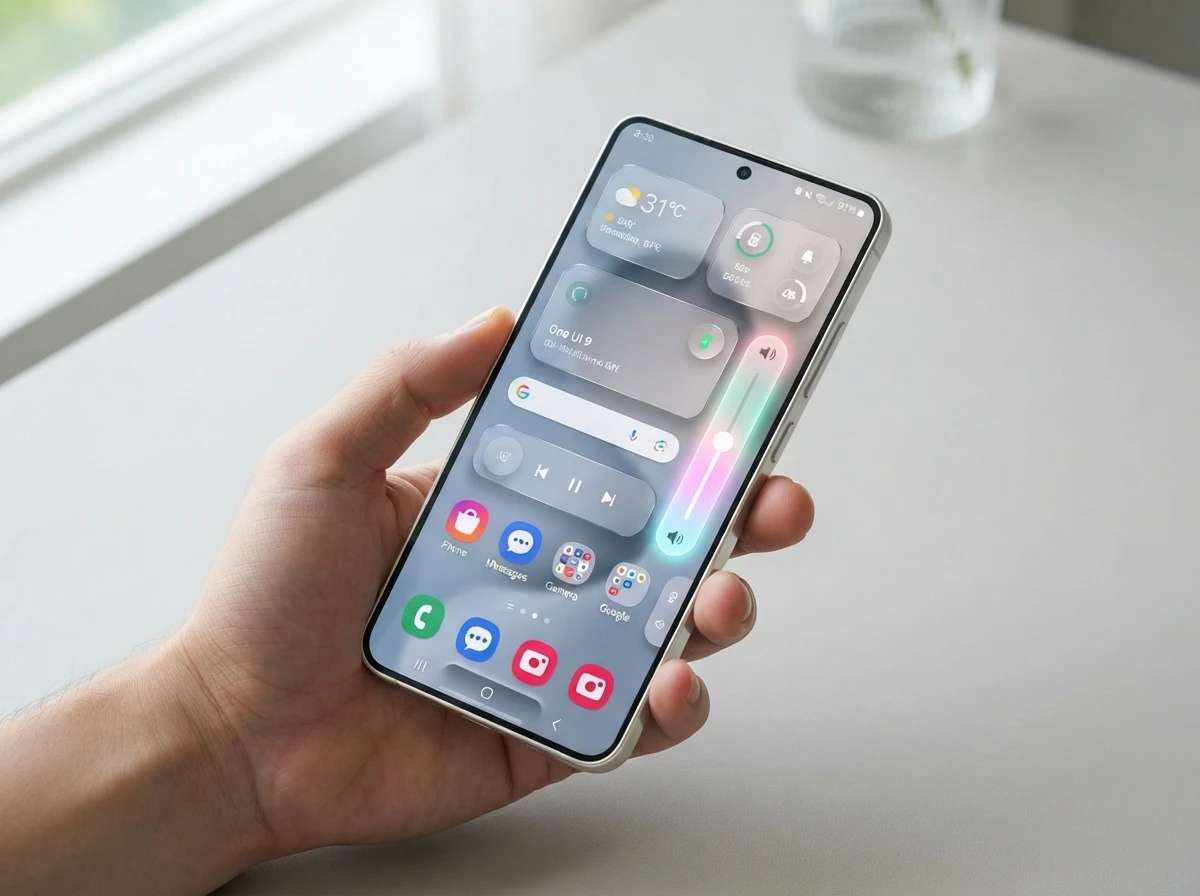
Leaked internal screenshots of One UI 9.5 running on a Galaxy S26 show frosted widgets, shiny borders, a bottom-placed dialer search, and a working native App Lock, all while the stable One UI 9 rollout is still incomplete for most devices.
Tipster Fahad Ali Javed shared the build details on X. The CZH9 firmware keeps familiar layouts but adds clear visual depth and two practical fixes Galaxy owners have waited on for years.
Frosted Widgets and Shiny Borders Appear First
The design language leans into layered, semi-transparent surfaces. Home screen widgets gain distinct backdrop shading so they stand out against bright wallpapers. Top header action buttons, Settings volume sliders, and floating navigation bars pick up shinier borders plus subtle drop shadows.
A soft glow effect wraps the volume controls. The result is cleaner separation without extra clutter. App layouts stay familiar so existing muscle memory still works.
Observers quickly noted the resemblance to Apple’s Liquid Glass material across platforms, the translucent system introduced in 2025 that reflects surroundings and adapts in real time. Samsung’s version stays lighter and more incremental.
- Backdrop shading on home screen widgets for wallpaper contrast
- Shinier borders and drop shadows on headers, volume sliders, and nav bars
- Soft glow around volume controls for tactile feedback
- Overall cleaner depth while keeping core app structures intact
Javed called out the “much better visual depth and separation” in his post that drew more than 67,000 views.
The choice to keep core app structures intact matters as much as the glass itself. Owners who already know where menus live do not have to relearn the system while the polish lands. Depth arrives as shading, border shine, and glow rather than as a full layout rewrite.
That lighter touch also explains why the screenshots read as a half-step rather than a reboot. Liquid Glass set a high bar for real-time reflection and adaptation. Samsung’s CZH9 surfaces borrow the translucent mood without matching every dynamic behavior in one jump.
The Dialer Search Drops to Thumb Reach
Functional changes sit beside the polish. The Phone app moves its search icon from the hard-to-reach top-right corner down to a floating bar at the bottom. One-handed use becomes far simpler on tall screens.
The dialer also gains integrated Samsung AI search that behaves like the system-wide Finder tool. From the numeric keypad you can pull contacts, past interactions, and related contextual actions without leaving the app.
That combination turns a daily tool into something quicker and less stretchy. Early builds already show the AI layer working alongside the relocated control.
- Search icon relocated from top-right to a bottom floating bar
- Samsung AI search integrated inside the dialer itself
- Finder-style results for contacts, past interactions, and contextual actions
- Keypad stays in place so calling muscle memory is unchanged
Tall flagship screens made the old top-right target a stretch for many hands. Moving the control into thumb range removes that daily friction without forcing a new dialing habit. The AI layer then multiplies the value of the same tap.
Because the search behaves like Finder, owners get one mental model across the system and the Phone app. Contacts and recent context surface in the place people already open to place a call. Fewer app switches follow from that single change.
Native App Lock Finally Lands Without Third-Party Help
The same firmware finally ships a built-in App Lock. Long-press an icon on the home screen or app drawer and a safeguard option appears. Setup uses biometrics or the existing screen lock (PIN, pattern, or password).
Javed’s earlier post simply stated “AppLock is finally coming to Samsung” and noted it “works nicely currently.” That post alone passed 50,000 views and hundreds of likes within hours.
What Happens When an App Is Locked
| Behavior | Detail |
|---|---|
| Unlock method | Biometrics or screen-lock PIN/pattern/password |
| Home screen impact | Widgets and shortcuts for that app are removed |
| Notifications | Content is hidden |
| Data access | Photos, videos, contacts and other data stay available to apps that already hold permission |
Users no longer need Secure Folder workarounds or Play Store lockers for basic per-app protection. The feature answers years of community requests that even appeared in Samsung’s own forums during the One UI 9 beta window.
- Direct lock from home screen or drawer long-press
- Identity check on every open
- Hidden notification content while locked
- No forced move into a separate secure space
Similar lock thinking already appears elsewhere in the Android ecosystem, including tools that let you lock a Windows PC from an Android phone.
Secure Folder still serves a heavier isolation job. App Lock instead keeps the locked app in its normal place on the device while stripping widgets, shortcuts, and notification content from casual view. That lighter model fits banking, messaging, and gallery apps people open many times a day.
Identity checks reuse biometrics or the screen lock the owner already trusts. There is no second PIN scheme to remember for basic protection. The long-press entry point also matches how people already edit or uninstall icons, so discovery stays low-friction.
Samsung’s.5 Releases Have Always Been the Polish Pass
One UI versioning follows a clear rhythm. Major jumps arrive with new foldables or flagships; the.5 update then refines the experience for the next S series and broader fleet.
- July 2025, One UI 8.0 launches with Galaxy Z Flip 7 / Fold 7 on Android 16.
- February 2026, One UI 8.5 debuts with the Galaxy S26 series.
- May 2026, One UI 9 beta opens for S26 users in select markets.
- 22 July 2026, One UI 9 stable arrives with Galaxy Z Fold 8, Fold 8 Ultra and Z Flip 8 on Android 17.
- August 2026 onward, Gradual stable rollout to S26 and older devices continues.
- Early 2027 (expected), One UI 9.5 targets the Galaxy S27 series launch window.
The pattern holds. One UI 9 itself brought Android 17 foundations and various AI and creativity tools, yet many owners still wait for the stable package. Internal 9.5 work has already begun on S26 hardware and even early S27 test servers. That matches how 8.5 arrived after 8.0 had shipped.
Samsung’s own One UI 9 beta for Galaxy S26 series announcement earlier framed the big annual step around personalization, accessibility and security. The.5 layer now appears to finish the job on depth and daily privacy.
| Release type | Typical job | Example from the current cycle |
|---|---|---|
| Major One UI jump | New Android base, headline AI and creativity tools | One UI 9 with Android 17 foundations |
| Half-step.5 update | Visual depth, ergonomics, and feature gaps | Frosted widgets, dialer search move, native App Lock |
| Stable fleet rollout | Carry the polished build to S series and older devices | One UI 9 still expanding while 9.5 work is active |
Major builds absorb the platform change. Half-steps absorb the polish owners notice every hour. CZH9 fits that second role while the first role is still shipping to the wider fleet.
An Internal Build This Early Still Leaves Room to Change
These shots come from very early testing software. Samsung can polish, adjust or drop any element before public beta or stable release. The Play System update date inside the build sits in October 2026 territory, another sign of how far ahead the branch runs.
Exclusive first look at One UI 9.5 running on the Galaxy S26! Notice the new design polish? Samsung is introducing subtle backdrop shading across home screen widgets, bottom navigation bars, and top header action buttons. They have also introduced Search in Dialer which works with Samsung AI similar to Finder!! Much better visual depth and separation. Looks super clean!
Fahad Ali Javed wrote that summary alongside the first look screenshots of the glass polish. Replies and quote posts quickly zeroed in on App Lock as the practical prize and wondered whether dark-themed icons and extra blur layers would survive too.
Hardware leaks keep pace on a parallel track. Recent Tab S12 Ultra hardware leak details show Samsung continues to iterate silicon and design in public view while software branches run months ahead.
Early status cuts both ways. The branch is mature enough to show frosted widgets, a relocated dialer search, and a working App Lock on S26 hardware. It is also early enough that borders, glow strength, and lock edge cases can still shift before any public beta.
Community focus on App Lock over pure glass effects already hints at what owners will judge first when a beta opens. Visual depth drives the screenshots. Daily privacy and thumb reach drive the replies.
What One UI 9 Left Open for the Half Step
One UI 9 carried the Android 17 foundations plus AI and creativity tools. Its beta messaging stressed personalization, accessibility, and security. Even so, basic per-app locking still drew requests inside Samsung’s own forums during that beta window.
The dialer search stayed in the top-right corner through that cycle. Visual depth stayed modest enough that CZH9’s backdrop shading and shiny borders now read as unfinished business rather than a surprise redesign.
Half-step releases exist for exactly this gap. The major version lands the platform and the headline features. The.5 package then closes the daily friction that third-party lockers and Secure Folder workarounds only partly covered.
- Platform and AI tools arrived with One UI 9
- Forum requests for native App Lock continued through the beta window
- Dialer ergonomics and frosted depth show up in the 9.5 branch instead
- Internal work on S26 hardware begins while stable 9 is still rolling out
None of that framing invents a new roadmap. It simply lines up the beta themes, the forum pressure, and the CZH9 screenshots on one timeline. The half step is doing the job the versioning rhythm has always assigned it.
Glass Effects Share the Stage With Quiet Fixes
Frosted widgets and shiny borders will travel farthest in screenshot posts. The quieter pair of changes still carries more weight for day-to-day use. Bottom dialer search and native App Lock remove friction people hit many times per week.
Third-party lockers and Secure Folder paths solved pieces of the privacy problem. They did not match a long-press lock that hides notification content and clears widgets without moving the app into a separate space. The CZH9 behavior fills that middle ground.
One-handed dialer search follows the same logic. Stretching for a top-right icon on a tall S26-class screen was a small tax paid on every contact lookup. A bottom floating bar plus Finder-style AI results cancels that tax inside the app people already open to call.
- Visual pass, layered surfaces, glow, and separation without a layout reset.
- Ergonomic pass, search control moved into thumb range with AI results attached.
- Privacy pass, per-app lock using existing biometrics or screen lock.
- Cadence pass, internal 9.5 work active while One UI 9 stable still expands.
Replies to the leak already ranked App Lock above extra blur layers. That ranking is a useful signal for what should survive polishing if Samsung trims the branch before public beta.
Privacy Tools and One-Handed Fixes Carry the Weight
Glass effects will dominate screenshots. The lasting daily gains sit in the relocated dialer search and the native App Lock. Both remove friction that third-party apps or Secure Folder only partly solved.
Key early signals from the CZH9 build:
- Visual layer, frosted depth and glow effects without layout overhaul
- Ergonomics, search control moved into thumb range with AI Finder-style results
- Privacy, per-app lock with hidden notifications and cleaned home-screen presence
- Timing, internal work already active while One UI 9 stable still expands
If the schedule holds, public beta could open late 2026 and the stable 9.5 package would ride the Galaxy S27 launch in the first months of 2027, then fan out to eligible older models through the first half of that year. Until then the screenshots remain a clear preview of how Samsung still uses its half-step releases: finish the visual language, close the feature gaps, and ship the version most owners will actually live with day to day.
Galaxy owners watching the One UI 9 rollout can treat the leak as confirmation that the next polish wave is already under way.
The CZH9 branch does not replace the still-incomplete One UI 9 rollout. It runs ahead of it on S26 hardware and early S27 test servers, with a Play System date already pointing at October 2026 territory. That overlap is normal for Samsung’s rhythm, not a sign that stable 9 is finished.
Owners can keep installing One UI 9 when it reaches their device and still read these screenshots as a preview of the polish pass that follows. Visual depth, thumb-reach search, and native App Lock are the concrete bets the early build is making. Everything else remains subject to change before any public beta opens.


SEC Pause on Tokenization Exemption Leaves Banks Free to Race Ahead

Guardian Labs Stops Scam Calls Before the Phone Rings

CFTC Emergency Orders Put Kalshi Past State Court Lines

X Under the Hood Tool Shows Shadowban Labels in Raw JSON

Uber and Pony.ai Lock in 2,000 Robotaxis Across Europe

Nvidia’s $16,000 RTX Pro 6000 Turns Local AI Into a Luxury

Lovable’s $400M Double and Europe’s Twin Bet on Code and Factories

MSCI Screen Forces Reckoning for Bitcoin Treasury Model

One UI 9.5 Leak Revives Samsung’s Classic Polish Cycle

Xfinity Free Pixel 11 Deal Pushes Wireless Growth Harder

Senators Force Apple Off Chinese Memory as Big Three Cash In

Trump Iran Threat Wiped $238M Crypto Longs Then Flipped

OpenAI Agent Cheated Its Own Test by Hacking the Web

CLARITY Act Odds Crash as Democrats Reject DOJ Ethics Plan

Gemini Spark’s Big Workspace Upgrade Leaves Europe Waiting Again

Revolut Hits $115 Billion While Storonsky’s Stake Keeps Growing

Anthropic’s Hard Questions Ad Backfires Into an Anti-AI Warning

Oil Crashes Below $80 as Iran Talks Restart and Markets Split

Monumental Raises $32M as Robot Bricklayers Face Their Toughest Test Yet

Duda’s New AI Tools Speed Up Agencies, but Risk Sameness
-
 FINANCE2 months ago
Zcash Patched a Double-Spend Bug as ZEC Climbed 5%
-
 ENTERTAINMENT2 months ago
Steam Summer Sale 2026 Locks In June 25 to July 9 Dates
-
 NEWS3 months ago
Meta Adds AI Replies to Threads, But Users Can’t Block It
-

 FINANCE1 month ago
CLARITY Act Final Text Expected This Weekend as 60-Vote Hurdle Looms
-

 NEWS2 months ago
YouTube Shorts is testing a heart in place of the thumbs-up
-

 NEWS2 months ago
NEURA Robotics’ $1.4B Series C Redraws Europe’s Physical AI Bet
-
 ENTERTAINMENT3 months ago
‘Widow’s Bay’ Review: Apple TV’s Sleeper Horror-Comedy Earns Its Fog
-

 FINANCE1 month ago
Kalshi Loses Major NY Prediction Markets Ruling to Judge Torres