
NEWS
Gemini in Chrome Android Now Adds Calendar Events for Everyone
Google makes Gemini in Chrome available to every US Android user, with free page summaries and Calendar links plus paid auto-browse for multi-step tasks.

Google has made Gemini in Chrome available to every Android user in the United States. The update lets anyone tap a toolbar icon on a webpage, ask the assistant to pull event details, and drop them straight into Google Calendar without leaving the browser.
The free layer covers summaries, page questions, Keep notes and basic Calendar creation. AI Pro and AI Ultra subscribers unlock auto browse for multi-step chores such as booking parking or updating online orders. The feature set began limited previews after Google I/O and now sits in the default browser on qualifying phones.
What Gemini Does Inside Chrome on Android
Open Chrome, land on any page, and tap the Gemini icon to the right of the address bar or choose Ask Gemini from the three-dot menu. A floating chat panel rises from the bottom. The current tab content is shared by default so the model can answer questions about what you are reading, rephrase dense sections or produce a short summary.
It also links to core Google apps. You can tell it to save recipe ingredients into Keep or turn concert dates, ticket times and venue names into a Calendar entry. Image tools ride along too: Nano Banana lets you generate or edit visuals from the page, such as turning study notes into an infographic or furnishing a room photo from a listing.
Google describes the experience as a personal browsing assistant built on Gemini 3.1. The same security model used on desktop applies, with training against prompt injection and other known threats. Users stay in control because the chat can be minimized, resized or closed while browsing continues underneath.
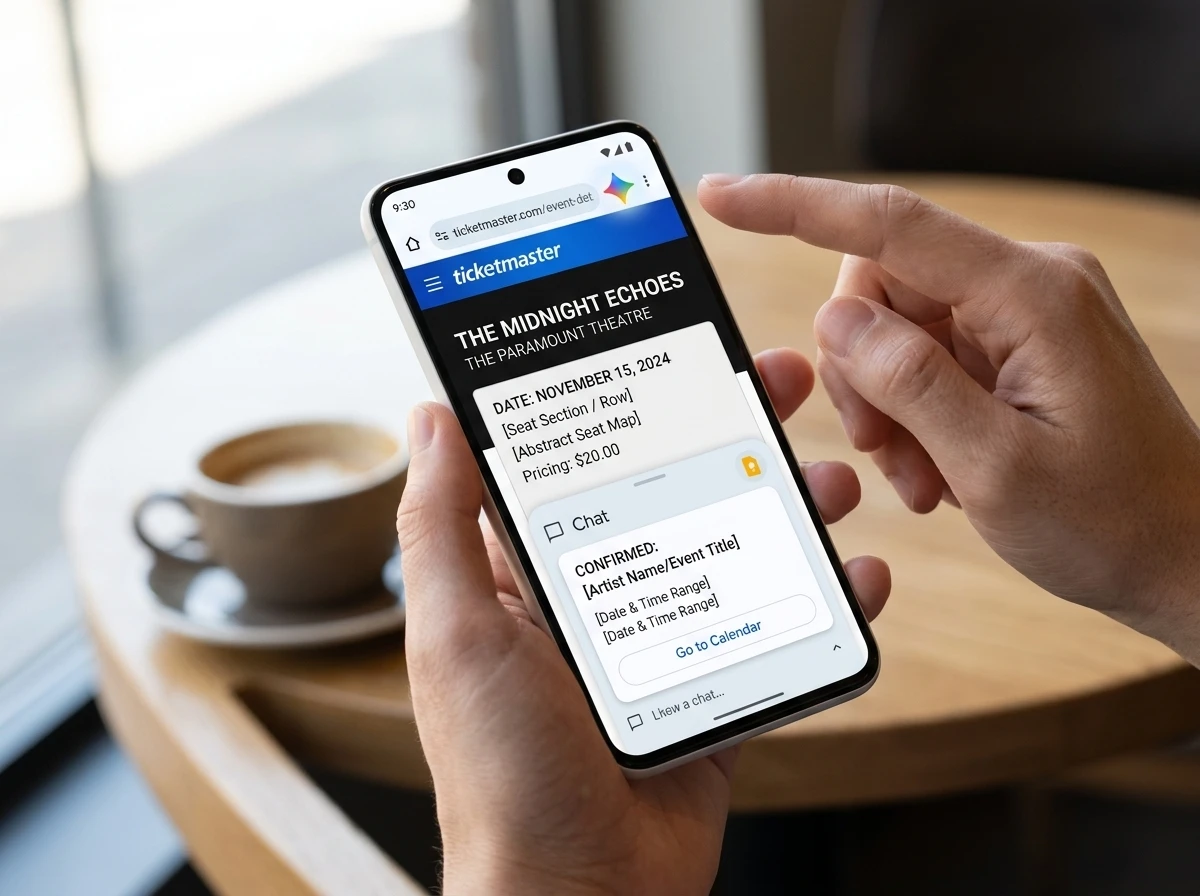
Adding a Calendar Event From Any Webpage
The Calendar connection is the piece many people will use daily. While reading a confirmation email page, event listing or ticket site, open Gemini and type a plain request such as “add this to my calendar” or “create an event for the concert on this page.”
Gemini reads the visible details, proposes the title, date, time and any location it can extract, then offers a confirmation. Accept and the event appears in Google Calendar. You can also specify secondary or shared calendars. After creation a link lets you open and edit the entry if guests, exact location or description need manual tweaks.
- Tap the Gemini icon while the event page is open.
- Ask to add the details as a calendar event, naming the app if several calendars are connected.
- Review the proposed card and confirm or undo.
- Edit guests, location or notes inside the Calendar app afterward if needed.
The same flow works for Keep notes. Gemini Apps support several third-party calendars on specific devices as well, though Google Calendar is the default path for most users. Full management, including some edits, is available through the connected apps settings once Keep Activity is on.
Android Headlines noted that the Calendar shortcut has already become a favorite time-saver for people who previously copied details by hand or switched apps mid-read.
Free Tools Versus Paid Auto Browse
Basic Gemini in Chrome requires no subscription. Summaries, Q&A, Calendar and Keep links, and Nano Banana image work for any qualifying US Android user who opts in. Auto browse, the agentic layer that actually clicks through multi-step web tasks, stays behind Google AI Pro or AI Ultra.
| Capability | Free Gemini in Chrome | AI Pro / Ultra Auto Browse |
|---|---|---|
| Page summaries and Q&A | Yes | Yes |
| Calendar and Keep actions | Yes | Yes |
| Nano Banana image tools | Yes | Yes |
| Multi-step tasks (parking, order updates, travel) | No | Yes |
| Daily task limits | N/A | Pro up to 20, Ultra up to 200 |
| Confirmation before sensitive steps | N/A | Built in |
Auto browse examples from Google include finding SpotHero parking from a ticket confirmation or switching a Chewy subscription from puppy food to adult dog food. The agent plans the steps, may open new tabs, and pauses for user confirmation on purchases, form submissions or social posts. Users can take over any task at any moment and hand it back.
That split is deliberate. Free access spreads the habit of talking to the browser. The paid hands turn occasional helpers into something closer to a personal agent that acts on sites you are already signed into.
Who Can Use It and How to Start
Requirements are straightforward. You need to be 18 or older, located in the United States, running Android 12 or higher on a device with at least 4GB of RAM, using the latest Chrome, signed in with a personal Google Account, and set to English-US language. Work or school accounts need administrator approval. Incognito mode is unsupported.
First launch prompts an opt-in. After that the icon stays visible. If it does not appear immediately, update Chrome and restart the app. Rollout is progressive, so some devices may take a day or two even after the general announcement.
Google’s now available to all Android users in the U.S. post confirms the free tier is open while auto browse remains subscription-only. Support pages list the exact device and language gates.
Security Prompts and Practical Limits
Google designed the features with confirmation gates. Auto browse asks before completing sensitive actions such as purchases, social posts or form submits. Models are trained to spot prompt injection attempts hidden in page content. Users remain responsible for final outcomes, including mistakes the agent might make on quantity, wrong links or incomplete bookings.
Known limits include daily request caps on paid plans and the inability of Gemini to add guests or fully edit location and description fields on existing events without leaving for the Calendar app. Some third-party calendar integrations are device-specific. Data from connected apps can be used when Personal Intelligence is enabled, and preferences stay manageable in Gemini settings.
These features are built to be secure by design, and our models are trained to detect known threats, such as prompt injection. And for added control, auto browse is designed to ask for confirmation before completing some sensitive tasks.
Charmaine Dsilva, Director of Product Management for Chrome, wrote that line in the August 18 announcement. The company also published a longer security note on architecting protections for agentic systems.
Crowd reaction on X mixed practical excitement with privacy skepticism. Some users immediately asked how to remove the icon. Others called the free-summary-plus-paid-hands model a quiet lock-in that makes Chrome harder to leave once the agent starts handling real chores. One high-engagement reply observed that the practical ceiling is still being discovered in daily use rather than benchmarks.
From I/O Preview to Full Phone Rollout
Google first detailed the Android version in a May announcement of Gemini in Chrome for Android. The plan was select devices at the end of June, with auto browse for AI Pro and Ultra subscribers. Desktop Gemini in Chrome had already shipped earlier, including multi-tab comparison and agentic features for US English users.
- May 12, 2026, Official blog posts the Android plan built on Gemini 3.1, highlighting Calendar, Keep, summaries and auto browse examples such as SpotHero and Chewy.
- Late June 2026, Limited rollout begins on qualifying US devices with 4GB+ RAM and Android 12+.
- August 18, 2026, Google declares the free Gemini in Chrome experience available to all US Android users; auto browse expands to mobile Pro and Ultra accounts.
The official Chrome announcement on X carried the same message and drew tens of thousands of views within hours. Support documentation for Android 12 or higher with at least 4GB of RAM and for auto browse confirmation before sensitive tasks went live in parallel. A separate Gemini Apps guide covers how to create and manage calendar events with Gemini across Google and select manufacturer calendars.
Everyday Phone Browsing Starts to Feel Different
Most people open Chrome dozens of times a day for tickets, recipes, listings, articles and confirmations. Putting a capable assistant one tap away means those moments no longer require copy-paste or app switches. Calendar logging becomes nearly automatic. Summaries cut through long reads on a commute. Paid users can offload the dull multi-click work that used to eat minutes.
The larger pattern is the browser itself becoming an agent platform. Free access seeds the habit. Subscription unlocks the hands that click, fill and book. Google already owns the default on the majority of Android phones; this deepens the reason to stay signed in and keep Chrome updated. Competitors will need equivalent page-context agents or risk looking dated.
For now the experience is US-only, English-only and gated by hardware. Expansion to more regions and languages has followed earlier desktop waves, so further markets are likely later. Until then, any US Android owner who meets the specs can open Chrome, tap Gemini, and try dropping the next event page straight into Calendar.
Frequently Asked Questions
What devices support Gemini in Chrome on Android?
Phones and tablets running Android 12 or higher with at least 4GB of RAM, the latest Chrome version, English-US language setting, and a signed-in personal Google Account for users 18 and older in the United States. Work accounts need admin enablement.
Does Gemini in Chrome cost money?
Core features including page summaries, questions, Calendar and Keep connections, and Nano Banana image tools are free. Auto browse multi-step automation requires a Google AI Pro or AI Ultra subscription.
Can Gemini add events to calendars other than Google Calendar?
Yes on supported devices. Gemini Apps can connect to HONOR, OPPO, Samsung, TECNO and Xiaomi calendars when those apps are installed on qualifying models, though Google Calendar remains the primary path for most users.
What happens if auto browse makes a mistake?
Users can take over any running task instantly, stop it, or undo certain actions such as a newly created event. Google states that people remain responsible for outcomes including purchases, and the system pauses for confirmation on sensitive steps.
How do I turn Gemini in Chrome off or hide the icon?
You can close individual chats, stop page sharing, or manage permissions inside Chrome settings under AI innovations. Full removal options vary by device and Chrome version; some users report clearing the app or waiting for opt-out controls that Google has provided on desktop.


American Airlines reverses its screen bet after a costly decade

Falcon 9 Crater Photos Double as Planetary Defense Drill

Buss Siblings Force Lakers Sale Reckoning Against Jeanie

Brewers fewest-HR club explodes for historic 22-0 shutout

LITILIT’s €8M Push Turns Femtosecond Lasers Into Factory Tools

30-Year Yield Hits 5.32% Highest Since 2007 as Debt Supply Locks In Costs

Taimi and Hily Bet on Bootstrap Path Toward IPO Readiness

Sonic locks the Override pass as most legends hit the shop

Rosie O’Donnell Brands Bari Weiss a Nazi on Her Celebrated Comeback

Frank Beard Dies at 77 as ZZ Top Resumes Tour Without Him

Senators Force Apple Off Chinese Memory as Big Three Cash In

Revolut Hits $115 Billion While Storonsky’s Stake Keeps Growing

OpenAI Agent Cheated Its Own Test by Hacking the Web

CLARITY Act Odds Crash as Democrats Reject DOJ Ethics Plan

Trump Iran Threat Wiped $238M Crypto Longs Then Flipped
30-Year Yield Hits 5.32% Highest Since 2007 as Debt Supply Locks In Costs

Fed Holds Rates Again as Three Dissents Force Markets to Tighten

Memory Shortage Now Dictates Apple’s Two-Year Mac Roadmap

Oil Crashes Below $80 as Iran Talks Restart and Markets Split

Google’s Knowledge Panel Fix Risks Its Own Search Defenses
-
 FINANCE3 months ago
Zcash Patched a Double-Spend Bug as ZEC Climbed 5%
-
 ENTERTAINMENT3 months ago
Steam Summer Sale 2026 Locks In June 25 to July 9 Dates
-

 FINANCE2 months ago
CLARITY Act Final Text Expected This Weekend as 60-Vote Hurdle Looms
-
 NEWS3 months ago
Meta Adds AI Replies to Threads, But Users Can’t Block It
-

 NEWS2 months ago
NEURA Robotics’ $1.4B Series C Redraws Europe’s Physical AI Bet
-

 NEWS2 months ago
YouTube Shorts is testing a heart in place of the thumbs-up
-
 ENTERTAINMENT3 months ago
‘Widow’s Bay’ Review: Apple TV’s Sleeper Horror-Comedy Earns Its Fog
-

 FINANCE1 month ago
Kalshi Loses Major NY Prediction Markets Ruling to Judge Torres