
GAMING
The Crosshair A16 HX Outruns Its Own Power Brick
The MSI Crosshair A16 HX E8W leads with a 12 GB 5070, then sells an 8 GB SKU whose 240 W brick loses to a 250 W gaming draw.

The MSI Crosshair A16 HX E8W reviewers get is often the 8 GB RTX 5070, not the 12 GB card on MSI’s product page. Cameron Aubernon’s two-week loan, a $2,999 as-tested build, used that 8 GB GPU behind a 16-inch 2560 x 1600 240 Hz IPS panel.
MSI still leads the U.S. page with 12 GB GDDR7, a 190 W OverBoost peak, and “AI-ready” copy. The chassis that showed up for tests is a 5.07-pound, 80 Wh machine whose 240 W brick already runs behind a 250 W gaming draw.
MSI Lists 12 GB First, Then Sells 8 GB
The Crosshair A16 HX E8W family is one 16-inch shell with three graphics lines. MSI’s own spec grid lists the 8 GB and 12 GB 5070 SKUs next to a cheaper RTX 5060, and every row keeps the same 190 W combined cap, 80 Wh pack, and 240 W adapter.
THE E8W GRAPHICS SPLIT
| SKU | GPU | Frame buffer | GPU board power |
|---|---|---|---|
| E8WGXK | RTX 5070 Laptop | 12 GB GDDR7 | 115 W with Dynamic Boost |
| E8WGK | RTX 5070 Laptop | 8 GB GDDR7 | 115 W with Dynamic Boost |
| E8WFK | RTX 5060 Laptop | 8 GB GDDR7 | 115 W with Dynamic Boost |
Aubernon’s unit was the 8 GB 5070 with 32 GB of DDR5 (the floor is 16 GB in two sticks; the ceiling is 96 GB). Street pricing for that class has been messy: MSI’s AMD base is $1,599, the Intel 16 HX E14W sibling starts at $1,299, Amazon showed about $2,699 for a loaded AMD build, and one E8WGK-009US listing sat near $2,000.
NVIDIA’s 50-series laptop sheet is what makes the mix-up possible. The RTX 5070 Laptop GPU is specified with 8 GB or 12 GB 5070 memory, 4,608 CUDA cores, 798 AI TOPS, a 1,425 to 2,347 MHz boost band, and 384 GB/s of bandwidth either way. The 12 GB card is a different order code, not a free upgrade inside the same box.
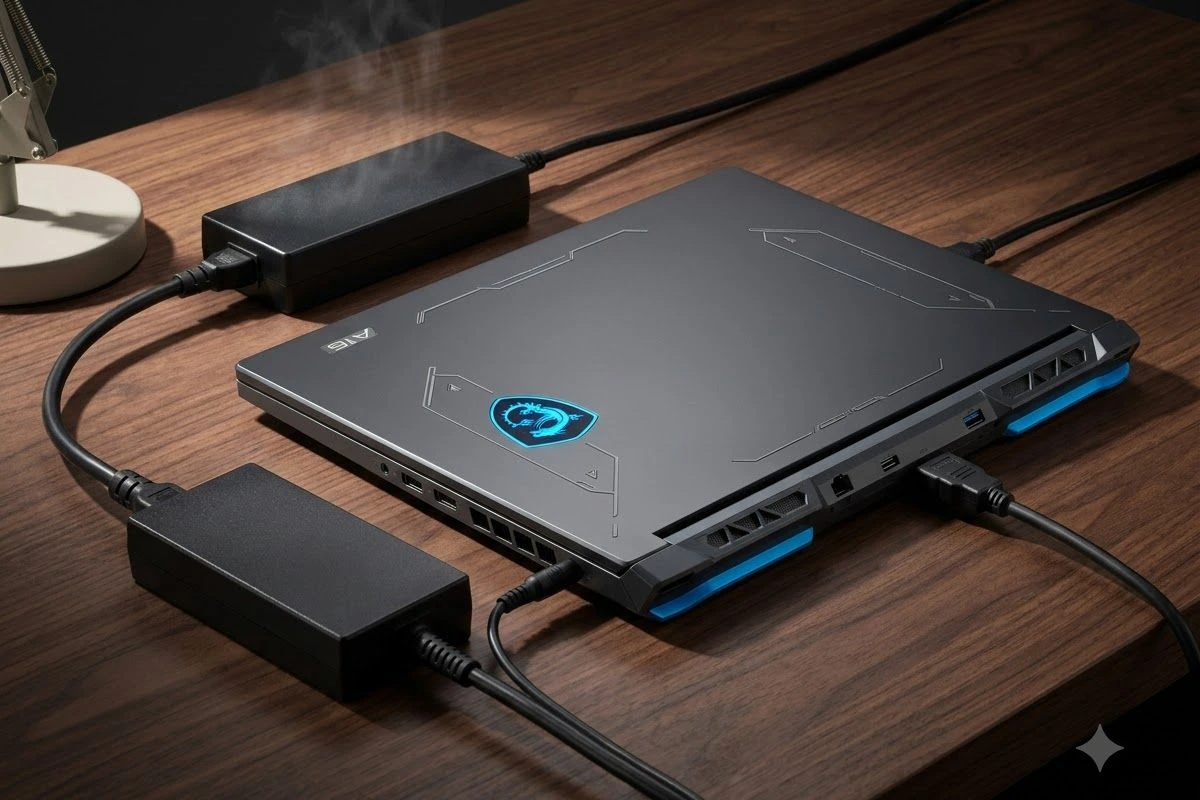
The 240 W Brick Loses to a 250 W Laptop
MSI rates Cooler Boost for four exhausts, 51.1 percent more airflow than the last generation, and noise under 50 dBA in its own gaming test. Aubernon heard the dual fans and saw the same 50 dBA peak. That cooling exists because the silicon budget is huge for a 2.3 kg notebook.
When under extreme workloads that require full CPU and GPU resources, MSI OverBoost technology delivers peak combined performance with a total power output of 190W.
MSI, Crosshair A16 HX E8W product page
That 190 W OverBoost combined budget is the whole product. AMD’s 8940HX is a desktop-class Zen 4 chip in a laptop socket, and the 5070 sits at the top of the mobile 70-class power band. Combined 190 W is already small-form-factor desktop power, so the remaining live question is fan noise, which both MSI and the two-week test put at 50 dBA.
https://x.com/MSInordic/status/2085304890016911695
MSI’s Nordic account posted the series in August with that 190 W figure and a 17.6 percent cooling-performance claim. Lab work on the E8WGK then found the 240 W brick undersized: the laptop already averages almost 250 W in games, the brick runs hot, and the pack can show charging while you play. A 3DMark run on battery cut the graphics score 69 percent, to 4,400 from 14,087 in the full Apex profile.
THE WALL WATTAGE
- OverBoost cap: MSI states 190 W for CPU plus GPU on Ryzen 7 8840HX and RTX 5050-class silicon and above, in Apex mode on AC power.
- GPU board power: 115 W maximum graphics power with Dynamic Boost, which sits at the top of the RTX 5070 75 W to 115 W window used across thick 16-inch shells.
- Measured draw: Independent charts on the E8WGK average almost 250 W in games, with a Prime95 plus FurMark stress near 250 W (215 to 264 W).
- Unplugged floor: Aubernon got about two to three hours in economy mode and about one hour in games; a Wi-Fi browsing run lasted 5 hours 32 minutes, and his pack later stuck at 95 percent.
USB-C Power Delivery is on the two Type-C ports, but it is a keep-alive path, not a gaming path. If you wanted a thinner MSI that tries to leave the wall behind, the company already sells a thin Cyborg 15 Max gaming chassis with a different power and cooling brief.
A 240 Hz Screen Without G-Sync
MSI prints 100 percent DCI-P3 typical on the 16-inch QHD+ 240 Hz IPS-level panel and uses that same glass on the 5060 SKU, so the cheap config is not punished with a 45 percent NTSC screen. Lab color work on the AU Optronics B160QAN02.3 measured 94.9 percent Display P3, 99.6 percent sRGB, a 1,314:1 contrast ratio, 0.39 cd/m² black, 512.4 nits peak, and 475.9 nits average. Out of the box the ColorChecker delta-E was 4.65, falling to 1.3 after a calibration. Aubernon still called the blacks a dark gray and the iRacing HUD crowded on 16 inches.
The cuts sit beside that panel. There is no G-Sync, no Advanced Optimus, and no HDR. A MUX switch is present, so the 5070 can drive the LCD directly, but a 240 Hz screen without adaptive sync is a strange pair at this refresh rate. The GPU side of the pair is the tighter bind at native 2560 x 1600.
E8WGK LAB CHARTS AT 2560 x 1600
| Title | 1080p ultra | QHD native | QHD with DLSS |
|---|---|---|---|
| Cyberpunk 2077 | 112.1 fps | 68.8 fps | 81.9 fps |
| Baldur’s Gate 3 | 133.2 fps | 90.3 fps | 129.6 fps |
| F1 24 | 94.7 fps | 59.3 fps | 93.1 fps |
Those native QHD numbers are why DLSS 4.5 is on the box. An 8 GB, 128-bit 5070 can hold 1080p ultra in those titles and needs upscaling to keep the 240 Hz panel fed at 1600p. Path tracing and heavy mods are the cases where 8 GB already runs out in this class; the 12 GB E8WGXK exists for that buyer, and it is a different SKU.
Aubernon’s own software mix was kinder. An 80-minute iRacing endurance at Misano with the Audi R8 LMS EVO II ran with wheel and pedals attached, even if the info boxes ate the 16-inch layout. American Truck Simulator from Chicago to California, two real hours in a Kenworth T680, looked as good as a decade-old title can look. Both sessions are the job this chassis can do: long, plugged-in sim work, not a 240 Hz esports claim at native QHD+.
Why the 8940HX Still Wins on This Chassis
The Ryzen 9 8940HX is not a Zen 5 AI part. AMD’s sheet calls it a Dragon Range follow-on with 16 cores, 32 threads, a 2.4 GHz base, a 5.3 GHz boost, 16 MB of L2 plus 64 MB of L3 (80 MB total), a Radeon 610M iGPU, and a 55 W to 75 W configurable TDP on TSMC 5 nm. Lab power limits on the E8WGK held 102 W for both short burst and sustained PL1, which is how a “55 W” chip eats a 240 W brick.
That older architecture still posted the CPU numbers MSI needs. Aubernon’s Geekbench 7.0.0 run scored 2,428 single-core and 16,317 multi-core, next to a Ryzen 7 7700 baseline of 2,524 and 15,441. The 5070’s OpenCL score of 126,538 cleared a 100,000 RTX 4060 baseline, with a Super Resolution result of 173,095 at 319.3 Kimages/sec. Independent testing also had this Zen 4 part ahead of a Ryzen AI 9 470 and within about 5 to 10 percent of a Core Ultra 9 275HX. The “latest” line on the laptop page is marketing; the 16-core count is the reason the machine edits video after it races.
Two SODIMM slots and two M.2 2280 bays (one Gen 4, one Gen 5) are the other half of that argument. SuperRAID 5 is quoted at up to 14,000 MB/s, only in RAID 0 with a second drive you add yourself. You can open this thing and finish the spec. You cannot do that on a soldered thin-and-light, and you cannot do it on a Claw 8 EX AI+ handheld either.
Rear Ports Tell You Where It Lives
MSI moved a block of I/O behind the hinge on purpose and wrote it up as cable management for a desk. The layout matches the power math. This is the port set you get, and it is a tower’s port set shrunk into a 14.29 x 10.62 x 0.86-to-1.01-inch slab.
THE DESK SIDE OF THE HINGE
- Rear row: Gigabit RJ45, HDMI 2.1 rated for 8K at 60 Hz or 4K at 120 Hz, and one USB-A 3.2 Gen 1.
- Left edge: The dedicated 240 W DC jack, two USB-C 3.2 Gen 2 ports with DisplayPort and Power Delivery, plus a heat exhaust.
- Right edge: Two more USB-A 3.2 Gen 1 ports, a 3.5 mm combo jack, and the other exhaust.
- Left behind: A 720p camera with a shutter, 2 x 2 W speakers, a 4-zone RGB keyboard with 1.7 mm travel and a number pad, and Wi-Fi 6E rather than Wi-Fi 7.
Plug a bigger monitor into HDMI, drop Ethernet into the RJ45, and add a USB hub, and the 16-inch LCD becomes a spare panel. Aubernon did the reverse in iRacing and felt the HUD crush. The rear ports are the honest product; the backpack pitch is leftover language from a thinner class.
RAM Slots and the Buyer Who Stays Home
Build quality is the other cut. The E8WGK’s chassis is matte black plastic that picks up fingerprints, the speakers are the weak 2 W pair, and the warranty on that lab unit was 12 months. You are paying midrange-to-loaded money ($1,599 on the AMD floor, about $2,699 on a 32 GB Amazon config) for silicon and a panel, not for a Raider-class shell. The keyboard, at least, was fine to type on before the machine was exiled to a desk.
Who should buy it is a short list. A sim racer who already owns a wheel, wants HDMI 2.1 and wired Ethernet, and will leave the 749 g brick (1.65 pounds) in the socket. A cutter who will fill the second M.2 and the RAM slots and use the 16 cores. Someone comparing 16-inch 5070 boxes who will read the SKU suffix and pay for E8WGXK if the extra 4 GB matters. The 8 GB E8WGK is the wrong laptop if you wanted native 1600p ultra, G-Sync, or a day of classwork off the 80 Wh pack.
Aubernon parked his loan on a late grandmother’s computer desk with the charger in all the time, because it would not live beside the bed like an old ThinkPad T480. That is the correct habitat. The Crosshair A16 HX E8W is a 16-core, 115 W GPU enclosure with a 240 Hz lid, and it is a good one if you stop asking it to be a laptop.
Frequently Asked Questions
Can the Crosshair A16 HX Charge From USB-C?
Yes, on the two Type-C ports, but only as Power Delivery. MSI rates that path at 65 W (20 V at 3.25 A) up to 100 W (20 V at 5 A) while the system is running or in sleep, and 45 W up to 100 W in hibernate. That will not feed OverBoost gaming, so the 240 W barrel brick remains the plug you use for the 5070.
Do All Crosshair A16 HX E8W Models Use the Same Screen?
They do. The RTX 5060 E8WFK, the 8 GB 5070 E8WGK, and the 12 GB 5070 E8WGXK all ship the same 16-inch 2560 x 1600 240 Hz IPS-level panel, so the cheaper GPU does not drag you down to a 45 percent NTSC LCD. Lab identification of that glass is AU Optronics B160QAN02.3, a 189 PPI 16:10 sheet shared with the Intel Crosshair 16 HX.
Is the Ryzen 9 8940HX a Copilot+ AI Chip?
No. AMD’s 8940HX page lists Zen 4 cores, a Radeon 610M iGPU, and an unlocked multiplier, and it does not publish NPU TOPS. The “AI-ready” line on the laptop is the RTX 5070’s 798 TOPS and the Copilot key on the 4-zone keyboard, not an XDNA coprocessor inside the 8940HX.
How Heavy Is the 240 W Adapter With the Laptop?
The E8WGK brick weighed 749 grams, or 1.65 pounds. Add MSI’s 2.3 kg chassis and the bag is carrying about 3.05 kg of computer plus power supply before you pack a wheel or a second SSD.
Check the suffix on the box before you pay the 12 GB price for an 8 GB card. Then leave room on the desk for a brick that already runs a little behind the machine it is meant to feed.


Space Cargo Buys Into France’s Zero-G Flight Company

The $399 Omni Walks Away, Then Asks for a Dock

TECNO’s 0mm Bezelless Phone Still Needs a Rim

The Ryobi Tools That Unblocked a Garage Workbench

Ripple’s 700 Million XRP Re-Lock Repeats a Yearlong Pattern

The 2026 Kawasaki Ninja ZX-10R Matches Honda’s Price

Chainlink Puts Official US Inflation and GDP Onchain

Google Pushes Gemini Daily Brief off the Chat Screen

The Crosshair A16 HX Outruns Its Own Power Brick

Cloover Turns a $350 Million Installer Book Into a Utility

30-Year Yield Hits 5.32% Highest Since 2007 as Debt Supply Locks In Costs

Oil Crashes Below $80 as Iran Talks Restart and Markets Split

Walter’s TWG Insists No Fraud as Insurer Probes Force Cleanup

Astute’s $1.2M bet makes B2B creator deals feed AI discovery

Strategy Parks $1.59B Cash While Bitcoin Stack Stays Flat

BlackRock Turns Cash Empire Into Stablecoin Reserve Rails

The 20% Savings Ideal Meets a 2.7% Reality Check

SpaceX Stock Rebound Tests Real Demand Before Huge Unlock

Monzo chair Gary Hoffman exits after board revolt fallout

Amber’s €7M locks Mittelstand knowledge inside Europe
-
 FINANCE3 months ago
Zcash Patched a Double-Spend Bug as ZEC Climbed 5%
-
 ENTERTAINMENT3 months ago
Steam Summer Sale 2026 Locks In June 25 to July 9 Dates
-

 FINANCE2 months ago
CLARITY Act Final Text Expected This Weekend as 60-Vote Hurdle Looms
-
 NEWS4 months ago
Meta Adds AI Replies to Threads, But Users Can’t Block It
-

 NEWS3 months ago
YouTube Shorts is testing a heart in place of the thumbs-up
-

 NEWS1 month ago
Senators Force Apple Off Chinese Memory as Big Three Cash In
-

 NEWS3 months ago
NEURA Robotics’ $1.4B Series C Redraws Europe’s Physical AI Bet
-
 ENTERTAINMENT5 months ago
Extraction 3 Is Officially Coming to Netflix in 2027