
NEWS
Google Pushes Gemini Daily Brief off the Chat Screen
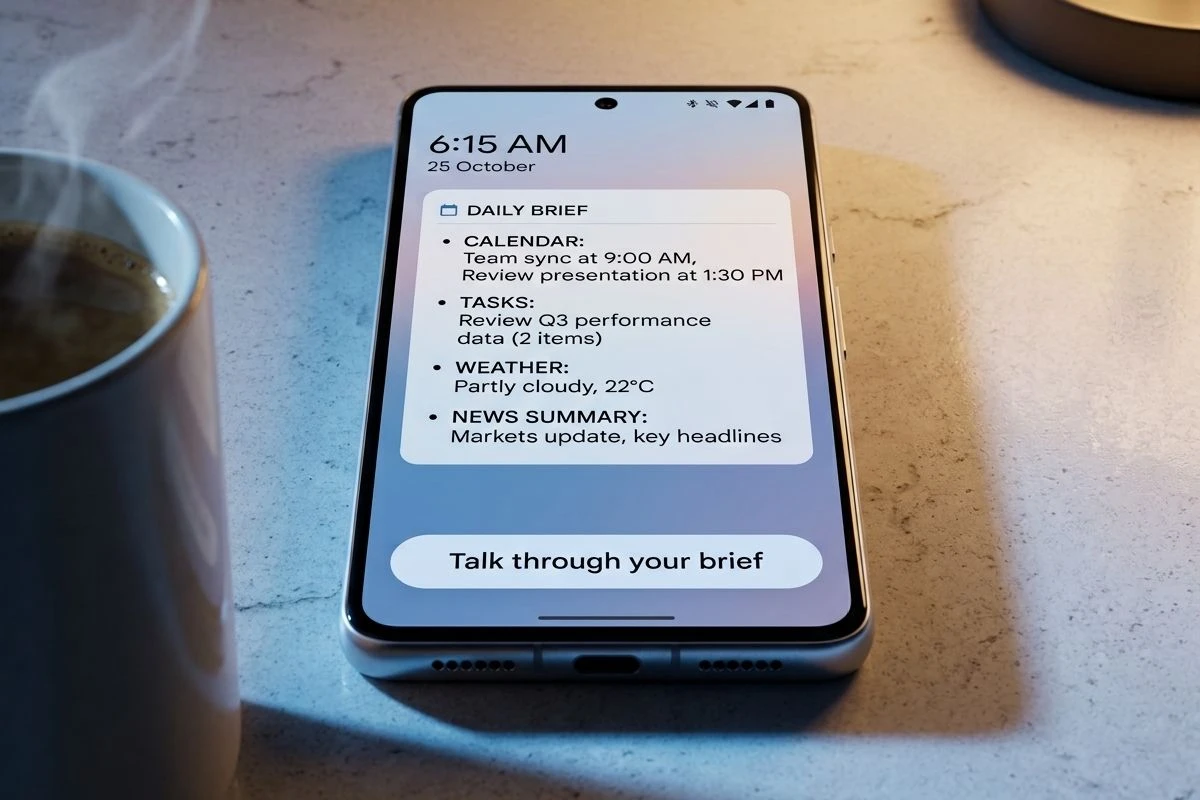
Google hid a Talk through your brief control in Gemini Daily Brief so the morning digest can play in Live without a prompt.

Code in Google app v17.54.10 hides a floating Talk through your brief button that opens Gemini Live and starts reading Gemini Daily Brief aloud. The spoken pass already plays. The on-screen copy still shows a stock greeting.
Google is not inventing audio for this digest. It is trying to put the same morning brief on Live, on a one-tap control, and on Pixel At a Glance so people do not have to open a chat and ask.
A Floating Button Still Opens Gemini Live
The new control sits on the Daily Brief screen as a floating button labelled Talk through your brief. Tap it, and Gemini Live takes over and reads the digest. Testers did not have to type a prompt or hunt for the Live mic.
The voice path already behaves. The screen does not. Live has been stuck on the line “Here’s what’s on your plate today,” even while the brief is being read. Tap the button again and the greeting just changes to another intro line. The digest is talking. The chrome is still a placeholder.
Audio briefings are not a new Gemini trick. Live can already read a Daily Brief if you ask. The hidden button is there so you never have to open Live first and say the magic words. That is a distribution change, not a new model skill, and Google has not said when a public build will show it.
Gemini Live Already Reads the Brief Aloud
Neel Joshi, director of product management for Gemini Live, rolled the spoken brief into Live on August 26, 2026, six days before this button showed up in the Google app. Google’s own figure is that 63 percent of users talk out loud. A morning digest that only exists as text inside an app fights that habit.
You can now access your Daily Brief in Gemini Live, providing a ready-to-go spoken summary of everything on your to-do list for the day. Just say, “What’s my daily brief?” and Gemini will combine your most important updates from Gmail, and Calendar into one concise digest.
Neel Joshi, Director of Product Management, Gemini Live, Google blog
The Gemini app account put the same prompt on the record the day that post went up: say “What’s my Daily Brief?” and listen while you move.
https://x.com/GeminiApp/status/2092662299333197958
Live is the ear. The new button is a shorter path into that ear. Anyone who already starts the day by talking to Gemini does not need a new agent. They need the brief to start without a script.
Pixel Lock Screens Get the Same Brief
Twelve days before the talk button appeared, hidden settings in Android System Intelligence showed a Gemini Daily Brief switch for Pixel’s At a Glance widget. It sits in the Customize list between Air Quality and Finance. Testers could not force the actual brief onto the lock screen, so the layout is still unknown.
At a Glance is already the strip Pixel owners see for weather, calendar, and commute cues. Dropping Daily Brief there would mean the digest meets you before you unlock, which is the opposite of burying it under a Gemini sidebar. Space is tight, and a full brief can run long, so a short lock-screen cut with a tap-through is the version that fits the widget.
FIVE WAYS TO REACH THE BRIEF
- Gemini app: Open Daily Brief in the sidebar after the morning build finishes.
- Live prompt: Say “What’s my daily brief?” and hear Gmail and Calendar folded into one digest.
- Talk button: Tap Talk through your brief on the Daily Brief screen; Live starts reading (hidden in v17.54.10).
- At a Glance: A Pixel lock-screen toggle is in Android System Intelligence, still not showing the brief itself.
- Morning alert: Earlier Google app builds offered a daily, personal notice when a new brief was ready.
Official pages already sell Daily Brief as a personalized digest from inbox and calendar, the thing you are supposed to hit before mail and meetings. A lock-screen toggle and a talk button are how that pitch leaves the Gemini home tab. The same Calendar graph also feeds Gemini creating calendar events on Android in Chrome, so a spoken brief can mention a meeting the assistant just filed.
Who Can Use Daily Brief Right Now?
Daily Brief is a paid, U.S., 18-plus feature on a personal Google account with Personal Intelligence turned on and Gmail plus Calendar connected. The new listen button does not change that gate. Gemini Live itself is free in many places, which is why a one-tap talk control will still feel missing to anyone outside the plan.
DAILY BRIEF ACCESS RULES
| Gate | Rule |
|---|---|
| Age | 18 or older |
| Country | United States |
| Account | Personal Google Account only; work, school, and supervised accounts are out |
| Plan | Google AI Plus, Pro, or Ultra |
| Setup | Personal Intelligence on, Workspace apps connected, Memory on |
Help docs say you must be 18 or older and in the US before the brief even appears. Google One still keeps Daily Brief listed as US only on the plan chart, next to Gemini Live and Spark. Live can run without a paid plan. The digest cannot.
That split is the part a floating button cannot fix. After Google promoted the Live upgrades, people outside the U.S. asked for the same morning pass. A control that opens Live and reads the brief only helps the accounts that already receive one. For everyone else, the shortcut points at an empty room.
Inside the U.S. paid group, quality still tracks how tidy Gmail and Calendar already are. Top of mind leans on real events and mail that needs a reply today. A cluttered Promotions pile will show up in the digest. Thumbs on each item, plus a chat note to skip newsletters or push school mail, are the levers Google documents now, ahead of the fancier customize sheet still sitting in app code.
The Pixel 10 Brief Google Already Pulled
Google launched Daily Brief on May 19, 2026 at I/O as an out-of-the-box agent for Plus, Pro, and Ultra subscribers in the U.S. The company said Gemini then had more than 900 million users across 230 countries. Daily Brief was not part of that free mass. It was a paid morning desk that Google described as “designed to be your first stop every morning,” pulling inbox, calendar, and tasks, then grouping them by topic and suggesting next steps.
Pixel owners had already met a cousin. Google tried a briefing called Daily Hub on the Pixel 10 series and later pulled it. Daily Brief is the second pass, this time inside Gemini rather than as a Pixel-only strip, and this time tied to a paid Google AI plan. The talk button and the At a Glance toggle are the tell that Google does not want this version stuck where Daily Hub died, on a screen people did not keep opening.
HOW THE BRIEF LEFT THE CHAT TAB
- July 24, 2026: Google app v17.43.11 hides a text box so people can type or speak what they want in the next brief, with chips for newsletters, more calendar events, school updates, or shorter copy.
- August 3, 2026: v17.45.14 swaps that box for a Customize your brief button, with topic, follow, and tone controls, plus a field to type something else.
- August 20, 2026: Android System Intelligence lists a Daily Brief toggle for Pixel At a Glance, between Air Quality and Finance.
- August 26, 2026: Gemini Live ships a spoken Daily Brief. The prompt is “What’s my daily brief?”
- September 1, 2026: v17.54.10 hides Talk through your brief, a one-tap jump into that same Live reading.
None of those later steps add new sources. They move the same digest closer to the lock screen and the speaker. That is the pattern after Daily Hub: stop waiting for people to open Gemini on purpose.
Samsung Put a Brief on the Lock Screen First
Galaxy phones already surface Now Brief from the lock screen. Google’s At a Glance work is the Pixel answer to that slot, not a fresh idea about what a briefing is. If Daily Brief ever lands there, it will be judged against a Samsung strip people already glance at while the phone is still locked.
ChatGPT Pulse took a different morning bet, a stack of visual cards built overnight from chats and connected apps, not a spoken pass you can hear while pouring coffee. Google is leaning the other way because most Gemini users already talk to it. A one-tap Live jump is how Daily Brief tries to occupy that same first-minutes window without asking anyone to read a card deck.
The weak point stays the same on every surface. The brief only sees Google mail, Google Calendar, and Gemini chats. Outlook, Apple Calendar, Notion, and Todoist do not feed it. A lock-screen tile and a talk button make a Google-only digest louder. They do not make it broader.
The Screen Still Shows Placeholder Lines
The talk control is still unfinished code. Hidden strings can ship, change, or vanish. Google has not named a public rollout date for the button or for Daily Brief inside At a Glance. Live’s spoken brief is the only audio path that is actually on.
WHAT WE KNOW
- Live path: Paying U.S. users can already say “What’s my daily brief?” and hear Gmail and Calendar in one digest.
- Button behavior: Talk through your brief opens Live and reads; the voice works in the hidden Google app build.
- Plan floor: Daily Brief still needs Google AI Plus or higher on a personal U.S. account.
WHAT IS UNCONFIRMED
- Ship date: No public timeline for the floating button or the At a Glance toggle.
- Lock-screen layout: The toggle exists; the brief has not been seen on At a Glance, so a compact cut is only a guess.
- On-screen copy: Greeting lines still rotate instead of tracking the spoken brief, which is why this still reads as unfinished.
Until Google ships a build where the screen and the voice agree, Daily Brief’s new shortcut is a hidden tap that plays a digest the assistant could already read. The lock-screen switch is in the same state: present in settings code, absent from the glass. Google has not said which one, if either, leaves the lab first.


Space Cargo Buys Into France’s Zero-G Flight Company

The $399 Omni Walks Away, Then Asks for a Dock

TECNO’s 0mm Bezelless Phone Still Needs a Rim

The Ryobi Tools That Unblocked a Garage Workbench

Ripple’s 700 Million XRP Re-Lock Repeats a Yearlong Pattern

The 2026 Kawasaki Ninja ZX-10R Matches Honda’s Price

Chainlink Puts Official US Inflation and GDP Onchain

Google Pushes Gemini Daily Brief off the Chat Screen

The Crosshair A16 HX Outruns Its Own Power Brick

Cloover Turns a $350 Million Installer Book Into a Utility

Trump Iran Threat Wiped $238M Crypto Longs Then Flipped

30-Year Yield Hits 5.32% Highest Since 2007 as Debt Supply Locks In Costs

Oil Crashes Below $80 as Iran Talks Restart and Markets Split

Walter’s TWG Insists No Fraud as Insurer Probes Force Cleanup

Astute’s $1.2M bet makes B2B creator deals feed AI discovery

Strategy Parks $1.59B Cash While Bitcoin Stack Stays Flat

BlackRock Turns Cash Empire Into Stablecoin Reserve Rails

The 20% Savings Ideal Meets a 2.7% Reality Check

SpaceX Stock Rebound Tests Real Demand Before Huge Unlock

Amber’s €7M locks Mittelstand knowledge inside Europe
-
 FINANCE3 months ago
Zcash Patched a Double-Spend Bug as ZEC Climbed 5%
-
 ENTERTAINMENT3 months ago
Steam Summer Sale 2026 Locks In June 25 to July 9 Dates
-

 FINANCE2 months ago
CLARITY Act Final Text Expected This Weekend as 60-Vote Hurdle Looms
-
 NEWS4 months ago
Meta Adds AI Replies to Threads, But Users Can’t Block It
-

 NEWS3 months ago
YouTube Shorts is testing a heart in place of the thumbs-up
-

 NEWS1 month ago
Senators Force Apple Off Chinese Memory as Big Three Cash In
-

 NEWS3 months ago
NEURA Robotics’ $1.4B Series C Redraws Europe’s Physical AI Bet
-
 ENTERTAINMENT5 months ago
Extraction 3 Is Officially Coming to Netflix in 2027