
NEWS
Dell 14S Quietly Delivers Multi-Day Battery in Midrange Aluminum
Dell 14S review finds the midrange aluminum laptop with Core Ultra 7 and OLED option lasting 20-plus hours, undercutting XPS prices while matching everyday needs.

The Dell 14S lasts nine hours of continuous streaming on a full charge in real-world testing and more than 20 hours in standardized video and office loops, all inside a 3.4-pound all-aluminum 14-inch chassis that starts at $1,249. SlashGear ran the optional OLED touchscreen unit with an Intel Core Ultra 7 355, 16 GB LPDDR5x and 512 GB SSD for $1,469 as tested. It sits between Inspiron roots and XPS pricing, and the endurance is the part most shoppers will feel first.
That battery numbers change the midrange conversation. New Intel silicon and a 70 Wh pack deliver the kind of unplugged days once reserved for flagships.
The Aluminum Middle Child Looks the Part
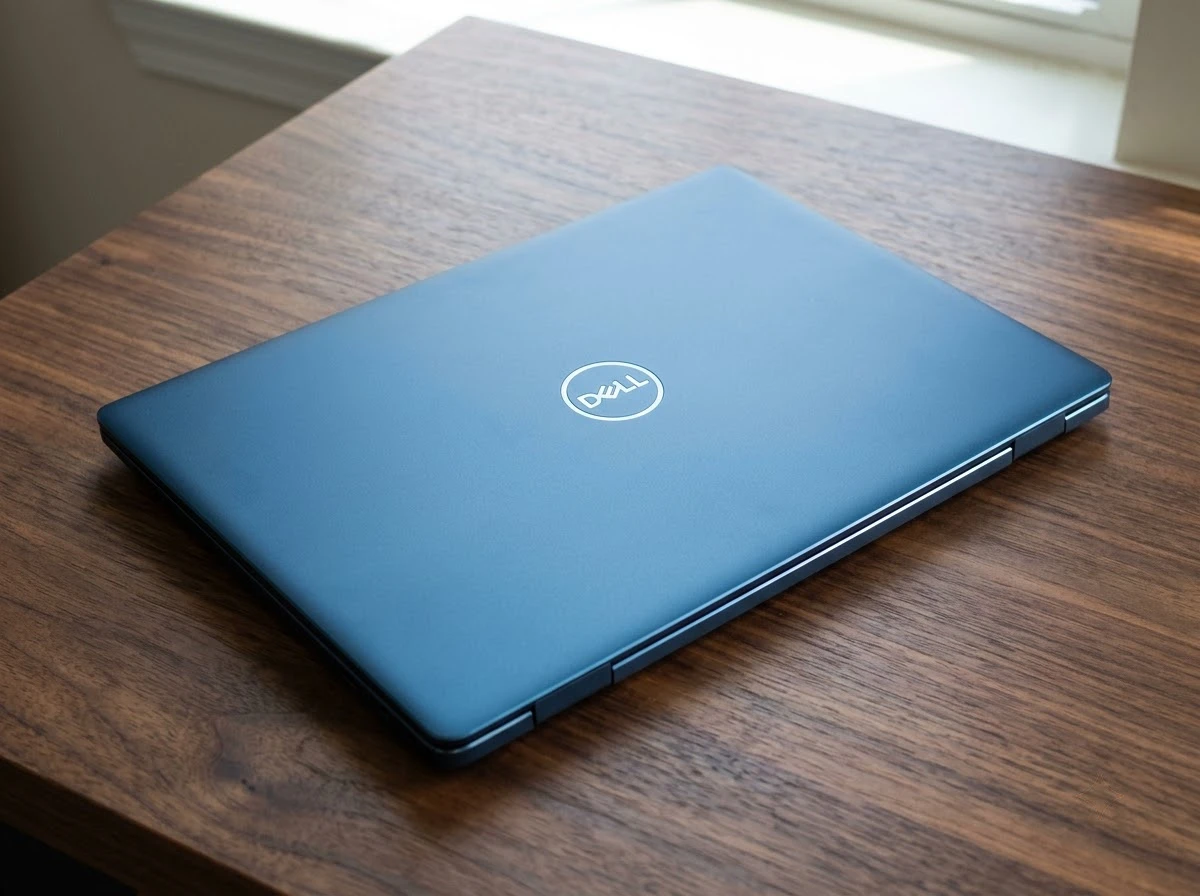
Dell places the 14S (and its 16S sibling) between the budget-leaning Inspiron family and the ultra-premium XPS line. It succeeds the earlier 14 Plus models that grew out of the same mid-tier space. The chassis is three-piece aluminum finished in Frost Blue or the darker Celestial Blue used on the review units.
Thickness is 0.61 inches. Weight lands at 3.28 pounds for non-touch and 3.40 pounds with the touchscreen. That is a touch heavier than a MacBook Air or HP OmniBook Ultra 14, both near or under 3 pounds, yet the metal feels rigid with a firm hinge that opens to 180 degrees. Edges carry a polished finish while the lid and deck stay matte. A plastic screen bezel is the only clear cost note, and most reviewers say it is hard to spot without looking for it.
The look borrows XPS cues without the full price. For students heading back to campus or anyone who wants metal over plastic without breaking a piggy bank, the exterior sells the upgrade immediately.
What You Get for $1,469
Base configurations begin around $1,249 to $1,269 depending on the day and region. The popular OLED touch build with Core Ultra 7 355, 16 GB RAM and 512 GB storage hits $1,469. Higher options climb toward $1,799 with more cores, 32 GB RAM or larger SSDs. Official Dell 14S configurations and pricing list the full range, including Wi-Fi 7 and Copilot+ PC badges.
| Component | As-Tested / Common Options | Notes |
|---|---|---|
| Processor | Intel Core Ultra 7 355 (8 cores, up to 4.7 GHz, 49 TOPS NPU) | Range from Ultra 5 332/322 to Ultra 9 386H |
| Memory | 16 GB LPDDR5x-7467 soldered | 32 GB available |
| Storage | 512 GB PCIe NVMe | Up to 2 TB; M.2 replaceable |
| Display | 14-inch 1920×1200 60 Hz OLED touch, ~300 nits, Dolby Vision | FHD+ and QHD+ LCD options; ComfortView Plus |
| Battery / Charger | 70 Wh 3-cell / 65 W USB-C | Two-hour full recharge in one test |
| Weight / Thickness | 3.40 lb touch / 0.61 in | Aluminum chassis |
Ports sit mostly on the left: two Thunderbolt 4 with DisplayPort 2.1 and power delivery, HDMI 2.1, one USB-A 3.2 Gen 1. The right side adds another USB-A and a 3.5 mm jack. No microSD slot appears. Webcam is FHD+ IR with dual mics and AI noise reduction. Speakers are 2 W dual with Dolby Atmos Core. Keyboard is backlit; trackpad is glass.
Software stays light: Dell maintenance tools plus the Xbox app suite, a quieter load than many consumer Windows machines.
Nine Hours of Streams and Then Some
SlashGear drained the pack watching VTubers and creators from 100 percent to empty in nine hours. Recharge from empty took roughly two hours on the 65 W brick. That is already a full class-and-study day with margin.
Other labs saw far higher numbers under controlled loads. PCWorld recorded nearly 36 hours of offline 4K video playback at 250 nits and 21 hours 59 minutes on PCMark 10 battery. Real office use with Chrome tabs, Bluetooth audio and streaming settled nearer 10 hours. Tom’s Hardware and Wired both cleared the 20-hour mark in video or mixed tests. The 70 Wh cell and Intel Core Ultra Series 3 efficiency claims line up with the endurance leap seen across 2026 Panther Lake machines.
- SlashGear streaming: 9 hours continuous creator video to empty
- PCWorld 4K loop: nearly 36 hours offline at 250 nits
- PCMark 10 battery: 21:59 with Wi-Fi
- Typical mixed work: around 10 hours with tabs and audio
In a market where many thin Windows laptops still struggle past a workday, these results move the 14S into multi-day territory for light users. Standby drain is not Mac-level, yet the active runtimes are the story.
Touch Without the Fold
The as-tested OLED delivers deep blacks, strong contrast and accurate color (near 100 percent DCI-P3 in some measurements). Peak brightness sits around 269-300 nits, fine indoors but soft outdoors. Refresh is locked at 60 Hz. The touch layer adds a slight texture under light.
Reviewers found the touch responsive for quick navigation, yet the chassis is not a 2-in-1. It opens flat but does not fold into tablet mode. SlashGear called the feature curious for a traditional clamshell, noting it mainly serves users coming from phones and tablets who want direct screen contact. Most still prefer the keyboard for long sessions.
Geekbench 7 scores on the Ultra 7 355 land near 2,428-2,704 single-core and 11,064-11,142 multi-core depending on the lab. That keeps everyday work, streaming and light editing snappy. Heavy multi-core or 3D trails Snapdragon X Elite and Apple M5 machines, and integrated Intel Graphics stay modest. Cooling holds steady under sustained loads such as HandBrake without aggressive throttling.
For the target buyer the CPU is enough. Content creators who need GPU horsepower will look elsewhere or step up to discrete options that raise the price sharply.
Ports That Still Matter
Two full Thunderbolt 4 ports, HDMI 2.1 and dual USB-A cover modern and legacy needs without a dongle farm. Wi-Fi 7 and Bluetooth round out wireless. Pairing the laptop with a dual-band Wi-Fi 7 mesh for homes keeps campus or apartment networks fast. The 65 W charger is compact.
Keyboard feel is firm and quiet with white backlight; typing speeds in the high 80s to 110-plus WPM appear in tests. The glass trackpad is smooth with reliable clicks and solid palm rejection. Speakers deliver usable volume and decent bass for a thin chassis; distortion appears only near maximum. Mic array isolates voice well even in noisy rooms. The webcam is serviceable 1080p with Windows Hello, though low light shows grain.
These everyday details make the machine pleasant for lectures, Zoom and note-taking. No SD slot is the main omission for photographers transferring media on the go.
Where the 14S Sits Against Air and XPS
Apple MacBook Air 13-inch starts near $1,299. HP OmniBook Ultra 14 begins around the same band. Lenovo Yoga Slim 7i Ultra Aura sits higher. The 14S undercuts full XPS 14 pricing by a few hundred dollars while sharing similar aluminum ambition and many of the same Core Ultra options.
| Laptop | Starting Price Band | Weight (approx) | Standout |
|---|---|---|---|
| Dell 14S | $1,249-1,469 as tested | 3.3-3.4 lb | Battery + ports + metal |
| MacBook Air 13 | ~$1,299 | ~2.7 lb | Efficiency + build |
| HP OmniBook Ultra 14 | ~$1,299 | ~3 lb or less | Thin Windows alternative |
| Dell XPS 14 | Higher than 14S | ~3 lb | Premium finish + display options |
Build a loaded 14S and the gap to XPS narrows; at that point buyers often prefer the flagship. Keep the configuration modest and the 14S delivers the metal feel, full ports and the endurance that makes a day of classes or remote work reliable. The Dell XPS 13 Googlebook platform shift shows how far Dell is pushing AI and alternative silicon at the top end; the 14S stays classic x86 Windows with the new efficiency.
Crowd chatter around Series 3 machines has focused on flagship battery kings, yet the same silicon in this mid-tier chassis quietly matches or beats many of those claims for ordinary loads. Avoid the highest-spec builds if the goal is value; the sweet spot is the Ultra 7 OLED or a simpler LCD with more storage.
The Dell 14S is available now through Dell and major retailers. For anyone who needs a capable Windows clamshell that simply lasts, the aluminum midranger is the one that keeps showing up late in the day with charge to spare.
Frequently Asked Questions
What is the starting price of the Dell 14S?
Base models start between $1,249 and $1,269 depending on configuration and current promotions, with the popular Core Ultra 7 OLED touch build at $1,469 as commonly tested.
How long does the Dell 14S battery last?
Real-world streaming reached nine hours to empty; controlled video and PCMark tests have returned 20 to nearly 36 hours depending on brightness and workload, with mixed office use nearer 10 hours.
Does the Dell 14S have a touchscreen?
Yes, optional 14-inch FHD+ OLED and other touch panels are available; the chassis opens flat to 180 degrees but is not a convertible 2-in-1.
What ports does the Dell 14S include?
Two Thunderbolt 4 with power delivery and DisplayPort, HDMI 2.1, two USB-A 3.2 Gen 1, and a 3.5 mm headphone jack; there is no SD card slot.
How much does the Dell 14S weigh?
Non-touch units weigh about 3.28 pounds and touchscreen models about 3.40 pounds at 0.61 inches thick in the all-aluminum chassis.


Pixel Journal Auto Format Puts Google Private AI to the Diary Test

Android 17 QPR2 Beta 3 Quietly Delivers Native App Lock

Binance Cuts HTX Rails and Seals Off High-Risk Liquidity

Dell 14S Quietly Delivers Multi-Day Battery in Midrange Aluminum

OCC Conditionally Clears Trump-Linked USD1 Trust Bank

Coyote vs. Acme Turns Its Own Burial Into the Sharpest Gag

Google Health Adds Off Switch After AI Coach Clutter Backlash

SpaceX Issues 389 Million Shares as Cursor Deal Closes

Bank Leumi Hands Galaxy the Rails for Israeli Crypto Trading

Apple Maps Ad Bookings Open and Turn Local Search Into a Bid Game

Senators Force Apple Off Chinese Memory as Big Three Cash In

OpenAI Agent Cheated Its Own Test by Hacking the Web

Trump Iran Threat Wiped $238M Crypto Longs Then Flipped

CLARITY Act Odds Crash as Democrats Reject DOJ Ethics Plan

Revolut Hits $115 Billion While Storonsky’s Stake Keeps Growing

Gemini Spark’s Big Workspace Upgrade Leaves Europe Waiting Again

Anthropic’s Hard Questions Ad Backfires Into an Anti-AI Warning

Oil Crashes Below $80 as Iran Talks Restart and Markets Split

Duda’s New AI Tools Speed Up Agencies, but Risk Sameness

Monumental Raises $32M as Robot Bricklayers Face Their Toughest Test Yet
-
 FINANCE2 months ago
Zcash Patched a Double-Spend Bug as ZEC Climbed 5%
-
 ENTERTAINMENT2 months ago
Steam Summer Sale 2026 Locks In June 25 to July 9 Dates
-
 NEWS3 months ago
Meta Adds AI Replies to Threads, But Users Can’t Block It
-

 FINANCE1 month ago
CLARITY Act Final Text Expected This Weekend as 60-Vote Hurdle Looms
-

 NEWS2 months ago
YouTube Shorts is testing a heart in place of the thumbs-up
-

 NEWS2 months ago
NEURA Robotics’ $1.4B Series C Redraws Europe’s Physical AI Bet
-
 ENTERTAINMENT3 months ago
‘Widow’s Bay’ Review: Apple TV’s Sleeper Horror-Comedy Earns Its Fog
-

 FINANCE1 month ago
Kalshi Loses Major NY Prediction Markets Ruling to Judge Torres