
NEWS
Windows K2 Pays Down Years of Windows 11 Bloat
Windows K2 is Microsoft’s late-2025 quality project to rebuild Start, cut ads, and chase SteamOS on the same hardware through 2027.

Microsoft is rebuilding Windows 11’s Start menu, File Explorer, and update cycle under an internal effort called Windows K2, assembled in late 2025. It is not a new edition of the OS. It is a quality project meant to run inside Windows 11 through 2027.
Pavan Davuluri, EVP of Windows and Devices, put the public version of that work in a March 20, 2026 letter. People familiar with the work say the internal version treats SteamOS as the gaming benchmark and a third-party file manager, File Pilot, as the Explorer benchmark.
K2 Has No Version Number and No End Date
Windows K2 was put together in the second half of 2025 to hit the complaints that have followed Windows 11 since 2021: slow shell surfaces, messy updates, too much Copilot, and ads in places that used to be empty. People familiar with the work say it is an ongoing build rule, not a boxed release with a ship party.
The same accounts say Microsoft wants Windows 11 in a better place by the end of 2026 and into 2027. They also say the project has no completion date. That split matters. The public letters describe a year of quality work. The internal brief is a change in how Windows gets built after that year ends.
WHAT WINDOWS K2 IS
- The name: Windows K2 is an internal quality project, not a new Windows version number.
- The start: Teams stood it up in the second half of 2025, before Davuluri’s March letter made the reset public.
- The pillars: Performance, reliability, and craft, with a fourth push to put engineers back in front of Insiders.
- The horizon: A better Windows 11 by the end of 2026 and into 2027, with no date when the project itself ends.
Davuluri’s letter is the public contract. He wrote that the company had spent months on feedback from people “who care deeply about Windows and want it to be better,” and he signed a commitment to Windows quality that started with taskbar placement, File Explorer, and quieter widgets.
The Start Menu Gets a Native Rebuild
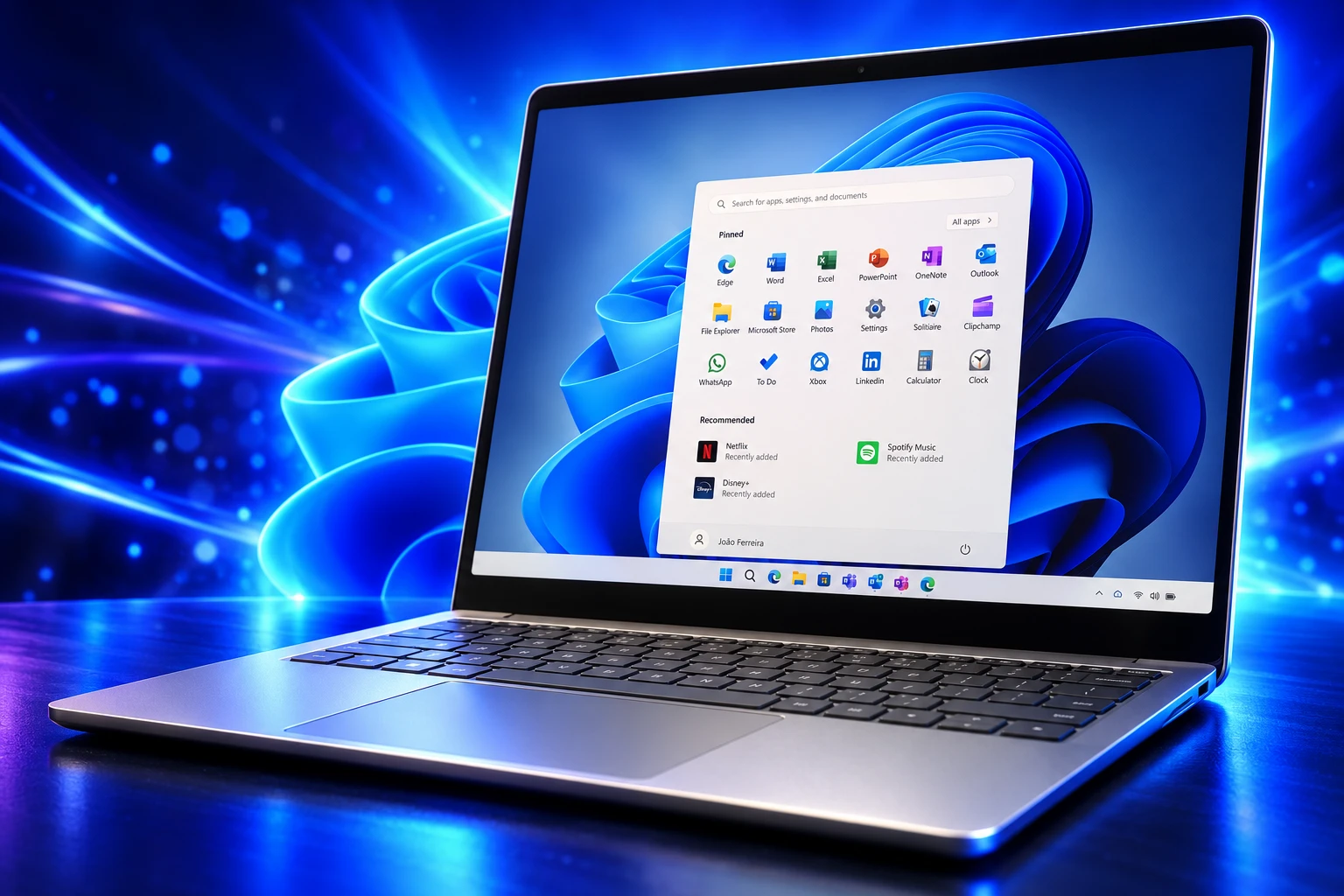
The sharpest product claim inside K2 is the Start menu. People familiar with the work say Microsoft is rewriting it from scratch on WinUI 3, the company’s current native UI stack, and targeting a menu that is up to 60 percent faster and more responsive than the one shipping now.
That rewrite rides on a new WinUI 3 system compositor meant to cut latency and memory overhead so Start and the taskbar stay usable when the PC is busy. The same plan adds controls users have asked for since 2021, including a menu they can resize and sections they can hide.
Ads in Start are on the cut list too, described internally as a real revenue concession rather than a settings toggle buried three screens down. That change had not been listed as done in Davuluri’s July 31, 2026 progress note. The 60 percent figure is a target from those internal accounts, not a measured result on retail PCs.
The menu is the right place to spend the money. It is the first surface people touch, and it is one of the first places Windows 11 taught them to wait. A native rebuild is also an admission that the current menu was the wrong kind of modern: heavier than it needed to be, and easier to hang promotions on.
SteamOS Is the Gaming Yardstick Now
Internal planning is blunt about games. Microsoft knows File Explorer, context menus, and games all lost ground, and it knows Windows 10 still wins some of those tests. For gaming, people familiar with the work say the company now treats SteamOS as the benchmark and wants Windows to compete on identical hardware within a year or two of that April 2026 plan.
That sentence would have sounded like trash talk a few years ago. It does not now. On handhelds with shared memory, independent tests have often shown SteamOS posting higher frame rates and better battery life on the same chip, because it is a thin games compositor rather than a full desktop. On desktop boxes with discrete GPUs, later tests have shown the two systems much closer, often within a few frames in the titles that were tried.
The gap that still stings is the handheld one, and it is the gap Xbox-branded Windows machines have to live with. Valve did not need a manifesto. It shipped a Linux stack that made Windows look heavy on the same silicon, then licensed that stack onto other people’s hardware. The K2 gaming brief reads like a response to that, not like a sudden love of fundamentals.
Parity in a year or two is a long bet. Anti-cheat, Game Pass, and every launcher still sit on Microsoft’s side of the ledger. Frame rate and sleep-resume sit on Valve’s. K2 only pays down the second list if the shell, idle RAM, and driver updates get out of the way of the GPU.
What Has Shipped in Windows 11 Since March?
Insiders have already received the first slice of the March promises: a movable taskbar, quieter widgets, fewer Copilot buttons in inbox apps, skippable setup updates, and File Explorer work on launch, Home, and the address bar. Davuluri said in July that this preview work would start reaching all Windows 11 PCs in fall 2026. The rebuilt Start menu, Start ads, instant filename search, and SteamOS-level gaming were still ahead.
The March letter was specific where it could be. Davuluri said Copilot entry points would be cut in Snipping Tool, Photos, Widgets, and Notepad. He said setup could skip updates, and that a restart or shut down could proceed without installing what was pending. He said widgets should feel helpful, not loud. Those are the items that have been moving through preview. The cinematic stuff in the K2 brief has not.
THE QUALITY CALENDAR SINCE MARCH
- March 20, 2026: Davuluri publishes the quality letter and ships a redesigned Feedback Hub to Insiders the same day.
- May 2026: Insiders preview taskbar placement, quieter widgets with MSN no longer first, File Explorer architecture fixes, and a Driver Quality Initiative with OEMs.
- July 13, 2026: A calmer Search home arrives in preview, with promotional content pulled from web results.
- July 31, 2026: Davuluri says Insider fixes will start reaching all Windows 11 PCs in fall 2026, and adds memory work for machines with 8GB of RAM and above.
- September 10, 2026: Hidden preview build 26340.9354 shows a cleaned-up Temporary Files page, more Settings polish under the same quality push.
Fall 2026 is the test of whether this stays an Insider diary. A movable taskbar is a five-year request finally getting a yes. A quieter widget panel is easier, and it still took until May to stop opening a news feed on hover. The 8GB work is the line that will decide if K2 is for the PCs people own or for the ones on stage.
41 Percent Fewer Allocations on Explorer Launch
The part of K2 that already has lab numbers sits in WinUI 3. Microsoft engineer Beth Pan wrote that moving from WinUI 2 to WinUI 3 should be a clear win, and that the team had been using File Explorer and Notepad as the launch benchmarks. The figures below are for the WinUI slice of Explorer opening, not for the whole window appearing on screen.
| Metric | Change on File Explorer launch |
|---|---|
| Allocations | 41 percent fewer |
| Transient allocations | 63 percent fewer |
| Function calls | 45 percent fewer |
| Time spent in WinUI code | 25 percent reduction |
Pan was asked, in the same thread, whether those cuts meant Explorer itself opened about 40 percent faster. She said no. The measurements are the WinUI portion of File Explorer launch, and other Windows teams still have to finish the end-to-end path. Some of the faster default styles also require apps to opt in until a later WinUI release flips them.
The approach here is we do what we can from framework side, and obv other teams in Windows also investigated and been doing work to improve overall launch perf, we connect/collaborate frequently to make sure the improvements will be end-to-end. It’s a long-term commitment for fundamentals and quality.
Beth Pan, Microsoft software engineer, WinUI GitHub discussion
That honesty is useful. Explorer still feels slow to a lot of people because of context menus, cloud placeholders, and preview handlers, not because a layout engine allocated one extra object. K2’s Explorer brief also names instant filename search and File Pilot as the bar. Those are user-facing tests. The GitHub table is the floor under them.
July’s letter said WinUI 3 had already moved into Widgets and a new Run dialog, with Autoplay and more file and folder property dialogs headed to Insider experimental builds. That is the unglamorous version of the compositor story: replace web-wrapped and legacy dialogs one surface at a time until the shell is one toolkit again.
Quiet Defaults for Widgets and Start
If the Start rebuild is the headline, the quieter defaults are the apology. Microsoft spent years putting MSN, badges, and hover panels in the taskbar’s way. K2’s craft brief says that stops being the factory setup.
THE QUIETER DEFAULTS
- Widgets hover: The board no longer opens because the pointer grazed the icon; a click is required.
- MSN feed: The panel opens on pinned widgets first, with the news feed pushed to a secondary place instead of the front door.
- Badges and alerts: Taskbar dots and animated widget alerts stay off until the user has actually opened the board.
- Lock screen: Weather becomes the only default widget, with anything else added in Settings, a change that began reaching new accounts in July 2026.
- Search promotions: Preview builds in July pulled promotional content out of web results and calmed the Search home.
- Start ads: Internal planning still calls for removing ads from Start, a change that had not been marked done by the July 31 letter.
The widget work is the one place the apology is already visible. The Start-ad promise is the one that will tell you whether finance signed the same memo as the shell team. Removing a recommendation row is cheap in engineering and expensive in a revenue forecast, which is why people familiar with the work flagged it as a fight worth naming.
Update manners sit in the same bucket. K2’s reliability brief wants a PC that needs a restart once a month, with display and audio drivers waiting for that reboot instead of swapping in the middle of a session. The March letter already gave Insiders a way to skip updates at setup and to shut down without taking the pending package. Monthly cadence is still a goal, not a clock users can set.
Quality Replaced Speed as the Internal Rule
The part of K2 that does not show up in a screenshot is the process change. People familiar with the work say Windows teams used to prize shipping features fast, and that the new rule is a higher quality bar before anything reaches a public preview. New code still has a bar. The bar is higher, and “agile” is no longer the word that wins the argument.
Davuluri tried to make that cultural turn visible. The night before the March letter, he sat with a small Insider group in Seattle and said those meetings would continue in other cities. The July note added a Driver Quality Initiative with hardware partners, plus work on USB4 docks, Bluetooth headsets, and printer discovery. That is the unfashionable half of reliability, and it is the half that actually crashes a workday.
Thank you for holding us to a high standard. Windows is as much yours as it is ours. We’re committed to strengthening its foundation and delivering innovation where it matters, for you.
Pavan Davuluri, EVP, Windows and Devices, March 20, 2026 letter
The first reaction to the K2 brief was a shrug that the company would prove it on PCs, not in a letter. That is the right instinct. Microsoft has promised a cleaner Windows before, then filled the gaps with Copilot buttons and a news feed. The difference this time is a competitor on the same handheld chip, and a public checklist that Insiders can tick month by month.
Davuluri told Insiders in July the work would start reaching every Windows 11 PC in fall 2026. The rebuilt Start menu, the missing ads, the 8GB memory cut, and SteamOS-level gaming are still the pieces that have not arrived. Those are the pieces that will decide if K2 paid the bill or just itemized it.

UPI MDR Delay Hands Traders the Calendar After Paytm Falls

Google Messages Builds Nine In-Chat Games After Samsung’s Exit

Anthropic’s $100 Million Academy Trains the Firms That Bill Both Sides

Toyota’s Electric C-HR Leaves the Cheap Twin to Subaru

Markets Bet the Fed Skips October After Hawkish Minutes

The Orchard Bug Forced Zcash to Open an Empty Pool

The $5.99 Game That Won Steam’s 2026 Summer Sale

Don Lee Joins Hemsworth as Extraction 3 Starts Shooting

YouTube Shorts Retires Dislikes and Swaps Likes for Hearts

NEURA Robotics Is Spending Its $1.4B on a Machine Stack
-
 NEWS5 months ago
The Orchard Bug Forced Zcash to Open an Empty Pool
-
 GAMING5 months ago
The $5.99 Game That Won Steam’s 2026 Summer Sale
-
 ENTERTAINMENT7 months ago
Don Lee Joins Hemsworth as Extraction 3 Starts Shooting
-
 NEWS4 months ago
YouTube Shorts Retires Dislikes and Swaps Likes for Hearts
-
 NEWS4 months ago
NEURA Robotics Is Spending Its $1.4B on a Machine Stack
-

 NEWS5 months ago
Atlantic City Turned WWE’s Return Into a Civic Night
-
 AUTO6 months ago
Kawasaki Bets the New Z1100 Against Its Own Supercharger
-
 BUSINESS5 months ago
Norway’s Export Bank Backs Nscale’s $790 Million Narvik Loan